Unable to start debugging with latest "nRF Connect for VS Code" Extension (Windows)

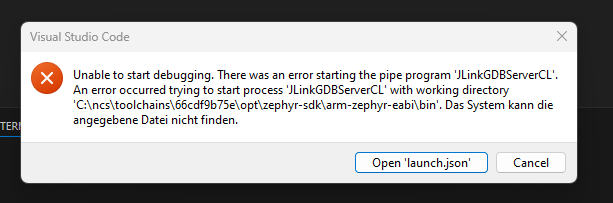
Unable to start debugging. There was an error starting the pipe program 'JLinkGDBServerCL'.
An error occurred trying to start process 'JLinkGDBServerCL' with working directory
'C:\ncs\toolchains\66cdf9b75e\opt\zephyr-sdk\arm-zephyr-eabi\bin'. Das System kann die
angegebene Datei nicht finden.

I returned to the previous version 2025.12.1228.

The new version is only working with adding the segger jlink installation path to the environment variable PATH.
C:\Program Files\SEGGER\JLink_V876


Changelog form 2026.1.1242

Other bug fixes
Fixed an issue with finding SEGGER J-Link installation on Windows.

I think there is a problem.

And adding to segger to PATH is not really a option for me.

  • I also had this problem, with build 2026.1.1327.  I downgraded to 2025.12.1228 and was able to debug properly.

  • Hello, 

    Thank you for sharing your output. 

    The team let me know that the reason for the extension not finding J-Link when starting a debugging session is that there is no InstallPath in the blob for CURRENT_USER. The extension expects there to be an InstallPath for the blob, so it does not use the fallback of LOCAL_MACHINE. 

    Could you please try the following: 

    1. In VS Code, open the command palette (Ctrl+Shift+P) 
    2. Find and select the "nRF Connect: Download and Install SEGGER J-Link" command.
    3. When the pop-up appears, select that you want to install SEGGER J-Link. 
    4. Keep the default options in the installation wizard. 

    After completing the installation, there should be an InstallPath for the CURRENT_USER blob when running reg query HKEY_CURRENT_USER\Software\SEGGER\J-Link again. 

    Since the team is now aware of the fallback not working in all cases, they are working on fixing this in an upcoming release of the extension. Thank you for the report!

    Best regards,
    Maria
  • Keep default options, not working. (default: "Install for all users")

    With "Install for this user only" it works now.

Related