Hello everyone, trying NRF for the first time and so far it's been only bunch of frustration and wasted time.
What I need to create is a subset of BM applications for NRF54L family utilizing both BLE and proprietary 2.4. Hence VSCode 1.108.1 + NCS-BM v1.0.0 + Toolchain v3.2.0 (bundled).
Here's how it went:
1. The SDK fails to install into the custom folder, gives "[west]: exited with code -4058" error. OK, installed into the default one.
- potentially resolved
2. Opening a sample project, there are ~20 BM demos vs 100+ zephyr / nrfx / modules ones (which I understand are not usable in BM ? why are they included at all ? more below). "Filter by board" works not as expected as the list actually refers to "platform" or "target" rather than a piece of hardware. Hence huge list that is impossible to review, and the search is useless unless you know exactly what to look for.
- potentially resolved
3. Opening any non-BM sample results in build script generation failure, even though the project is included with the SDK, and all default settings used (e.g. "radio_test" sample, "nrf54l15dk/nrf54l15/cpuapp" target):
-- Configuring incomplete, errors occurred!
CMake Error at cmake/modules/sysbuild_extensions.cmake:530 (message):
CMake configure failed for Zephyr project: radio_test
- resolved
4. Going strictly with BM projects (again, only ~20 available), even simplest peripheral demos (e.g. "pwm") require SoftDevice-based platform (why ?). I will not need it for the proprietary 2.4 portion as well. At least it seems that the linker removes SoftDevice library if it's not called ? And strange observation - some BM / SoftDevice projects offer S115 only, some - S115 and S145 while targeting exact same part (why ?).
5. The working projects are missing "Source" folder in project tree on NRF CONNECT panel, only "Output files" and "Config files". Sure the sources can be accessed through Explorer panel, but as far as I understand they should be listed in the project tree as well. Interestingly, the faulty projects from #3 do list "Source" folder, but inside there's only a "Missing compile_commands.json Click to regenerate" link (which still yields the same faulty result as above).
- resolved
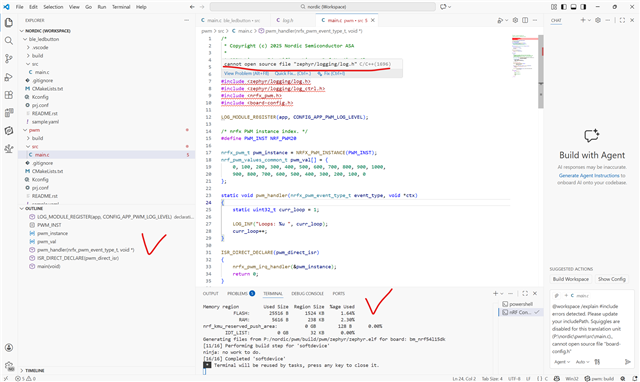
6. No signs of source processing / language service support. Hence no code navigation / refactoring / etc. Any advice here ?
- partially resolved, now it can parse and navigate throughout a current file. But still cannot read headers and do cross-file navigation. Where to look ?
So here is where I am right now after hours of trial and error - only a handful of demos in very certain configuration do compile, not much clear about project configuration in general (why errors, cpuapp vs cpuflpr, secure / non secure, bootloader), many questions to the UI, source processing doesn't work. And I didn't even try flashing / debugging yet.
Wondering if anyone got the above working right. Any insight would be appreciated.