nRF54L15 DK ChannelSounding HCI Command

Hello,
I am developing Channel Sounding related features using nRF Connect SDK (NCS) v3.1.1 and the nRF54L15 Development Kit (DK), based on Nordic’s official hci_uart sample. I found that the default sample does not support sending Channel Sounding-related HCI commands.
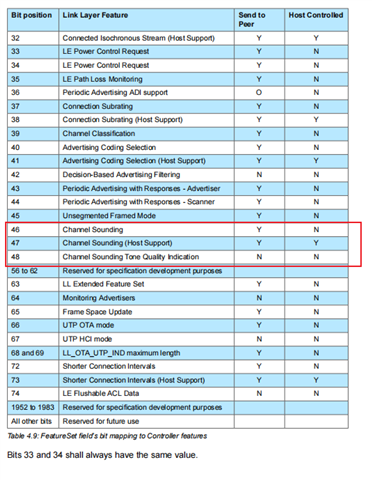
Subsequently, I modified the prj.conf file by adding the configuration item CONFIG_BT_CHANNEL_SOUNDING=y, then flashed the compiled program to the DK. After that, I executed the LE Read Local Supported Features HCI command and verified that the bits corresponding to Channel Sounding and Channel Sounding Tone Quality Indication were present in the feature set. However, Bit 47 (representing Channel Sounding Host Support) was still not set to 1.
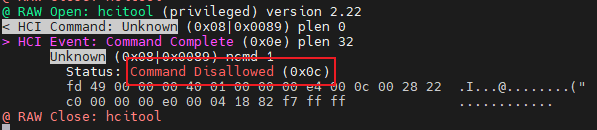
This issue leads to a Command Disallowed (0x0c) error response from the controller whenever I attempt to send the LE CS Read Local Supported Capabilities HCI command.
I would like to implement the full functionality of sending Channel Sounding-related HCI commands. Could anyone advise on additional configurations or steps that I need to complete to resolve this problem?
Thank you for your assistance!
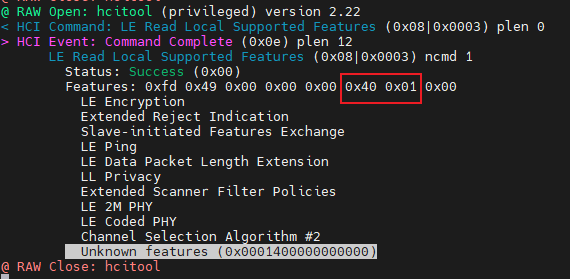
The first image shows the transmission of the LE Read Local Supported Features HCI command. The red box indicates that bits 46 and 48 in the controller's response are set to 1, while bit 47 remains 0.
The second image shows the transmission of the LE Read Local Supported Features command (Op Code: 0x08 0x89), which results in a Command Disallowed (0x0c) error response from the controller.
The third image provides the official Bluetooth Core Specification explanation of each bit in the LE Read Local Supported Features response.
Parents
  • Hello,

    First you need to enable channel sounding in the controller by setting CONFIG_BT_CTLR_CHANNEL_SOUNDING=y.

    Enabling the controller alone isn’t sufficient – the host side must also advertise that it supports Channel Sounding, or the controller will refuse certain CS commands. So you also need to configure CONFIG_BT_CHANNEL_SOUNDING=y on the host to set the channel sounding feature during initialization. Note: If you are using an external host, then you may need to implement the HCI command “LE Set Host Feature” for the Channel Sounding host support bit, this is automatically done for zephyr host when using  CONFIG_BT_CHANNEL_SOUNDING=y.

    The Bluetooth Core Specification states that the host must enable the Channel Sounding Host Support bit before using related commands. If the host issues a CS capability request while that bit is 0, the controller shall respond with Command Disallowed. This design is similar to other features (e.g. LE Privacy, LE Extended Advertising) where the host must opt-in via an HCI command.

    Kenneth

Reply
  • Hello,

    First you need to enable channel sounding in the controller by setting CONFIG_BT_CTLR_CHANNEL_SOUNDING=y.

    Enabling the controller alone isn’t sufficient – the host side must also advertise that it supports Channel Sounding, or the controller will refuse certain CS commands. So you also need to configure CONFIG_BT_CHANNEL_SOUNDING=y on the host to set the channel sounding feature during initialization. Note: If you are using an external host, then you may need to implement the HCI command “LE Set Host Feature” for the Channel Sounding host support bit, this is automatically done for zephyr host when using  CONFIG_BT_CHANNEL_SOUNDING=y.

    The Bluetooth Core Specification states that the host must enable the Channel Sounding Host Support bit before using related commands. If the host issues a CS capability request while that bit is 0, the controller shall respond with Command Disallowed. This design is similar to other features (e.g. LE Privacy, LE Extended Advertising) where the host must opt-in via an HCI command.

    Kenneth

Children
Related