Hello,
I am developing Channel Sounding Test Mode functionality using nRF Connect SDK (NCS) v3.1.1 and the nRF54L15 Development Kit (DK), based on Nordic’s official
hci_uart sample. Initially, I found that the default sample did not support sending Channel Sounding-related HCI commands.To resolve this, I modified the
prj.conf file by adding the following configuration entries:CONFIG_BT_CHANNEL_SOUNDING=y
CONFIG_BT_CTLR_CHANNEL_SOUNDING=y
CONFIG_BT_CTLR_CHANNEL_SOUNDING_TEST=yAfter applying these changes, I further configured the host and controller via HCI commands:
- Used
LE Set Host Featureto enable Channel Sounding (Host Support) - Used
Set Event Maskto enable LE Meta Events - Used
LE Set Event Maskto configure the LE event mask
With these settings in place, I can successfully run interactive Channel Sounding functionality by sending HCI commands from a Linux host to the nRF54L15 controller.
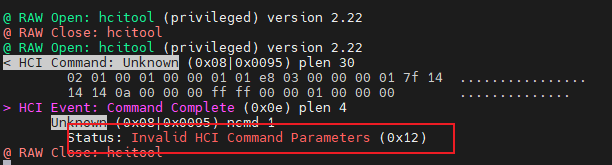
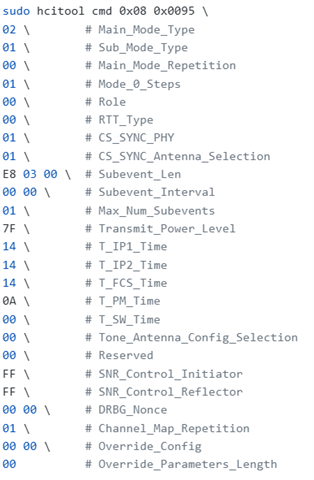
However, when attempting to enter Test Mode using the same approach by sending the HCI_LE_CS_Test command as specified in the official Bluetooth Core Specification, the nRF54L15 controller consistently responds with an Invalid HCI Command Parameters (0x12) error. The attached images show the command I sent via
hcitool and the packet capture logs from btmon.Could you please advise on the root cause of this issue and what modifications I need to make to resolve it?
Thank you for your assistance!