SSD1306 OLED display fails for nRF52840 boards using nRF Connect SDK 3.2.1

Hello,

I’ve been using SSD1306 128x64 OLED displays with nRF52840 boards for several years without any issues, building with nRF Connect SDK 2.5.x to 3.1.0. Recently, I've been attempting to move existing NCS 3.1.0 projects over to NCS 3.2.1. However, I’m unable to successfully get the SSD1306 OLED display to work with any of the nRF52840 boards using the latest nRF Connect SDK 3.2.1.

All the nRF52840 boards with SSD1306 display work fine when built with vanilla Zephyr 4.1.x and 4.2.x.

Also, the target for thingy53/nrf5340/cpuapp/ns failed to run successfully with both NCS 3.1.0 and NCS 3.2.1. The target thingy53/nrf5340/cpuapp ran fine with the SSD1306 OLED.

To try to isolate the issue, I’ve taken the Zephyr sample, “/opt/nordic/ncs/v3.2.1/zephyr/samples/subsys/display/cfb_custom_font” and built it for a couple of different nRF52840 boards (e.g. particle_xenon_nrf52840, promicro_nrf52840) plus thingy/nrf5340/cpuapp.

Built exactly the same sample "cfb_custom_font" main.c (modified to display board target and Zephyr version) & used the same devicetree overlays. All the builds compiled and linked without any issues.  However, only particle_xenon/nrf52840 using NCS 3.1.0 and thingy53/nrf5340/cpuapp using NCS 3.2.1 ran successfully with the SSD1306 displays.

I used the below board configuration and the overlays with the ssd1306 devicetree included in the I2C sections of the overlays. Default sysbuild option used from with the nRF Connect SDKs.

I don't see anything that is obvious that may be wrong. I would appreciate if you could determine the cause of the issue with the nRF52840 boards with SSD1306 when using  nRF Connect SDK 3.2.1.

Also, Is there any reason as to why the target for thingy53/nrf5340/ns doesn’t run successfully with the I2C SSD1306 display?

Thank you.

particle_xenon_nrf52840.overlay:

/ {
	chosen {
		zephyr,display = &ssd1306;
		zephyr,console = &uart0;
		zephyr,shell-uart = &uart0;
	};
};

&uart0 {
	compatible = "nordic,nrf-uarte";
	status = "okay";
	current-speed = <115200>;
	pinctrl-0 = <&uart0_default>;
	pinctrl-1 = <&uart0_sleep>;
	pinctrl-names = "default", "sleep";
};

&gpio0{
	status = "okay";
};

&i2c0 {
	compatible = "nordic,nrf-twi";
	status = "okay";
	pinctrl-0 = <&i2c0_default>;
	pinctrl-1 = <&i2c0_sleep>;
    pinctrl-names = "default", "sleep";
	ssd1306: ssd1306@3c {
		compatible = "solomon,ssd1306fb";
		reg = <0x3c>;
		width = <128>;
		height = <64>;
		segment-offset = <0>;
		page-offset = <0>;
		display-offset = <0>;
		multiplex-ratio = <63>;
		segment-remap;
		com-invdir;
		prechargep = <0x22>;
	};
};

thingy53_nrf5340_cpuapp.overlay

/ {
	chosen {
		zephyr,display = &ssd1306;
	};
};

&pinctrl {
	i2c0_default: i2c0_default {
		group1 {
			psels = <NRF_PSEL(TWIM_SDA, 0, 5)>,
				<NRF_PSEL(TWIM_SCL, 0, 4)>;
		};
	};

	i2c0_sleep: i2c0_sleep {
		group1 {
			psels = <NRF_PSEL(TWIM_SDA, 0, 5)>,
				<NRF_PSEL(TWIM_SCL, 0, 4)>;
		};
	};
};

&i2c0 {
	compatible = "nordic,nrf-twim";
	status = "okay";
	clock-frequency = <I2C_BITRATE_FAST>;
	zephyr,concat-buf-size = <4096>;
	pinctrl-0 = <&i2c0_default>;
	pinctrl-1 = <&i2c0_sleep>;
    pinctrl-names = "default", "sleep";
	ssd1306: ssd1306@3c {
		compatible = "solomon,ssd1306fb";
		reg = <0x3c>;
		width = <128>;
		height = <64>;
		segment-offset = <0>;
		page-offset = <0>;
		display-offset = <0>;
		multiplex-ratio = <63>;
		segment-remap;
		com-invdir;
		prechargep = <0x22>;
	};
};

prj.conf:

CONFIG_HEAP_MEM_POOL_SIZE=16384

CONFIG_DISPLAY=y
CONFIG_SSD1306=y

CONFIG_CHARACTER_FRAMEBUFFER=y
CONFIG_CHARACTER_FRAMEBUFFER_USE_DEFAULT_FONTS=n

CONFIG_LOG=y

# Preferred SHELL options
CONFIG_SHELL=y
CONFIG_DEVICE_SHELL=y
CONFIG_INIT_STACKS=y
CONFIG_KERNEL_SHELL=y
CONFIG_SHELL_STATS=n
CONFIG_I2C_SHELL=y

# Enable RTT to replace UART
CONFIG_UART_CONSOLE=y
CONFIG_USE_SEGGER_RTT=n
CONFIG_SHELL_BACKEND_RTT=n

CONFIG_LOG_BACKEND_UART=y
CONFIG_SHELL_LOG_BACKEND=y

Console Output 

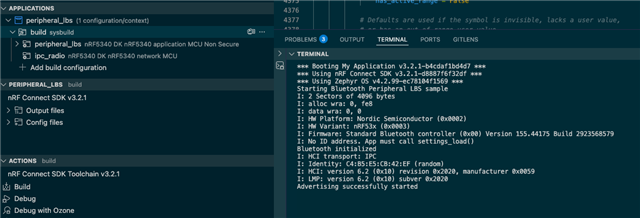
NCS 3.2.1 build  - particle_xenon_nrf52840 with  SSD1306 (particle_xenon/nrf52840):

*** Booting nRF Connect SDK v3.2.1-d8887f6f32df ***
*** Using Zephyr OS v4.2.99-ec78104f1569 ***

Display device not ready

Failed to turn off display blanking

NCS 3.1.0 build  - particle_xenon_nrf52840 with  SSD1306 (particle_xenon/nrf52840):

*** Booting nRF Connect SDK v3.1.0-6c6e5b32496e ***
*** Using Zephyr OS v4.1.99-1612683d4010 ***
Zephyr v4.1.99
Board target: particle_xenon/nrf52840
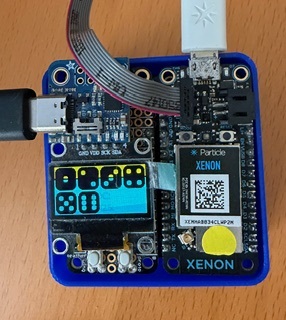
NCS 3.2.1 build  - thingy53_nrf5340_cpuapp with  SSD1306:

*** Booting nRF Connect SDK v3.2.1-d8887f6f32df ***
*** Using Zephyr OS v4.2.99-ec78104f1569 ***
[00:00:00.035,614] <inf> udc_nrf: Initialized
Zephyr v4.2.99
Board target: thingy53/nrf5340/cpuapp
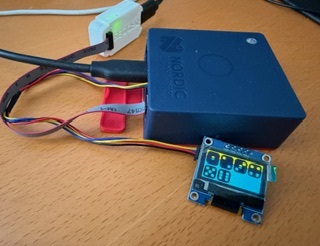
NCS 3.1.0 build  - thingy53_nrf5340_cpuapp with  SSD1306:

[Disconnected]
[Connected]
*** Booting nRF Connect SDK v3.1.0-6c6e5b32496e ***
*** Using Zephyr OS v4.1.99-1612683d4010 ***
Zephyr v4.1.99
Board target: thingy53/nrf5340/cpuapp

Vanilla Zephyr 4.2.x from terminal command line: SSD1306 displays works fine.

*** Booting Zephyr OS build v4.2.0-717-g85e135362445 ***
Zephyr v4.2.99
Board target: particle_xenon/nrf52840
uart:~$ 

  • Hi Vidar,

    For both the Thingy53 and nRF5340-DK, when building BLE applications, I've extended the TF-M size to get successful non-secure builds. A “pm_static_thingy53_nrf5340_cpuapp_ns.yml” in the local project folder with TF_M size extended to 96kB was used.

    These applications (peripheral_lbs sample and a few migrated BLE applications) run fine provided if I silence (CONFIG_TFM_LOG_LEVEL_SILENCE=y) the TF-M logs. Otherwise, I get   “<err> flash_nrf: invalid address: 0x100feff8:8”. 

    Clearly this address is outside the 1MB address range for Thingy53 internal FLASH. I'm not sure what TF-M logging generates the error. Any suggestions on how to debug the TF-M logs? Thanks.

    I need to debug further and also us the addr2line utility to isolate the cause of the issue. 

    Have you seen this type of error before?


    Best Regards,
    Ravi

  • Hi Ravi,

    Have you made any other changes modifications to the peripheral_lbs sample? I do not get any build errors if I build the original version from from SDK v3.2.1 for nrf5340dk/nrf5340/cpuapp/ns. It also seems to run without issues.

    Best regards,

    Vidar 

  • Hi Vidar,

    No modification to the original peripheral_lbs sample was made when building for thingy53/nrf5340/cpuapp/ns. Building the sample for nrf5340dk/nrf5340/cpuapp/ns works, and it runs fine. The issue is with the Thingy53 NS.

    I have just taken another copy of peripheral_lbs from the NCS 3.2.1 samples and attempted to build for thingy53/nrf5340/cpuapp/ns.

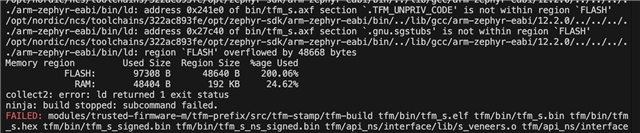
    Again, I get the FLASH overflow error, as below.


    Can you please try to build peripheral_lbs for  thingy53/nrf5340/cpuapp/ns? Thank you.

    On Github nrfconnect sdk, for the peripheral_lbs, I noticed that there was a change in the Kconfig.sysbuild last week. PM was disabled for the Thingy53.

    config PARTITION_MANAGER
    	default n if !BOARD_THINGY53 && !BOARD_IS_NON_SECURE
    
    config NRF_DEFAULT_IPC_RADIO
    	default y
    
    config NETCORE_IPC_RADIO_BT_HCI_IPC
    	default y
    
    source "share/sysbuild/Kconfig"


    I haven't updated NCS 3.2.1 to the latest but will later today.

    Also, from the sample.yml history, the Thingy53 non secure target got removed because of BT_CRYPTO support.

    Anyway, I've ended up the path of modifying TF_M size for the Thingy53 NS applications because of the additional space required to support BT_CRYPTO.

    As mentioned before, if I silence (CONFIG_TFM_LOG_LEVEL_SILENCE=y) the TF-M logs, the Thingy NS applications run fine.

    I like to know what's causing TFM Log bus faults and if here is a way to have TFM logs enabled for Thing NS builds.. Thank you.


    Best Regards,
    Ravi

  • Hi Ravi,

    I thought you were getting the same warning on nrf5340DK. Have now tried to build for the thingy53 as well after making the following changes in the board directory:

    diff --git a/boards/nordic/thingy53/pm_static_thingy53_nrf5340_cpuapp_ns.yml b/boards/nordic/thingy53/pm_static_thingy53_nrf5340_cpuapp_ns.yml
    index 70ffe6d9c12..b05346273bd 100644
    --- a/boards/nordic/thingy53/pm_static_thingy53_nrf5340_cpuapp_ns.yml
    +++ b/boards/nordic/thingy53/pm_static_thingy53_nrf5340_cpuapp_ns.yml
    @@ -8,20 +8,20 @@ mcuboot_pad:
       size: 0x200
     tfm_secure:
       address: 0x10000
    -  size: 0xc000
    +  size: 0x18000 
       span: [mcuboot_pad, tfm]
     tfm_nonsecure:
    -  address: 0x1c000
    -  size: 0xd4000
    +  address: 0x28000
    +  size: 0xc8000
       span: [app]
     tfm:
       address: 0x10200
       region: flash_primary
    -  size: 0xbe00
    +  size: 0x17e00
     app:
    -  address: 0x1c000
    +  address: 0x28000
       region: flash_primary
    -  size: 0xd4000
    +  size: 0xc8000
     mcuboot_primary:
       address: 0x10000
       orig_span: &id001
    diff --git a/boards/nordic/thingy53/thingy53_nrf5340_cpuapp_ns_defconfig b/boards/nordic/thingy53/thingy53_nrf5340_cpuapp_ns_defconfig
    index f831ec5148e..aeb0691df9d 100644
    --- a/boards/nordic/thingy53/thingy53_nrf5340_cpuapp_ns_defconfig
    +++ b/boards/nordic/thingy53/thingy53_nrf5340_cpuapp_ns_defconfig
    @@ -6,6 +6,17 @@ CONFIG_ARM_MPU=y
     # Enable TrustZone-M
     CONFIG_ARM_TRUSTZONE_M=y
     
    +# TF-M profile has to be properly configured to be able to run
    +# the Bluetooth stack which uses PSA crypto API.
    +# The following configuration is a minimal set of options required.
    +CONFIG_TFM_PROFILE_TYPE_NOT_SET=y
    +
    +CONFIG_TFM_PARTITION_PLATFORM=y
    +CONFIG_TFM_PARTITION_CRYPTO=y
    +CONFIG_TFM_PARTITION_INTERNAL_TRUSTED_STORAGE=y
    +CONFIG_TFM_PARTITION_PROTECTED_STORAGE=n
    +CONFIG_TFM_PARTITION_INITIAL_ATTESTATION=n
    +
     # This Board implies building Non-Secure firmware
     CONFIG_TRUSTED_EXECUTION_NONSECURE=y


    I did not see any warnings or errors in the log.

    Best regards,

    Vidar

  • HI Vidar,

    Thank you for the TF-M Kconfig. Using the minimal set of option for TF-M, I can now build and run my BT applications (including peripheral_lbs) for thingy53/nrf5340/cpuapp/ns. Your help is much appreciated.

    What minimal TF-M configuration should be used to build & successfully run thingy53/nrf5340/cpuapp/ns applications that do not use BT?

    I'm finding that I need to turn off logging (CONFIG_LOG=n) in order to get the non-BT thingy53/nrf5340/cpuapp/ns applications to run successfully.

    Is this related to "When building TF-M with logging enabled, UART instance used by TF-M must be disabled in the non-secure application, otherwise the non-secure application will fail to run." as mentioned in the TF-M Logging docs?  Thingy53 has the TF-M logging on UART0, same as the console.


    Regards,
    Ravi

Related