mesh model setting up problem after DFU

hi support team,

customer is using mesh and met a problem, here is the situation:

1. customer using mesh/light as basic demo, adding mesh DFU function in it ,and deploy those nodes onsite testing(provisions and settings are completed).

2.customer need new function in the light and add new model(time model), and upgrade it to new version.

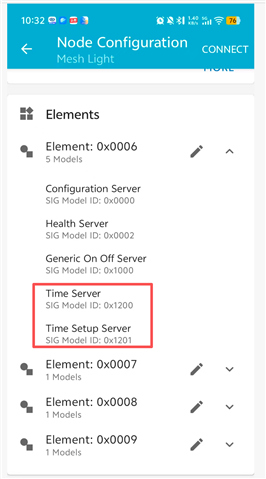
3.using app to set up the time model find out the app could not see the new model, so need to reset the device(using app) and re-provision the light, and then we can see the time model.

here is the difference:
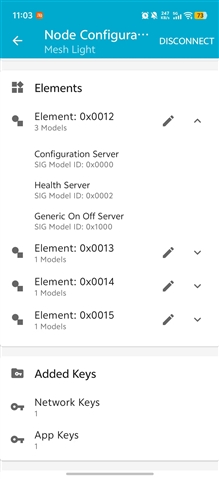
and here is the problem, all those nodes need to be reset and re-provisioned. otherwise the model could not work.

this will be really hard work that, those devices have been installed tall and high in the lights on the street, re-provision is almost infeasible. 

so they need our suggestions how to deal with this situation, do we have any method to avoid those operations and make time model work?
Regards,
William.
Parents
  • Hi,

    If the device didn't unprovision itself on update and continued to work normally, and you are expecting the new models to show up in the app, I suppose this may be a limitation of the nRF Mesh app on Android. The old version (visiible on the images) sends Config Composition Data Get only once, after provisioning. That's why you had to send Config Node Reset message and reprovision the device.

    However, if this is the case, there's a very simple solution. Few weeks ago we released a new version of the app for Android (currently called "nRF Mesh (New)", available here: https://play.google.com/store/apps/details?id=no.nordicsemi.android.nrfmesh. You should be able to Export the network configuration from the old app and Import it into the new one. Before exporting, please create a new Provisioner object in Settings and assign it a Unicast Address range and a Unicast Address from that range. This is important, as the new app won't know the Sequence number used by the old one, so needs to have a unique Unicast Address. This has to be done manually, just once. You may also use nRF Mesh for iOS, with the same migration steps.

    After migration is complete you should see your network in the new app. When on Network tab, tap the node that was updated and Pull to Refresh. This will send a Config Composition Data Get message and will update the list of Elements and Models. If my initial assumption is correct, you should see Time models.

    We are currently working on the new nRF Mesh on Android. It may have some issues. Please report any issues on GitHub page: https://github.com/NordicSemiconductor/Kotlin-Mesh-Library

Reply
  • Hi,

    If the device didn't unprovision itself on update and continued to work normally, and you are expecting the new models to show up in the app, I suppose this may be a limitation of the nRF Mesh app on Android. The old version (visiible on the images) sends Config Composition Data Get only once, after provisioning. That's why you had to send Config Node Reset message and reprovision the device.

    However, if this is the case, there's a very simple solution. Few weeks ago we released a new version of the app for Android (currently called "nRF Mesh (New)", available here: https://play.google.com/store/apps/details?id=no.nordicsemi.android.nrfmesh. You should be able to Export the network configuration from the old app and Import it into the new one. Before exporting, please create a new Provisioner object in Settings and assign it a Unicast Address range and a Unicast Address from that range. This is important, as the new app won't know the Sequence number used by the old one, so needs to have a unique Unicast Address. This has to be done manually, just once. You may also use nRF Mesh for iOS, with the same migration steps.

    After migration is complete you should see your network in the new app. When on Network tab, tap the node that was updated and Pull to Refresh. This will send a Config Composition Data Get message and will update the list of Elements and Models. If my initial assumption is correct, you should see Time models.

    We are currently working on the new nRF Mesh on Android. It may have some issues. Please report any issues on GitHub page: https://github.com/NordicSemiconductor/Kotlin-Mesh-Library

Children
No Data
Related