

Hi devzone team
I'm working on the nRF54L05 with the FEM RFX2401C from Skyworks. I'm trying to configure the FEM with the "Simple GPIO" option.
Here my overlay file:
/ {
    cpuapp_sram@20017000 {
        compatible = "zephyr,memory-region", "mmio-sram";
        reg = <0x20017000 DT_SIZE_K(4)>;
        zephyr,memory-region = "RetainedMem";
        status = "okay";

        retainedmem0: retainedmem {
            compatible = "zephyr,retained-ram";
            status = "okay";
        };
    };

    aliases {
        retainedmemdevice = &retainedmem0;
    };
};

&cpuapp_sram {
    /* Shrink SRAM size to avoid overlap with retained memory region:
     * 96 - 4 = 92KB = 0x17000
     */
    reg = <0x20000000 0x17000>;
    ranges = <0x0 0x20000000 0x17000>;
};


/delete-node/ &{/pin-controller/pwm20_default/group1/};
/delete-node/ &{/pin-controller/pwm20_sleep/group1/};

/* Remove unused LEDs */
 /delete-node/ &led0;
 /delete-node/ &led1;
 /delete-node/ &led2;
 /delete-node/ &led3;

/* Remove unused buttons */
 /delete-node/ &button1;
 /delete-node/ &button0;
 /delete-node/ &button2;
 /delete-node/ &button3;

 / {
     aliases {
         /* Remove aliases for deleted LEDs */
         /delete-property/ led0;
         /delete-property/ led1;
         /delete-property/ led2;
         /delete-property/ led3;

         /* Remove aliases for deleted buttons */
         /delete-property/ button1;
         /delete-property/ button0;
         /delete-property/ button2;
         /delete-property/ button3;

         /* Remove switch aliases pointing to deleted buttons */
         /delete-property/ sw0;
         /delete-property/ sw1;
         /delete-property/ sw2;
         /delete-property/ sw3;
     };
 };

&i2c21 {
    status = "okay";
    pinctrl-0 = <&i2c21_default>;
    pinctrl-1 = <&i2c21_sleep>;
    pinctrl-names = "default", "sleep";
    dps368: dps368@76{
        compatible = "i2c-device";
        status = "okay";
        reg = < 0x76 >;
    };
    lis3dh: lis3dh@19 {
        compatible = "st,lis3dh";   /* LIS3DHTR works with LIS3DH driver */
        reg = <0x19>;               /* or <0x19> depending on SA0 pin */
        status = "okay";
    };
};

&pinctrl {
    /omit-if-no-ref/ i2c21_default: i2c21_default {
        group1  {
            psels = <NRF_PSEL(TWIM_SCL, 1, 12)>,
                    <NRF_PSEL(TWIM_SDA, 1, 13)>;
        };
    };

    /omit-if-no-ref/ i2c21_sleep: i2c21_sleep {
        group1  {
            psels = <NRF_PSEL(TWIM_SCL, 1, 12)>,
                    <NRF_PSEL(TWIM_SDA, 1, 13)>;
            low-power-enable;
        };
    };
};

/ {
    gpio_keys: gpio_keys {
        compatible = "gpio-keys";

        mems_int1: mems_int1_pin {
            gpios = <&gpio0 0 (GPIO_ACTIVE_HIGH | GPIO_PULL_DOWN)>; // P0.00
            label = "MEMS INT1";
        };

        pwr_switch: pwr_switch_pin {
            gpios = <&gpio1 11 (GPIO_ACTIVE_HIGH)>;
            label = "POWER SWITCH";
        };
    };
};

/ {
    nrf_radio_fem: rfx2401c {
        compatible = "generic-fem-two-ctrl-pins";
        ctx-gpios = <&gpio0 4 GPIO_ACTIVE_HIGH>;
        crx-gpios = <&gpio0 3 GPIO_ACTIVE_HIGH>;
        ctx-settle-time-us = <10>;
        crx-settle-time-us = <10>;
        tx-gain-db = <4>;
        rx-gain-db = <4>;
    };
};

&radio {
    fem = <&nrf_radio_fem>;
};

&dppic10 {
    status = "okay";
};
&dppic20 {
    status = "okay";
};
&dppic30 {
    status = "okay";
};
&ppib11 {
    status = "okay";
};
&ppib21 {
    status = "okay";
};
&ppib22 {
    status = "okay";
};
&ppib30 {
    status = "okay";
};
After a successful build and flashing, I see this error message on the console all the time and the nRF54L05 is blocked.
MPSL ASSERT: 122, 28
Investigating more about this issue I found that maybe the nRF54L05 doesn't support any FEM.
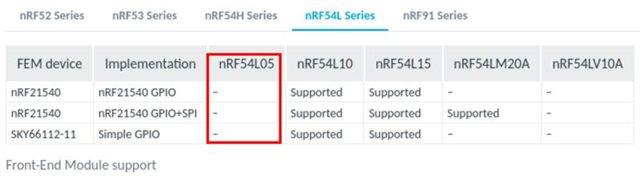
Questions 1.
What does the message "MPSL ASSERT: 122, 28" mean?
Is it true that nRF54L05 doesn't support FEM?
is there a plan to add FEM support on nRF54L05 in the future?
I then tried to use the nRF54L15-DK which has the nRF54L15 and it is supposed to support a FEM, but the result was the same.
Questions 2.
Am I seeing the same result because the devkit doesn't have a FEM connected?
Does this problem mean a configuration issue?
We want to achieve a range of 100 meters line of sight, that's why we decided to use a FEM. Also we wanted to know the distance using channel sounding.
Questions 3.
Is it true that channel sounding cannot be used with a FEM?
Can you suggest an option to reach that range without using a FEM?
I'm thinking on all the possibilities and combinations.
Questions 4.
Can we use coded PHY for range and channel sounding for distance, without FEM?
Can we use coded PHY for range and Bluetooth mesh together with algorithms for distance, without FEM?
Thanks in advance and I'm sorry for asking a lot of questions.


