nRF Connect SDK Fundamentals Lesson 6 exercise 1: Error with i2c_write_read_dt

I am using the nRF52840DK with nRFConnect for VS Code. In Lesson 6 Exercise 1, I connected the DK to a BME280 board I purchased online. The board exposes the four pins needed for I2C comms and I connected them to the DK pins as directed in the exercise. I also use this BME board with a nRF52840 Feather board from Adafruit - and I know it's address is 0x76. I altered the device overlay as shown below to account for this address change. 

&i2c21 {
status = "okay";
pinctrl-0 = <&i2c21_default>;
pinctrl-1 = <&i2c21_sleep>;
pinctrl-names = "default", "sleep";
mysensor: mysensor@76{
compatible = "i2c-device";
status = "okay";
reg = < 0x76 >;
};
};

&pinctrl {
/omit-if-no-ref/ i2c21_default: i2c21_default {
group1 {
psels = <NRF_PSEL(TWIM_SCL, 1, 11)>,
<NRF_PSEL(TWIM_SDA, 1, 12)>;
};
};
/omit-if-no-ref/ i2c21_sleep: i2c21_sleep {
group1 {
psels = <NRF_PSEL(TWIM_SCL, 1, 11)>,
<NRF_PSEL(TWIM_SDA, 1, 12)>;
};
};
};

The software builds and flashes, but the output I get when I run the program is : Failed to read register d0, which means the first call to i2c_write_read_dt failed.

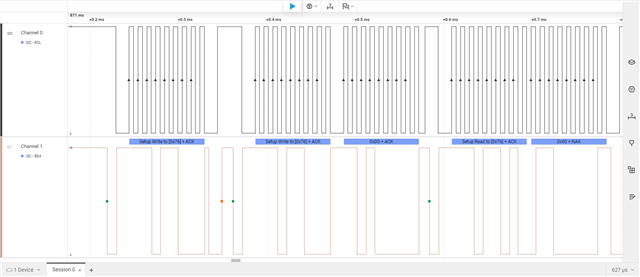
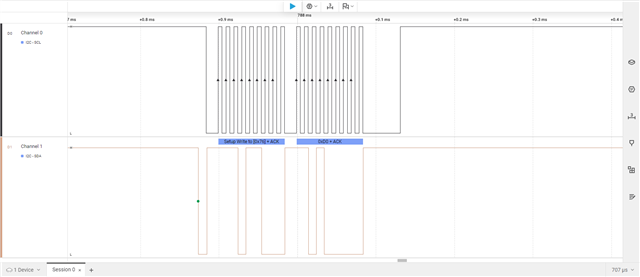
When I probed deeper, I found that the error returned was -5 - which I believe is a general read/write failure. When I connected my logic analyzer (screenshots below) I found that the DK wrote 0x76 ACK and 0xD0 ACK as expected, but the BME never replied. When I probed the Feather board I noticed that the sequence written by the Feather was 0x76 ACK, 0x76 ACK, 0xD0, and the same BME board replied with the expected 0x60. Has anyone seen this, or do you have any hints to fix it?

Thanks Lonnie
Parents
  • I continued to dig into this problem, and I discovered that if I substitute a write_dt followed by a read_dt for the write_read_dt, I still get an error code of -5 returned, however the actual write and read took place with the read returning a 0x60 as expected. I confirmed this both with my logic analyzer and by printing the "id" returned by the function. So it seems the read and write functions work, but they still return an error code. However the write_read function doesn't return a read value, and it returns an error. Also, further in the example code, the bme_calibrationdata function is called - which in turn calls the i2c_burst_read_dt function. This function returns a -5 error code and like the write_read function does not return any read values (confirmed by me logic analyzer. One further observation: when I build the project with only the main.c file open in the vscode editor, I get no problems. however, I have seen a "problem" when I build with the prj.conf file open in the editor - and the problem is listed as "The I2C drivers must be enabled by CONFIG_I2C to be included in the build". Perhaps this has something to do with some i2c functions working but returning error codes? I have included the prj.conf file in my build configuration. I can include logic analyzer screenshots if requested.

Reply
  • I continued to dig into this problem, and I discovered that if I substitute a write_dt followed by a read_dt for the write_read_dt, I still get an error code of -5 returned, however the actual write and read took place with the read returning a 0x60 as expected. I confirmed this both with my logic analyzer and by printing the "id" returned by the function. So it seems the read and write functions work, but they still return an error code. However the write_read function doesn't return a read value, and it returns an error. Also, further in the example code, the bme_calibrationdata function is called - which in turn calls the i2c_burst_read_dt function. This function returns a -5 error code and like the write_read function does not return any read values (confirmed by me logic analyzer. One further observation: when I build the project with only the main.c file open in the vscode editor, I get no problems. however, I have seen a "problem" when I build with the prj.conf file open in the editor - and the problem is listed as "The I2C drivers must be enabled by CONFIG_I2C to be included in the build". Perhaps this has something to do with some i2c functions working but returning error codes? I have included the prj.conf file in my build configuration. I can include logic analyzer screenshots if requested.

Children
No Data
Related