nRF Connect SDK Fundamentals Lesson 6 exercise 1: Error with i2c_write_read_dt

I am using the nRF52840DK with nRFConnect for VS Code. In Lesson 6 Exercise 1, I connected the DK to a BME280 board I purchased online. The board exposes the four pins needed for I2C comms and I connected them to the DK pins as directed in the exercise. I also use this BME board with a nRF52840 Feather board from Adafruit - and I know it's address is 0x76. I altered the device overlay as shown below to account for this address change. 

&i2c21 {
status = "okay";
pinctrl-0 = <&i2c21_default>;
pinctrl-1 = <&i2c21_sleep>;
pinctrl-names = "default", "sleep";
mysensor: mysensor@76{
compatible = "i2c-device";
status = "okay";
reg = < 0x76 >;
};
};

&pinctrl {
/omit-if-no-ref/ i2c21_default: i2c21_default {
group1 {
psels = <NRF_PSEL(TWIM_SCL, 1, 11)>,
<NRF_PSEL(TWIM_SDA, 1, 12)>;
};
};
/omit-if-no-ref/ i2c21_sleep: i2c21_sleep {
group1 {
psels = <NRF_PSEL(TWIM_SCL, 1, 11)>,
<NRF_PSEL(TWIM_SDA, 1, 12)>;
};
};
};

The software builds and flashes, but the output I get when I run the program is : Failed to read register d0, which means the first call to i2c_write_read_dt failed.

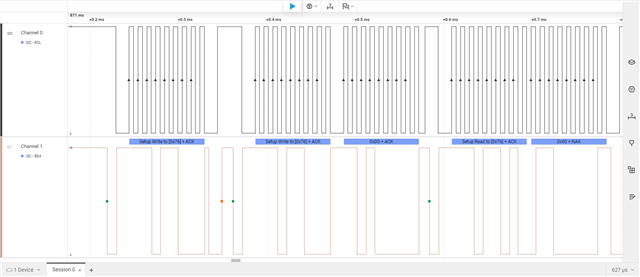
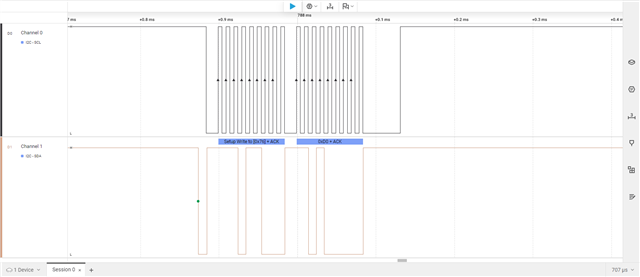
When I probed deeper, I found that the error returned was -5 - which I believe is a general read/write failure. When I connected my logic analyzer (screenshots below) I found that the DK wrote 0x76 ACK and 0xD0 ACK as expected, but the BME never replied. When I probed the Feather board I noticed that the sequence written by the Feather was 0x76 ACK, 0x76 ACK, 0xD0, and the same BME board replied with the expected 0x60. Has anyone seen this, or do you have any hints to fix it?

Thanks Lonnie
Parents
  • Hello,

    Sorry for the delay in getting back to you.I was sick and out of the office.

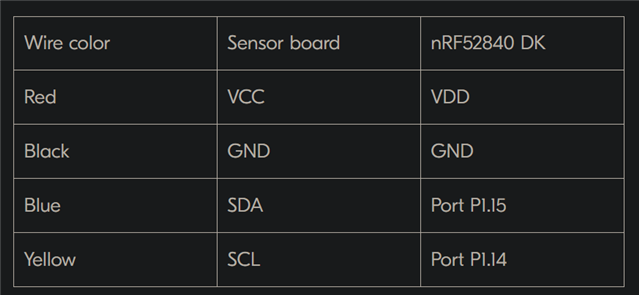
    I see from your response that you were able to collect the logs from the device. From what I can tell, this might be a physical connection issue. Please make sure you are following the connection setup shown below for the nRF52840 DK.

    Are you using the same setup? If possible, could you please share a picture of your physical connections?

    Kind Regards,

    Abhijith

Reply
  • Hello,

    Sorry for the delay in getting back to you.I was sick and out of the office.

    I see from your response that you were able to collect the logs from the device. From what I can tell, this might be a physical connection issue. Please make sure you are following the connection setup shown below for the nRF52840 DK.

    Are you using the same setup? If possible, could you please share a picture of your physical connections?

    Kind Regards,

    Abhijith

Children
  • Thanks for getting back to me. I searched DevZone several times and found a similar issue in the post "I2C write-restart-read issue on nRF Connect SDK v3.2.x".   suggested the following addition in the device tree overlay: 

    &i2c1 {
    status = "okay";
    compatible = "nordic,nrf-twim"; <-- this line is added
    i2cclock: i2cclock@68 {
    compatible = "i2c-device";
    label = "I2CCLOCK";
    reg = <0x68>;
    };
    };

    And this solved the problem. Kazi later wrote "That's the fix for now as there is bug in the "nordic,nrf-twi" driver in ncs v3.2.1." It would be great if you highlighted that for beginners like me taking the SDK Fundamentals course.

  • Hello,

    Great to hear that your issue has been resolved.

    LonnieB said:
    And this solved the problem. Kazi later wrote "That's the fix for now as there is bug in the "nordic,nrf-twi" driver in ncs v3.2.1." It would be great if you highlighted that for beginners like me taking the SDK Fundamentals course.

    I will discuss this with Kazi and update the exercise accordingly.

    Kind Regards,

    Abhijith

Related