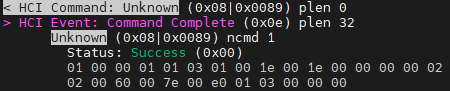
nRF54L15 HCI_LE_CS_TEST Unsupported Feature or Parameter Value (0x11)

Hello,
I configured the hci_uart sample for the nRF54L15 DK by following the instructions in this official Nordic documentation:
https://docs.nordicsemi.com/bundle/ncs-latest/page/nrfxlib/softdevice_controller/doc/channel_sounding.html
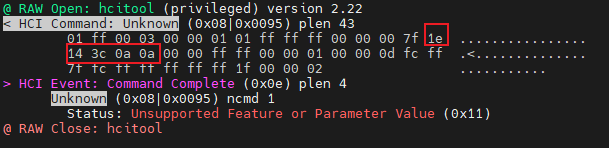
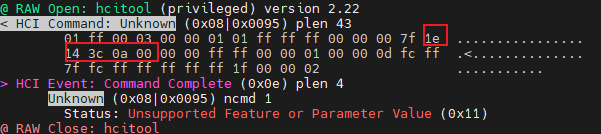
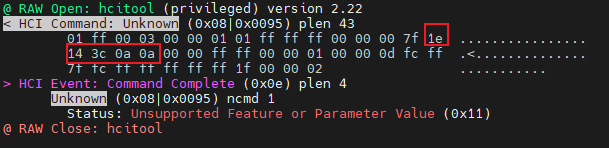
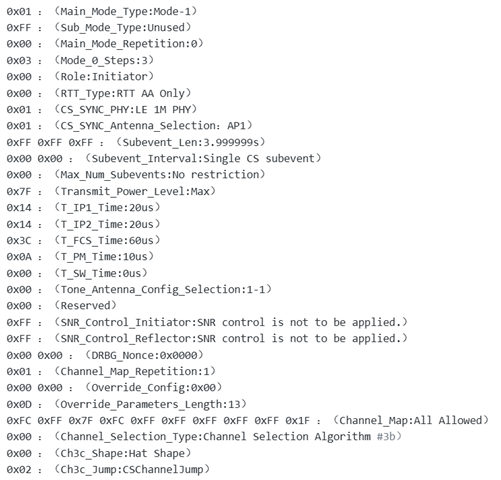
After flashing the configured firmware, I sent the HCI_LE_CS_TEST command to the Nordic controller using an external Bluetooth host. The specific parameters of this command are shown in the attached image. However, the controller responded with the error Unsupported Feature or Parameter Value (0x11).
Could you please help identify which part of my configuration is incorrect?
Thank you for your assistance!
Parents
  • Hi,

    T_IP1 must be 30 µs or greater, ref. the LE Channel Sounding chapter of the SoftDevice Controller documentation.

    Regards,
    Terje

  • Hi,

    I followed your guidance to set the value of T_IP1 to 30µs (0x1e), but the error Unsupported Feature or Parameter Value (0x11) still persists.
    Since I am using an older version of btmon, it cannot parse the OCF (0x0095) of the HCI_LE_CS_TEST command—this is why it displays Unknown Command—but it is still able to send the raw HCI command to the controller properly.

  • Hi,

    Have you double checked that also the other parameters are within what is specified at https://docs.nordicsemi.com/bundle/ncs-latest/page/nrfxlib/softdevice_controller/doc/channel_sounding.html?

    Also, can you try with a newer version of btmon, where the commands are supported?

    Regards,
    Terje

  • Dear Terje,

    Yes, all other parameters are within their specified ranges. Below is the content of my modified prj.conf file:

    CONFIG_CONSOLE=n
    CONFIG_STDOUT_CONSOLE=n
    CONFIG_UART_CONSOLE=n
    CONFIG_GPIO=y
    CONFIG_SERIAL=y
    CONFIG_UART_INTERRUPT_DRIVEN=y
    CONFIG_BT=y
    CONFIG_BT_HCI_RAW=y
    CONFIG_BT_HCI_RAW_H4=y
    CONFIG_BT_HCI_RAW_H4_ENABLE=y
    CONFIG_BT_HCI_VS=y
    CONFIG_BT_CHANNEL_SOUNDING=y
    CONFIG_BT_CTLR=y
    CONFIG_BT_CTLR_CHANNEL_SOUNDING=y
    CONFIG_BT_CTLR_CHANNEL_SOUNDING_TEST=y
    CONFIG_BT_CTLR_SDC_CS_COUNT=2
    CONFIG_BT_CTLR_SDC_CS_ROLE_BOTH=y
    CONFIG_BT_CTLR_SDC_CS_STEP_MODE3=y
    CONFIG_BT_CTLR_ASSERT_HANDLER=y
    CONFIG_BT_CTLR_PHY_2M=y
    CONFIG_BT_CTLR_PHY_CODED=y
    CONFIG_BT_CTLR_DATA_LENGTH_MAX=251
    CONFIG_BT_BUF_CMD_TX_SIZE=255
    CONFIG_BT_BUF_EVT_DISCARDABLE_SIZE=255
    CONFIG_BT_BUF_ACL_RX_SIZE=251
    CONFIG_BT_BUF_ACL_TX_SIZE=251
    CONFIG_BT_CTLR_SDC_RX_PACKET_COUNT=10
    CONFIG_BT_CTLR_SDC_TX_PACKET_COUNT=10
    CONFIG_SYSTEM_WORKQUEUE_STACK_SIZE=512

    I haven’t tried the latest version of btmon yet. While this older version cannot parse the OCF (0x0095) of the HCI_LE_CS_TEST command (thus displaying "Unknown Command"), it can still send raw HCI commands properly.
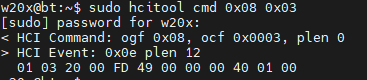
    In fact, I have already successfully completed the entire workflow for normal ChannelSounding pairing using this setup—including sending commands like HCI_LE_CS_Read_Local_Supported_Capabilities, HCI_LE_CS_Read_Remote_Supported_Capabilities, HCI_LE_CS_Set_Default_Settings, HCI_LE_CS_Read_Remote_FAE_Table, HCI_LE_CS_Create_Config, HCI_LE_CS_Security_Enable, HCI_LE_CS_Set_Procedure_Parameters, and HCI_LE_CS_Procedure_Enable—all of which executed successfully. However, the HCI_LE_CS_TEST command continues to fail when sent.
  • Hi,

    I understand. The suggestion to try with a newer btmon, assuming there is one with full support for the command, was in order to make 100 % sure the command is not somehow mistaken. It is so easy to get something mixed up, when you have a large command which is crafted manually. Do you mind sharing the full command that you send, verbatim, so that we can have a thorough look at it and confirm that all the parameters are both within spec and within what the SoftDevice Controller can handle?

    Regards,
    Terje

  • Dear Terje,
    Below are the complete commands I sent. Please help me check what the problem is. Thank you very much.

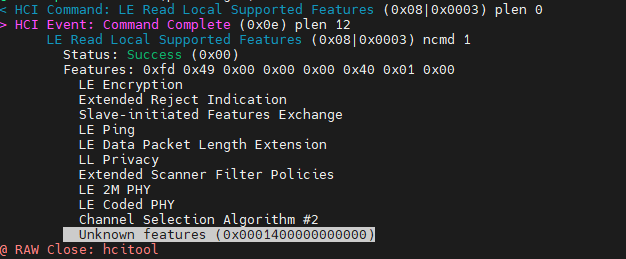
    1、HCI_LE_Read_Local_Supported_Features_Page_0

    # btmon pactet capture


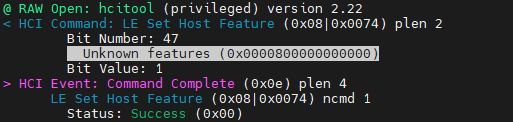
    2、HCI_LE_Set_Host_Feature [v1](Set Host Support:bit47->0x2F)


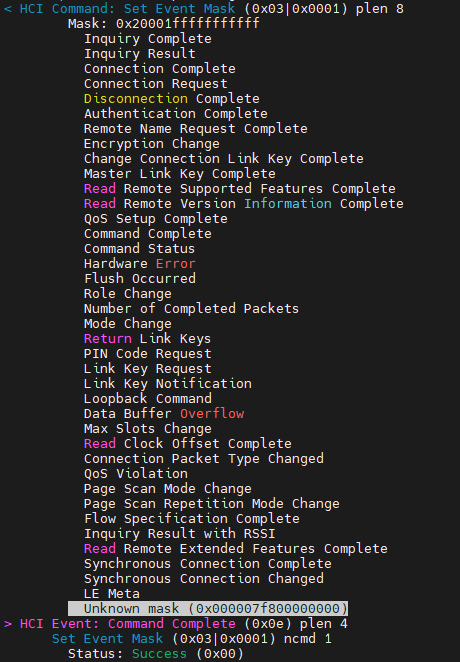
    3、HCI_Set_Event_Mask(Set LE Meta)


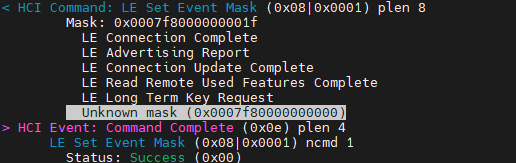
    4、HCI_LE_Set_Event_Mask(Set CS Event Mask:bit43 to bit50->0xF8 0x07)


    5、HCI_LE_CS_Read_Local_Supported_Capabilities


    6、HCI_LE_CS_Test

  • Hello,
    I have found that the Timing Parameter you mentioned earlier is dependent on the nRF Connect SDK version.
    The version I am using is v3.1.1, so the value of T_IP1 should be 60 µs or greater.
    This is one of the reasons why the HCI command kept failing when I set it to 30 µs as you previously suggested.
    Furthermore, from the document you provided, I assumed all the listed Timing Parameters were mandatory.
    This led me to change the Bluetooth official default value of 0x00 for the T_SW parameter to your recommended 10 µs.
    However, the nRF54L15 DK has only one antenna, and I did not configure multi-antenna mode for testing.
    This also resulted in errors when sending the command.
    After reverting T_SW back to the official default value 0x00, the HCI command was sent successfully.
Reply
  • Hello,
    I have found that the Timing Parameter you mentioned earlier is dependent on the nRF Connect SDK version.
    The version I am using is v3.1.1, so the value of T_IP1 should be 60 µs or greater.
    This is one of the reasons why the HCI command kept failing when I set it to 30 µs as you previously suggested.
    Furthermore, from the document you provided, I assumed all the listed Timing Parameters were mandatory.
    This led me to change the Bluetooth official default value of 0x00 for the T_SW parameter to your recommended 10 µs.
    However, the nRF54L15 DK has only one antenna, and I did not configure multi-antenna mode for testing.
    This also resulted in errors when sending the command.
    After reverting T_SW back to the official default value 0x00, the HCI command was sent successfully.
Children
No Data
Related