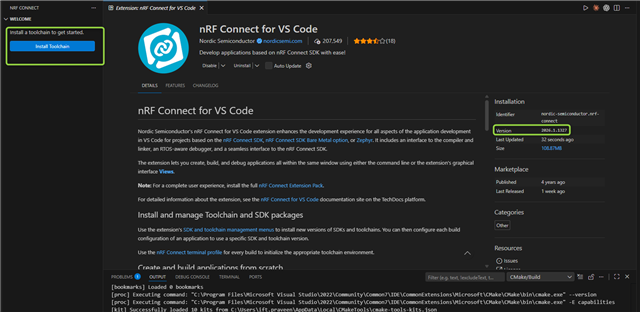
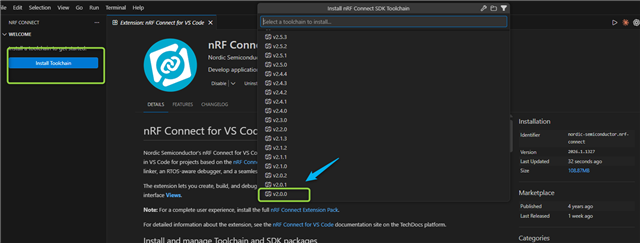
Hi DevZone Community,
I am facing a build issue while working with the following environment:
Environment
-
SDK: nRF Connect SDK v1.9.1
-
Hardware: nRF9160 DK (custom board)
-
Toolchain: v2.0.0
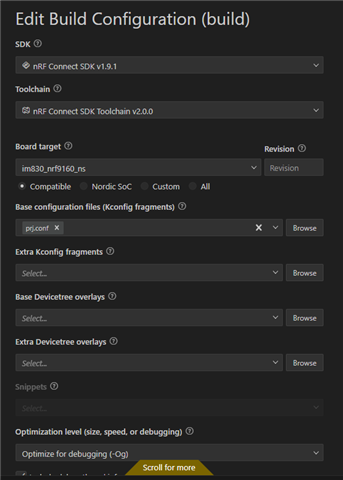
Since older toolchain versions (v1.x.x) are no longer supported, Toolchain v2.0.0 or later is required for building and execution. However, I am currently unable to build my project using Toolchain v2.0.0 with NCS v1.9.1.
I am encountering the following error during the build process:
west build --build-dir d:/im830/build d:/im830 --pristine --board im830_nrf9160_ns -- -DNCS_TOOLCHAIN_VERSION="NONE" -DCONFIG_DEBUG_OPTIMIZATIONS=y -DCONFIG_DEBUG_THREAD_INFO=y -DCONF_FILE="prj.conf" -DBOARD_ROOT=d:/im830

-- west build: generating a build system
Including boilerplate (Zephyr base): C:/ncs/v1.9.1/zephyr/cmake/app/boilerplate.cmake
-- Application: D:/im830
-- Zephyr version: 2.7.99 (C:/ncs/v1.9.1/zephyr), build: v2.7.99-ncs1-1
-- Found Python3: C:/ncs/toolchains/v2.0.0/opt/bin/python.exe (found suitable exact version "3.8.2") found components: Interpreter
-- Found west (found suitable version "0.13.1", minimum required is "0.7.1")
-- Board: im830_nrf9160_ns, Revision: 0.1.0
-- Cache files will be written to: C:/ncs/v1.9.1/zephyr/.cache
-- Found host-tools: zephyr 0.14.1 (C:/ncs/toolchains/v2.0.0/opt/zephyr-sdk)
-- Found dtc: C:/ncs/toolchains/v2.0.0/opt/bin/dtc.exe (found suitable version "1.4.7", minimum required is "1.4.6")
-- Found toolchain: zephyr 0.14.1 (C:/ncs/toolchains/v2.0.0/opt/zephyr-sdk)
-- Found BOARD.dts: D:/im830/boards/arm/im830_nrf9160/im830_nrf9160_ns.dts
-- Generated zephyr.dts: D:/im830/build/zephyr/zephyr.dts
-- Generated devicetree_unfixed.h: D:/im830/build/zephyr/include/generated/devicetree_unfixed.h
-- Generated device_extern.h: D:/im830/build/zephyr/include/generated/device_extern.h
-- Including generated dts.cmake file: D:/im830/build/zephyr/dts.cmake

warning: Experimental symbol NET_SOCKETS_OFFLOAD is enabled.


D:/im830/prj.conf:59: warning: attempt to assign the value 'y' to the undefined symbol AT_CMD

D:/im830/prj.conf:60: warning: attempt to assign the value 'y' to the undefined symbol AT_NOTIF

D:/im830/prj.conf:116: warning: attempt to assign the value 'y' to the undefined symbol BSD_LIBRARY

D:/im830/prj.conf:117: warning: attempt to assign the value 'n' to the undefined symbol BSD_LIBRARY_SYS_INIT
Parsing D:/im830/Kconfig
Loaded configuration 'D:/im830/boards/arm/im830_nrf9160/im830_nrf9160_ns_defconfig'
Merged configuration 'D:/im830/prj.conf'
Merged configuration 'D:/im830/build/zephyr/misc/generated/extra_kconfig_options.conf'

error: Aborting due to Kconfig warnings

CMake Error at C:/ncs/v1.9.1/zephyr/cmake/kconfig.cmake:272 (message):
  command failed with return code: 1
Call Stack (most recent call first):
  C:/ncs/v1.9.1/zephyr/cmake/app/boilerplate.cmake:544 (include)
  C:/ncs/v1.9.1/zephyr/share/zephyr-package/cmake/ZephyrConfig.cmake:24 (include)
  C:/ncs/v1.9.1/zephyr/share/zephyr-package/cmake/ZephyrConfig.cmake:35 (include_boilerplate)
  CMakeLists.txt:5 (find_package)


-- Configuring incomplete, errors occurred!
FATAL ERROR: command exited with status 1: 'C:\ncs\toolchains\v2.0.0\opt\bin\cmake.EXE' '-DWEST_PYTHON=C:\ncs\toolchains\v2.0.0\opt\bin\python.exe' '-Bd:\im830\build' '-Sd:\im830' -GNinja -DBOARD=im83
0_nrf9160_ns -DNCS_TOOLCHAIN_VERSION=NONE -DCONFIG_DEBUG_OPTIMIZATIONS=y -DCONFIG_DEBUG_THREAD_INFO=y -DCONF_FILE=prj.conf -DBOARD_ROOT=d:/im830

 *  The terminal process terminated with exit code: 1.
 *  Terminal will be reused by tasks, press any key to close it.
I would like to know:
-
Is it officially supported to build an application using NCS v1.9.1 with Toolchain v2.0.0?
-
If not, is there any recommended workaround or migration approach?
Your guidance and suggestions would be greatly appreciated.
Thank you.