nRF54L15-DK I2C voltage issues with sensors failing to be detected as "ready" unless voltage reduced to below 3.3V

Hello,

As part of an effort to migrate applications to nRF5415 devices, I've encountered voltage sensitivity issues when using existing sensors (bme688, bme280). After reviewing and trying out various overlay & pinctrl settings for a few days and cross-referencing them against the nRF5L15-DK pin assignments , I was at a loss as to why the sensors were not being recognized. 

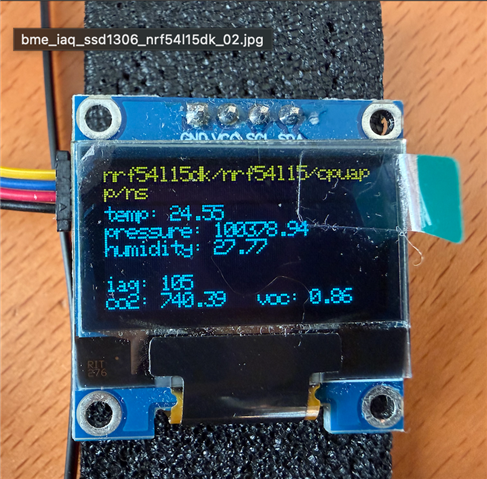
I decided to vary the nRF54L15DK VDD using the Nordic Board Configurator (v1.1.3). As soon as the VDD was dropped below 3.3V to 2.5V and then 1.8V, the BME sensors got detected as "Ready" and they worked flawlessly. The SSD1306 OLED displays that are being used with the nRF54L15DK worked without any issues in the range 1.8V - 3.3V.

I suspect the issue may be to do with I2c sensor driver or perhaps the way nRF54L15DK works with I2C that causes these sensors not to be detected.  

The BME280 and BME688 sensors (Pimoroni) are rated at 2V-5V range. They have been working without any issues at 1.8v - 3.3V on several existing devices (nRF52840, nRF5340, Raspberry Pi Pico, and ESP32). 

In the tests conducted with nRF54L15-DK, the BME280 and BME688 sensors failed to be detected in "ready" state unless the voltage was reduced below 3.3V. For BME280, the working range was found to be in the range 1.8V- 2.7V , and 1.8-V-2.4V for BME688. The sensors were configured to use the internal pull-ups. 

The Board Configurator was used to vary the voltage range. The TWIM_SDA, TWIM_SCL and VDD on the nRF54L15-DK  were verified for the voltage range using a multimeter. Unfortunately, as I currently don't have an oscilloscope, I wasn't able to look at I2C signal timings, etc.

Below are the configuration and overlay used with the nRF54L15-DK.

I've used quite a few I2C sensors on multiple platforms but haven't encountered such behaviour before.


Do you have any suggestions as to why the peculiar voltage behaviour of the nRF54L15DK with these sensors? Thank you.


Environment:

  • nRF54L15DK with nRF Connect SDK 3.2.1 on macOS 15.7.3 and latest VS Code / nRF Connect

Devices used

  • nRF54L15-DK, Particle_Xenon (nRF52840), and Thingy53

nRF and Zephyr samples

  • Verified sensor I2C detection on nRF54L15-DK with samples bme68x_iaq and bme280 

Sensors

  • BME688 (Pimoroni, rated at 2-5V)
  • BME280 (Pimoroni, rated at 2-5V)

I2C overlay

  • Used i2c22 
  • Also tested with i2c21  (pinctrl TWIM_SDA  1,12 and TWIM_SCL 1,11)

&i2c22 {
    /delete-property/ status;compatible = "nordic,nrf-twim";
    compatible = "nordic,nrf-twim","i2c-device";
    status = "okay";
    clock-frequency = <I2C_BITRATE_FAST>;
    zephyr,concat-buf-size = <4096>;
    pinctrl-0 = <&i2c22_default>;
    pinctrl-1 = <&i2c22_sleep>;
    pinctrl-names = "default", "sleep";
    
    bme688: bme688@76 {
        compatible = "bosch,bme680";
        reg = <0x76>;
    };
};

&pinctrl {
    i2c22_default: i2c22_default {
        group1 {
            psels = <NRF_PSEL(TWIM_SDA, 1, 12)>,
                    <NRF_PSEL(TWIM_SCL, 1, 11)>;
                    nordic,drive-mode = <NRF_DRIVE_H0H1>;
                    bias-pull-up;         
        };
    };

    i2c22_sleep: i2c22_sleep {
        group1 {
            psels = <NRF_PSEL(TWIM_SDA, 1, 12)>,
                    <NRF_PSEL(TWIM_SCL, 1, 11)>;
                    low-power-enable;
        };
    };
};

prj.conf

CONFIG_SENSOR=y
CONFIG_SENSOR_INFO=y

CONFIG_BME680=n
CONFIG_BME68X_IAQ=y

#I2C configuration
CONFIG_I2C=y
CONFIG_I2C_SHELL=y
CONFIG_I2C_LOG_LEVEL_DBG=y

CONFIG_APP_TRIGGER=n


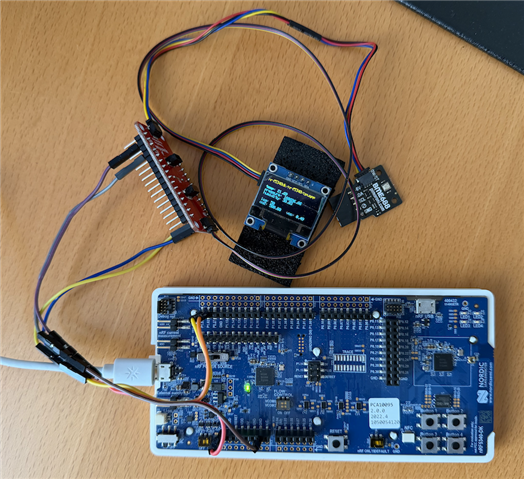
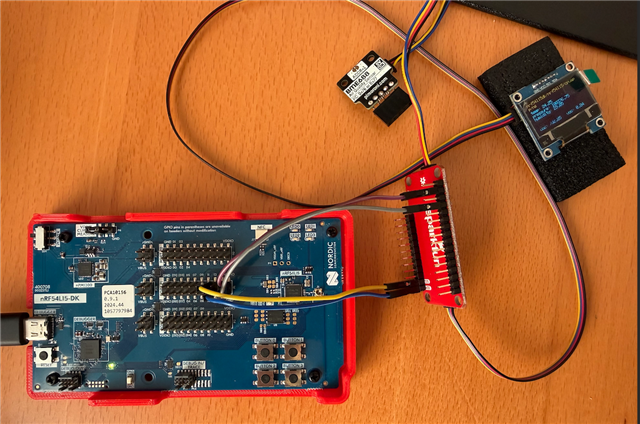
nRF54L15-DK and SSD1306 OLED setup with a Sparkfun QWICC multiplexer.
Results

  • nRF52840 and Thingy53
    • No issues
    • Both BM688 and BME280 worked, as expected, with device and sensor voltages at 3.3V.

  • nRF54L15-DK
    • Sensors BME280 and BME688 were not detected on the I2C at VDD 3.3V. “Device not ready” message observed.
    • However, SSD1306 was detected correctly at 3.3V
    • Using the Board Configurator v1.1.3, tried several setting between 1.8V to 3.3.V

    • BME280 sensor was detected and output sensor values correctly for voltage range 1.8V - 2.7V. Failed to be detected on I2C above 2.7V.
    • BME688 sensor was detected successfully on the I2C bus for voltage range 1.8V - 2.4V. It failed I2C detection above 2.4V

BME688 console output - VDD set to 2.4V

*** Booting nRF Connect SDK v3.2.1-d8887f6f32df ***
*** Using Zephyr OS v4.2.99-ec78104f1569 ***
[00:00:00.018,858] <inf> app: App started
uart:~$ 
[00:00:05.018,951] <inf> app: temp: 25.80; press: 100549.60; humidity: 27.91; iaq: 50; CO2: 500.00; VOC: 0.49
uart:~$  device list
devices:
- clock@10e000 (READY)
  DT node labels: clock
- gpio@10a000 (READY)
  DT node labels: gpio0
- gpio@d8200 (READY)
  DT node labels: gpio1
- gpio@50400 (READY)
  DT node labels: gpio2
- uart@c6000 (READY)
  DT node labels: uart20
- rram-controller@5004b000 (READY)
  DT node labels: rram_controller
- i2c@c8000 (READY)
  DT node labels: i2c22
- spi@4a000 (READY)
  DT node labels: spi00
- mx25r6435f@0 (READY)
  DT node labels: mx25r64
- temp@d7000 (READY)
  DT node labels: temp
- bme688@76 (READY)
  DT node labels: bme688
[00:00:15.019,052] <inf> app: temp: 24.27; press: 100546.75; humidity: 29.87; iaq: 50; CO2: 500.00; VOC: 0.49
uart:~$ 

i2c scan i2c22: BME688 detected at address 0x76

uart:~$ i2c scan i2c22
     0  1  2  3  4  5  6  7  8  9  a  b  c  d  e  f
00:             -- -- -- -- -- -- -- -- -- -- -- -- 
10: -- -- -- -- -- -- -- -- -- -- -- -- -- -- -- -- 
20: -- -- -- -- -- -- -- -- -- -- -- -- -- -- -- -- 
30: -- -- -- -- -- -- -- -- -- -- -- -- -- -- -- -- 
40: -- -- -- -- -- -- -- -- -- -- -- -- -- -- -- -- 
50: -- -- -- -- -- -- -- -- -- -- -- -- -- -- -- -- 
60: -- -- -- -- -- -- -- -- -- -- -- -- -- -- -- -- 
70: -- -- -- -- -- -- 76 --                         
1 devices found on i2c22

BME688 console output - VDD set to 3.3V

[00:00:00.016,272] <err> bsec: Failed to init bme68x: -2
*** Booting nRF Connect SDK v3.2.1-d8887f6f32df ***
*** Using Zephyr OS v4.2.99-ec78104f1569 ***
[00:00:00.016,499] <inf> app: App started
uart:~$ 

i2c scan i2c22: Failed to detect BME688 on the I2C bus

uart:~$ i2c scan i2c22
     0  1  2  3  4  5  6  7  8  9  a  b  c  d  e  f
00:             -- -- -- -- -- -- -- -- -- -- -- -- 
10: -- -- -- -- -- -- -- -- -- -- -- -- -- -- -- -- 
20: -- -- -- -- -- -- -- -- -- -- -- -- -- -- -- -- 
30: -- -- -- -- -- -- -- -- -- -- -- -- -- -- -- -- 
40: -- -- -- -- -- -- -- -- -- -- -- -- -- -- -- -- 
50: -- -- -- -- -- -- -- -- -- -- -- -- -- -- -- -- 
60: -- -- -- -- -- -- -- -- -- -- -- -- -- -- -- -- 
70: -- -- -- -- -- -- -- --                         
0 devices found on i2c22
[00:00:05.016,590] <err> app: device is not ready
uart:~$ 
uart:~$ i2c scan i2c22
     0  1  2  3  4  5  6  7  8  9  a  b  c  d  e  f
00:             -- -- -- -- -- -- -- -- -- -- -- -- 
10: -- -- -- -- -- -- -- -- -- -- -- -- -- -- -- -- 
20: -- -- -- -- -- -- -- -- -- -- -- -- -- -- -- -- 
30: -- -- -- -- -- -- -- -- -- -- -- -- -- -- -- -- 
40: -- -- -- -- -- -- -- -- -- -- -- -- -- -- -- -- 
50: -- -- -- -- -- -- -- -- -- -- -- -- -- -- -- -- 
60: -- -- -- -- -- -- -- -- -- -- -- -- -- -- -- -- 
70: -- -- -- -- -- -- -- --                         
0 devices found on i2c22

Parents
  • Hi,


    In order to run 400 kHz I2C, you will need a stronger pull resistor than the internal pull on the nRF gpio, which is nom. 13 kOhm.

    You want 5kOhm or lower.

    You can look at the SDA/SCL lines with an oscilloscope to confirm how the waveform looks.


    Can you please try to add stronger pull-resistors, and see if the system starts to behave more stable?

    Kind regards,

    Håkon

  • Hi Håkon,

    Thank you for the quick response. Very much appreciated!

    I tried using 100 KHz I2C (I2C_BITRATE_STANDARD) with the internal pull on the nRF GPIO
    . This behaves the same as previously. The BME688 sensors again work only at 2.4V or below but the SSD1306 works up to 3.3V.

    It is somewhat strange that at I2C_BITRATE_FAST, the SSD1306 has no issue on I2C bus with the internal pull resistors.

    As per your suggestion, I'll try 5kOhm resistors on the SDA/SCL GPIOS to see if it makes any difference.


    Best Regards,
    Ravi


  • Hi Håkon,

    Thank you for the quick response. Very much appreciated!

    I tried using 100 KHz I2C (I2C_BITRATE_STANDARD) with the internal pull-up on the nRF GPIO
    . This behaves the same as previously. The BME688 sensors again work only at 2.4V or below but the SSD1306 works up to 3.3V.

    Update:

    With I2C_BITRATE_STANDARD and bias-pull-up disabled, I tried using 4.7kOhm on the SDA/SCL GPIOS to see if it makes any difference. Unfortunately, not much of a difference. The BME sensors were not stable at anything much higher than 1.8V. SSD1306 display was fine at 3.3V, same as with internal pull-up.


    Best Regards,
    Ravi


  • Hi,


    Your sensor seems to be a module, more specifically this one:

    https://shop.pimoroni.com/products/adafruit-bme688-temperature-humidity-pressure-and-gas-sensor-stemma-qt?variant=39358272798803


    Which states:

    For your convenience, Adafruit have pick-and-placed the sensor on a PCB with a 3.3V regulator and some level shifting, so it can be easily used with your favorite 3.3V or 5V microcontroller.


    Although the IC accepts lower voltage, your module does not seem to do this.


    Kind regards,

    Håkon

  • Hi Håkon,

    Actually the BME280 and BME688 sensors we're using are from Pimoroni.

    We've been using these for several years on a number of devices, including nRF9151-DK, nRF5340-DK, nRF52840, ESP32, and Raspberry Pi Picos without any issues at voltages up to 3.3V and at both I2C_BITRATE_STANDARD / I2C_BITRATE_FAST settings.

    It's only the nRF54L15-DK that seems to be problematic.

    The Pimoroni BME280 and BME688 are rated at 2V-5V range, have I2C level shifting and 10KOhm pull-ups. So, don't quite understand why they don't work with the nRF54L15-DK at 3.3V. Problems start with voltages above 2.4V.

    The Adafruit BME688 in your link above also provides the same 10KOhm pull-ups with level-shifting.

    Best Regards,
    Ravi


  • Hi,


    Can you share the logic trace when trying to communicate?

    Please share both working and non-working scenario.


    Kind regards,

    Håkon

Reply Children
  • Hi Håkon,

    Unfortunately, I don't have a scope to review the I2C signals.

    I think we can safely ignore the Pimoroni BME688 / BME280 sensors. I've tested the same sensors with a nRF5340-DK. The BME688 sensor and SSD1306 work at both I2C_BITRATE_FAST and I2C_BITRATE_STANDARD. The default "nrf5340_cpuapp_common-pinctrl.dtsi" was used for the nRF5340-DK.

    The exact the same hookup as the nRF54L15-DK was used with the exception of using the nRF5340-DK's I2C1 at P1.0.3 (SCL) & P1.02 (SDA). 


    I suspect that there may be an issue with the nRF541L15-DK board. I don't have another nRF54L15-DK but may order one.

    I do have the Power Profiler II, so could try using the logic connections to SDA/SCL.

    Here are the results with a nRF5340-DK, BME688 and SSD1306.

    &i2c1 {
    	compatible = "nordic,nrf-twim";
    	status = "okay";
    	clock-frequency = <I2C_BITRATE_FAST>;
    	zephyr,concat-buf-size = <4096>;
    	pinctrl-0 = <&i2c1_default>;
    	pinctrl-1 = <&i2c1_sleep>;
        pinctrl-names = "default", "sleep";
    	ssd1306: ssd1306@3c {
    		compatible = "solomon,ssd1306fb";
    		reg = <0x3c>;
    		width = <128>;
    		height = <64>;
    		segment-offset = <0>;
    		page-offset = <0>;
    		display-offset = <0>;
    		multiplex-ratio = <63>;
    		segment-remap;
    		com-invdir;
    		prechargep = <0x22>;
    	};
    	
    	bme688: bme688@76 {
    		compatible = "bosch,bme680";
    		reg = <0x76>;
    	};
    };

    nRF5340-DK hookup to BME688 & SSD1306

    Console output

    *** Booting nRF Connect SDK v3.2.1-d8887f6f32df ***
    *** Using Zephyr OS v4.2.99-ec78104f1569 ***
    [00:00:00.267,303] <inf> app: Board target: nrf5340dk/nrf5340/cpuapp
    
    [00:00:00.267,303] <inf> app: bme688x_iaq_ssd1306 - App started
    [00:00:00.267,303] <inf> app: Init ssd1306
    [00:00:00.267,486] <dbg> cfb: cfb_framebuffer_init: number of fonts 2
    [00:00:00.295,043] <inf> oled: Index[0] font dimensions  5x8
    [00:00:00.295,074] <inf> oled: Index[1] font dimensions  8x8
    [00:00:00.295,104] <inf> oled: Selected font: index[0]
    [00:00:00.295,104] <inf> oled: x_res 128, y_res 64, ppt 8, rows 8, cols 128
    uart:~$ 
    uart:~$ i2c scan i2c1
         0  1  2  3  4  5  6  7  8  9  a  b  c  d  e  f
    00:             -- -- -- -- -- -- -- -- -- -- -- -- 
    10: -- -- -- -- -- -- -- -- -- -- -- -- -- -- -- -- 
    20: -- -- -- -- -- -- -- -- -- -- -- -- -- -- -- -- 
    30: -- -- -- -- -- -- -- -- -- -- -- -- 3c -- -- -- 
    40: -- -- -- -- -- -- -- -- -- -- -- -- -- -- -- -- 
    50: -- -- -- -- -- -- -- -- -- -- -- -- -- -- -- -- 
    60: -- -- -- -- -- -- -- -- -- -- -- -- -- -- -- -- 
    70: -- -- -- -- -- -- 76 --                         
    2 devices found on i2c1
    

    Best Regards,
    Ravi

  • Hi,


    Try connecting the BME sensor directly to the DK, and omit the interconnect board and ssd-display, to isolate the issue.

    zpm1066 said:
    I do have the Power Profiler II, so could try using the logic connections to SDA/SCL.

    You should get a oscilloscope to debug this.


    Kind regards,

    Håkon

  • Hi Håkon,

    I tried connecting the BME688 directly to the nRF54L15-DK. Same result, only works up to 2.4V. I originally started with a direct connection of the sensor to the board.

    A scope access is unlikely for a while. Is there anyway that you could try reproducing this issue with a BME280 or a BME688 internally? Thanks.

    Best Regards,
    Ravi

  • Can confirm the nRF54L15 works without problems with the BME688 at 3.0V when directly connected and with 10K external pull-ups on the datalines. Most likely issue is the supply/signals on your setup.

  • Hi,


    Here's a quick setup, with i2c shell, with nRF54L15-dk connected to the SDA/SCL of a thingy53 (3.3V):

    uart:~$ i2c scan i2c@c8000
         0  1  2  3  4  5  6  7  8  9  a  b  c  d  e  f
    00:             -- -- -- -- -- -- -- -- -- -- -- -- 
    10: 10 -- -- -- -- -- -- -- -- -- -- -- -- -- -- -- 
    20: -- -- -- -- -- -- -- -- -- -- -- -- -- -- -- -- 
    30: -- -- -- -- -- -- -- -- -- -- -- -- -- -- -- -- 
    40: -- -- -- -- -- -- -- -- -- -- -- -- -- -- -- -- 
    50: -- -- -- -- -- -- -- -- -- -- -- -- -- -- -- -- 
    60: 60 -- -- -- -- -- -- -- -- -- -- -- -- -- -- -- 
    70: -- -- -- -- -- -- 76 --                         
    3 devices found on i2c@c8000

    It was not a problem to detect the address of the bme-sensor.

    zpm1066 said:
    A scope access is unlikely for a while.

    I would strongly recommend that you obtain these tools for development, such as logic analyzer and/or oscilloscope.


    Kind regards,

    Håkon

Related