nRF5340 DK hardware configuration & software setup for EV-WT02C40C ( for nRF7002 Wi-Fi)

Hello Nordic Team,

I am using nRF5340 DK as a debugger/programmer to develop firmware for the Fanstel EV-WT02C40C module.
My goal is to use Wi-Fi (nRF7002)  Wi-Fi scan,   Wi-Fi shell, Wi-Fi station (STA) example on the EV-WT02C40C with nRF Connect SDK.

I have a few hardware software and build configuration related questions and would appreciate clarification.

SDK:         nRF Connect SDK v3.2.1
Toolchain: nRF Connect SDK Toolchain v3.2.1

1. Hardware configuration on nRF5340 DK

When using nRF5340 DK to program and debug EV-WT02C40C:

  • Which jumpers/switches need to be set on the nRF5340 DK?

  • Which USB port should be used (DEBUG USB vs nRF USB)?

  • Is external power required for EV-WT02C40C, or is it powered via the DK?

  • Are there any specific GPIO / interface connections (SPI, reset, etc.) that must be verified for nRF7002 Wi-Fi operation?

Basically, I want to confirm the correct HW setup of nRF5340 DK when used as a debugger for EV-WT02C40C.

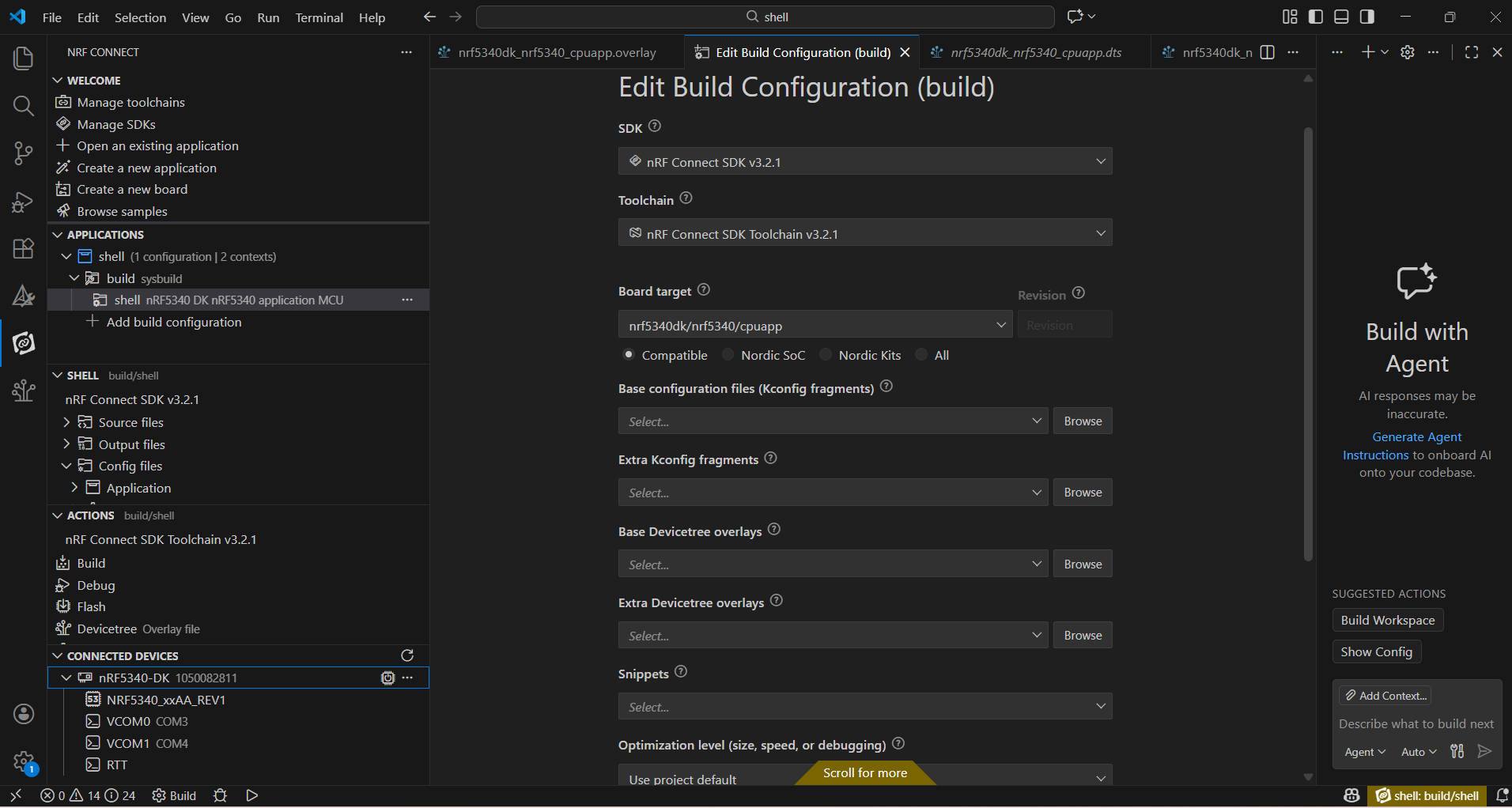
2. Add Build configuration 

for that i attached Screenshots please review and verify 

for src/main.c i have refer copy sample code (sta/shell/scan)

3. DeviceTree (.overlay) configuration

&pinctrl {
    myuart0_default: uart0_default {
        group1 {
            psels = <NRF_PSEL(UART_TX, 0, 20)>,
                    <NRF_PSEL(UART_RTS, 0, 19)>;
        };

        group2 {
            psels = <NRF_PSEL(UART_RX, 0, 22)>,
                    <NRF_PSEL(UART_CTS, 0, 21)>;
            bias-pull-up;
        };
    };

    myuart0_sleep: uart0_sleep {
        group1 {
            psels = <NRF_PSEL(UART_TX, 0, 20)>,
                    <NRF_PSEL(UART_RTS, 0, 19)>,
                    <NRF_PSEL(UART_RX, 0, 22)>,
                    <NRF_PSEL(UART_CTS, 0, 21)>;
            low-power-enable;
        };
    };
};

&uart0 {
    status = "okay";
    current-speed = <115200>;
    pinctrl-0 = <&myuart0_default>;
    pinctrl-1 = <&myuart0_sleep>;
    pinctrl-names = "default", "sleep";
};

&uart1 {
    status = "disabled";
};

&spi4 {
    status = "disabled";
};

&pwm0 {
    status = "disabled";
};

&i2c1 {
    status = "disabled";
};

&led1 {
    status = "disabled";
};

&button0 {
    status = "disabled";
};

&button1 {
    status = "disabled";
};

4. prj.conf configuration

CONFIG_WIFI=y
CONFIG_WIFI_NRF70=y

# WPA supplicant
CONFIG_WIFI_NM_WPA_SUPPLICANT=y
CONFIG_NET_L2_WIFI_SHELL=y

# Networking
CONFIG_NETWORKING=y
CONFIG_NET_SOCKETS=y
CONFIG_NET_LOG=y
CONFIG_NET_IPV6=y
CONFIG_NET_IPV4=y
CONFIG_NET_UDP=y
CONFIG_NET_TCP=y
CONFIG_NET_DHCPV4=y
CONFIG_DNS_RESOLVER=y

CONFIG_NET_STATISTICS=y
CONFIG_NET_STATISTICS_WIFI=y
CONFIG_NET_STATISTICS_USER_API=y

CONFIG_NET_PKT_RX_COUNT=8
CONFIG_NET_PKT_TX_COUNT=8

# Below section is the primary contributor to SRAM and is currently
# tuned for performance, but this will be revisited in the future.
CONFIG_NET_BUF_RX_COUNT=16
CONFIG_NET_BUF_TX_COUNT=16
CONFIG_NRF70_RX_NUM_BUFS=16
CONFIG_NRF70_MAX_TX_AGGREGATION=4
CONFIG_NET_TC_TX_COUNT=1

CONFIG_NET_IF_UNICAST_IPV6_ADDR_COUNT=4
CONFIG_NET_IF_MCAST_IPV6_ADDR_COUNT=5
CONFIG_NET_MAX_CONTEXTS=5
CONFIG_NET_CONTEXT_SYNC_RECV=y

CONFIG_INIT_STACKS=y

CONFIG_NET_L2_ETHERNET=y
CONFIG_NET_SHELL=y

# Zephyr NET Connection Manager Connectivity layer.
CONFIG_NET_CONNECTION_MANAGER=y
CONFIG_L2_WIFI_CONNECTIVITY=y
CONFIG_L2_WIFI_CONNECTIVITY_AUTO_CONNECT=y
CONFIG_L2_WIFI_CONNECTIVITY_AUTO_DOWN=n

# Memories
CONFIG_MAIN_STACK_SIZE=5200
CONFIG_SHELL_STACK_SIZE=5400

CONFIG_NET_TX_STACK_SIZE=4096
CONFIG_NET_RX_STACK_SIZE=4096
CONFIG_NET_CONNECTION_MANAGER_MONITOR_STACK_SIZE=5000

# Debugging
CONFIG_STACK_SENTINEL=y
CONFIG_DEBUG_COREDUMP=y
CONFIG_DEBUG_COREDUMP_BACKEND_LOGGING=y
CONFIG_DEBUG_COREDUMP_MEMORY_DUMP_MIN=y
CONFIG_SHELL_CMDS_RESIZE=n
#CONFIG_DEBUG=y
CONFIG_WIFI_NM_WPA_SUPPLICANT_LOG_LEVEL_INF=y

# Kernel options
CONFIG_ENTROPY_GENERATOR=y
CONFIG_REBOOT=y

# Logging
CONFIG_LOG=y
CONFIG_PRINTK=y
CONFIG_SHELL=y
CONFIG_SHELL_GETOPT=y
CONFIG_DEVICE_SHELL=y
CONFIG_POSIX_TIMERS=y
CONFIG_DATE_SHELL=y
CONFIG_NET_CONFIG_AUTO_INIT=n
CONFIG_POSIX_API=y

CONFIG_WIFI_CREDENTIALS=y
CONFIG_FLASH=y
CONFIG_FLASH_PAGE_LAYOUT=y
CONFIG_FLASH_MAP=y
CONFIG_NVS=y
CONFIG_SETTINGS=y
CONFIG_SETTINGS_NVS=y

CONFIG_NET_MGMT_EVENT_QUEUE_TIMEOUT=5000
CONFIG_NET_SOCKETS_POLL_MAX=12
CONFIG_NET_MGMT_EVENT_QUEUE_SIZE=16

Enable the Network Management relevant configurations
CONFIG_NET_MGMT=y
CONFIG_NET_MGMT_EVENT=y
CONFIG_NET_MGMT_EVENT_INFO=y
CONFIG_WIFI_CREDENTIALS_SHELL=y
Enable support for shell commands
CONFIG_WIFI_CREDENTIALS_SHELL=y

/*************************************************/

till here i done using noridc documents.

when i giving cmd : wifi scan /wifi shell , nothing is showing in serial terminal

Screenshot 


Parents Reply Children
Related