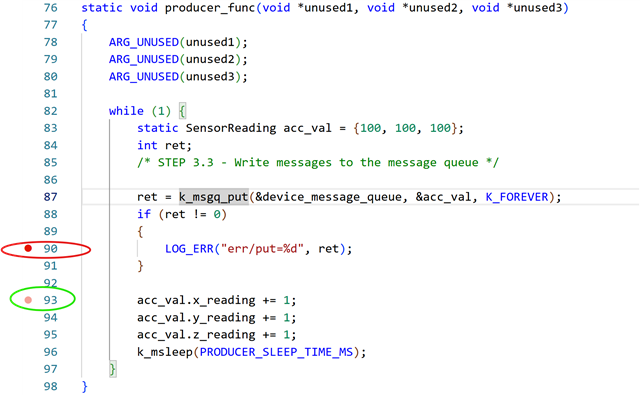
Working the SDK intermediate course, L1.E1. (SDK 3.2.1 / nRF54LM20A)
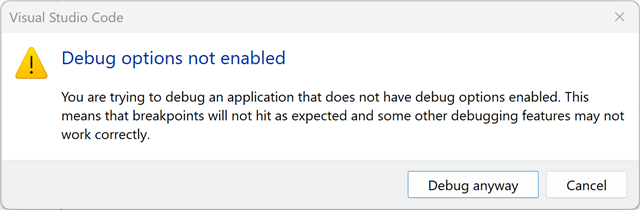
After building, I select <Debug> under Actions in VS Code. I get this popup that says "Debug options not enabled"`
I can confirm that debuging is enabled in prj.conf...
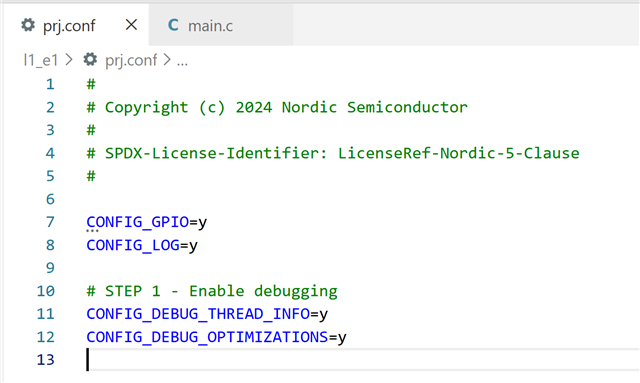
When I hover over those CONFIG_DEBUG defines, I get the expected description pop-ups, showing that the symbols are correct.
I tried a pristine build - same problem. I tried removing and re-creating the build config - same problem. Restart VS Code - same problem.
I clicked "debug anyway" and it did not run to main(), but clicking the |> button on the debug palette did start the application and pausing did reveal good debug symbols, including thread stacks.
I restarted VS Code *again* and deleted the build config *again* and re-made it *again*. This time the debug sessions stop at main() properly, but some breakpoints don't set correctly, as if some source lines are still being optimized away. Also, the "Debugging options not enabled" still appears when I launch a debug session, even though symbols, single stepping, and the call stacks with thread names appear to be working.
I'm not sure what happened at first, but at least now it is stopping at main() at startup. It continues to display "Debugging options not enabled" every time I start a debug session.
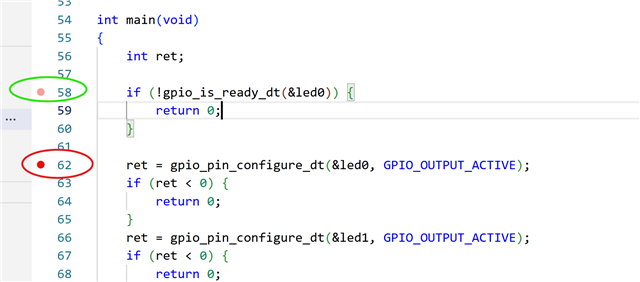
It also does not appear to be actually using debug optimization settings, as I cannot set a breakpoint on every line of code. For example, trying to set a breakpoint at line 58 of main results in one being set at line 62. On closer inspection, I see that gpio_is_ready_dt() is an inline function, so maybe that confused things. Nevertheless, I was able to single step into gpio_is_ready_dt() from main, so it exists as a distinct line somewhere.
I suspect debug-oriented optimization settings are not being set correctly, which I would expect to allow breakpoints at inlines and is probably why the "debugging options not enabled" is being shown.
Tying to set a breakpoint at 93 results in a breakpoint set at 89 - no inlines involved here - so breakpoint trouble is not restricted to inline functions.