How to ensure an nRF52840 GPIO pin is disconnected at powerup via the DeviceTree board overlay file?

I would like to ensure that a particular GPIO pin is disconnected when an nRF52840 is powered up via the initial configuration specified in the DeviceTree board overlay file.  I am using nRF Connect SDK v3.2.1 with an nRF52840 Dongle.  The pin will be used later as an output, but I must ensure there are no spurious signals on the pin until that time.  What is the recommended method of doing this?

Thank you,

Ken

Parents
  • Hello Ken,

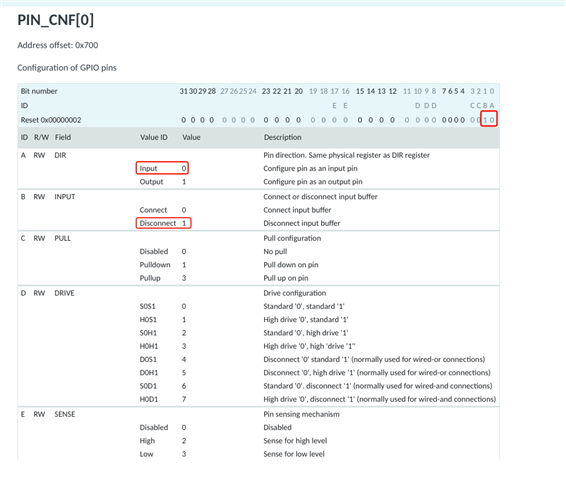
    On startup after a power-on-reset, all GPIOs are configured to their reset state (“disconnected input”), so you should not need to do anything to avoid spurious signals at startup. If this is not what you are seeing, perhaps it could be that the pin may be assigned to a peripheral or a driver in the device tree and is being reconfigured during driver initialisation?

    (PIN_CNF[0])

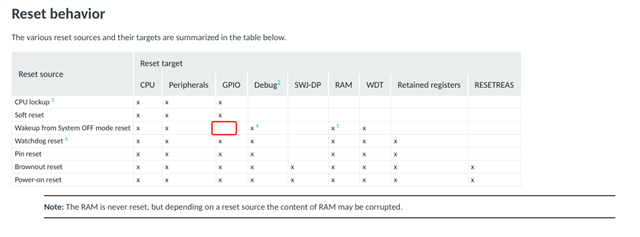
    "Wakeup from System OFF mode reset" is the only reset source which will not reset the GPIO registers.

    Best regards,

    Vidar

  • Hi Vidar,

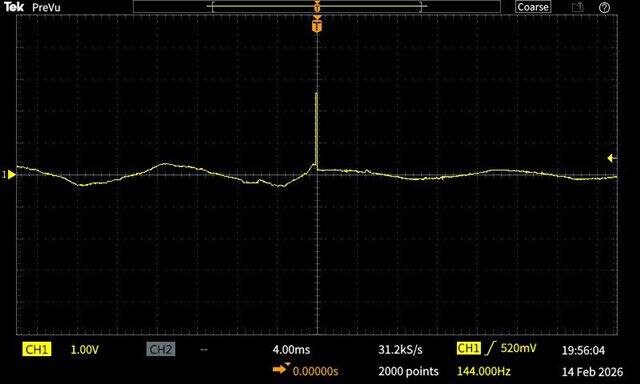
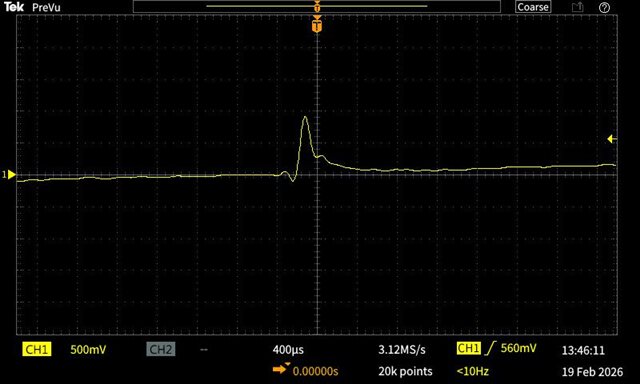
    I can run my application on both the nRF52840DK and nRF52840 Dongle although I am using different pins (P1.06 and P0.13 respectively) to connect with the rest of my electronics.  Using the debugger and the DK, I have checked with that my PIN_CNF register value for the GPIO pin I am using is set as you show:  Input and Disconnect.  I checked DeviceTree as well.  Monitoring the DK pin with a scope, turning the DK on via the SW8 power switch, the GPIO pin remains stable and at 0V through the power on reset and boot.  On the other hand, when plugging the Dongle into a USB cable, the GPIO pin shows a spike and oscillating voltage as shown in the attached picture.  I think this is the root of the problem I am trying to solve.  Why is the Dongle producing this GPIO pin voltage during the power on reset and boot?  I have seen no evidence of this from the DK.

    Best regards, and good to talk with you again,

    Ken

  • Hi Ken,

    Thank you, likewise. With the DK board switches in their default positions and the USB cable connected to the J2 port, the nRF52840 will be supplied with 3 V regulated from the USB bus in normal voltage mode while the dongle is powered directly from the USB in high voltage mode. Perhaps this explains the different behaviour. Could you please try supplying the nRF52840 DK from the nRF USB to see if you get the same result?

    https://docs.nordicsemi.com/bundle/ug_nrf52840_dk/page/UG/dk/power_source.html

    Best regards,

    Vidar

Reply Children
  • Hi Vidar,

    I did the following with the nRF52840 DK:  Set SW9 to USB and plugged the USB cable into J3.  I did not modify the application software.  Powering the board on and off via plugging/unplugging the USB cable into my PC USB port does not produce anything weird on the GPIO pin I've been monitoring.  It seems well behaved as before.  I did note that VDD is now about 1.8V vs. 3V when powered as before.

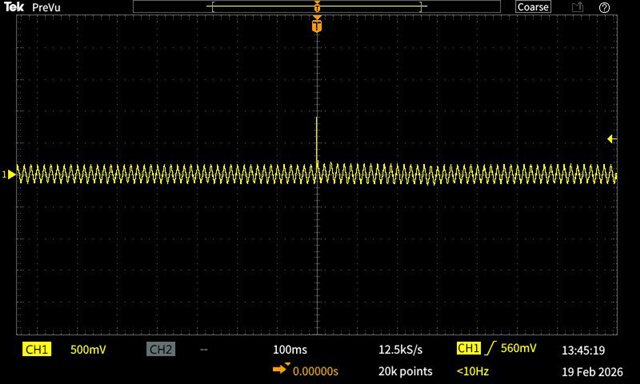
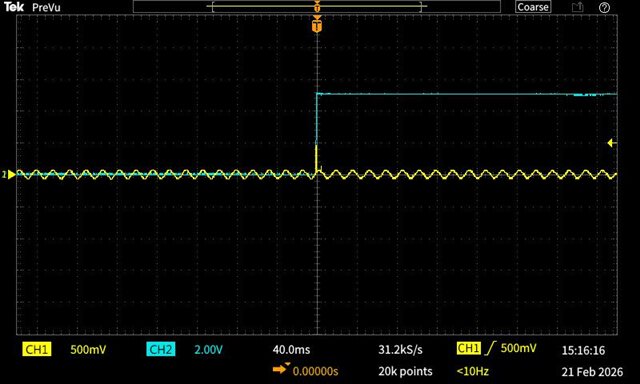
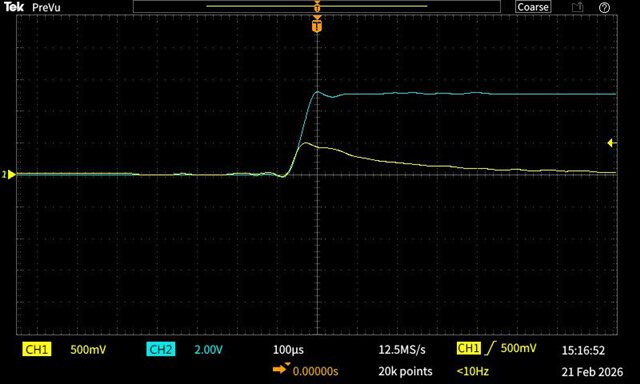
    Also, a couple more screen shots from my scope showing the weird pulse seen on GPIO P0.13 when plugging in the nRF52840 Dongle, zoomed in on the second pic.  I'm assuming the 60Hz noise is expected.

    Ken

  • Hi Ken,

    I'm wondering if you are simply seeing noise because the inputs are high-z. To be honest, I am not entirely sure what to expect here, but I know that USB ports can be quite noisy. Have you tried probing other unused pins on the dongle to see if they exhibit similar behaviour?

    Ken58 said:
    I did note that VDD is now about 1.8V vs. 3V when powered as before.

    Yes, default is 1.8. It is controlled by the REGOUT0 register. The pre-programmed FW on the dongle sets it to 3v to be able to drive the on-board RGB LED.

    Vidar

  • Probing other GPIOs shows similar pulses.  Looking around the internet, I see indications that this is not uncommon on MCUs in general, though I haven't found a specific instance of Nordic SOCs.  Could you ask one of your EEs to comment on this?  If the pulse cannot be eliminated through setup within the application software, what would be the recommended method of connecting a GPIO port to other electronics - say a simple case of interfacing to a transistor operating as a switch?

    I'll add a couple more pics.  As above, the yellow trace is the nRF52840 Dongle GPIO pin (P0.13).  In these new images, blue is the 5V supply from my electronics going into VBUS on the dongle.  The second pic is zoomed in on the area of interest.

    Ken

  • Hi Ken,

    I discussed this with one of my more hardware oriented coworkers who suggested adding an external pull-down resistor between the GPIO pad and the transistor gate to ensure the signal is not floating on startup.

    Vidar

  • Hi Vidar,

    I had tried the pull-down resistor before using a rather high value (10k) without success.  Using a lower value resistor (2.2k) seems to allow dissipation of the startup pulse without switching on the transistor.  This becomes a balancing act to keep the "on" circuit current minimized and still pulling enough current on startup to pull down the pulse.  Never the less, this conversation helped me ensure there was nothing else in the software I could or should do to prevent the pulse.

    A related question or 3 from our discussion:   You said "The pre-programmed FW on the dongle sets it to 3v to be able to drive the on-board RGB LED".  Where does this happen and can I easily set REGOUT0 to a different value within a Zephyr application on the nRF52840 Dongle?  Is there a system initialization function where this could be done, or DeviceTree parameter used by Zephyr?  What would be your recommended method?

    A sidebar to that question:  I have a particular nRF52840 Dongle whose output voltage running the same application as we have been talking about is 3.5V.  That's a little weird!  Any idea on what might cause that?

    I will probably have a related question or 2 concerning a custom board, but I'm not ready to ask yet.

    Thanks,

    Ken

Related