How to ensure an nRF52840 GPIO pin is disconnected at powerup via the DeviceTree board overlay file?

I would like to ensure that a particular GPIO pin is disconnected when an nRF52840 is powered up via the initial configuration specified in the DeviceTree board overlay file.  I am using nRF Connect SDK v3.2.1 with an nRF52840 Dongle.  The pin will be used later as an output, but I must ensure there are no spurious signals on the pin until that time.  What is the recommended method of doing this?

Thank you,

Ken

Parents
  • Hello Ken,

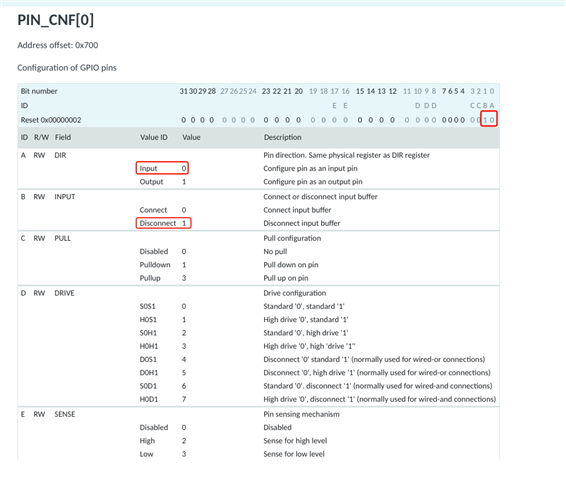
    On startup after a power-on-reset, all GPIOs are configured to their reset state (“disconnected input”), so you should not need to do anything to avoid spurious signals at startup. If this is not what you are seeing, perhaps it could be that the pin may be assigned to a peripheral or a driver in the device tree and is being reconfigured during driver initialisation?

    (PIN_CNF[0])

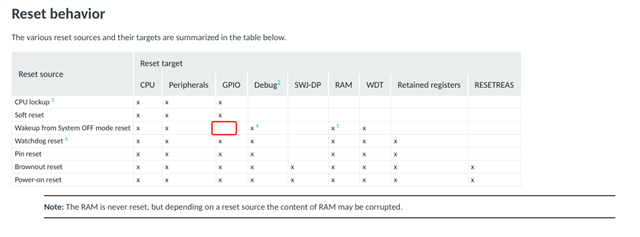
    "Wakeup from System OFF mode reset" is the only reset source which will not reset the GPIO registers.

    Best regards,

    Vidar

  • Hi Vidar,

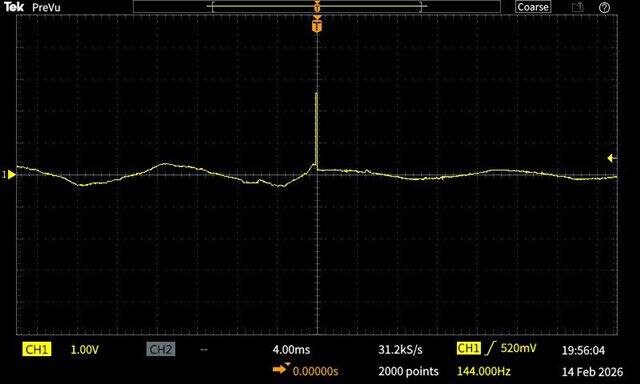
    I can run my application on both the nRF52840DK and nRF52840 Dongle although I am using different pins (P1.06 and P0.13 respectively) to connect with the rest of my electronics.  Using the debugger and the DK, I have checked with that my PIN_CNF register value for the GPIO pin I am using is set as you show:  Input and Disconnect.  I checked DeviceTree as well.  Monitoring the DK pin with a scope, turning the DK on via the SW8 power switch, the GPIO pin remains stable and at 0V through the power on reset and boot.  On the other hand, when plugging the Dongle into a USB cable, the GPIO pin shows a spike and oscillating voltage as shown in the attached picture.  I think this is the root of the problem I am trying to solve.  Why is the Dongle producing this GPIO pin voltage during the power on reset and boot?  I have seen no evidence of this from the DK.

    Best regards, and good to talk with you again,

    Ken

  • It should be supported out of the box. Is your dongle not enumerating as a USB CDC device when you plug it in? 

  • I will have to check.  Is there anything in the Nordic documentation that would tell me all the DeviceTree and Kconfig setup I need to have?

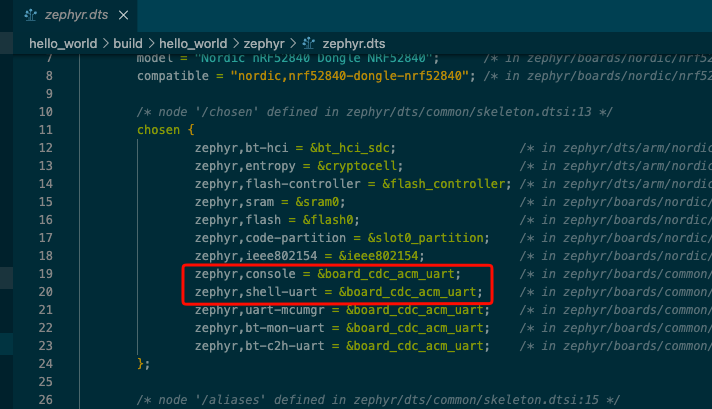
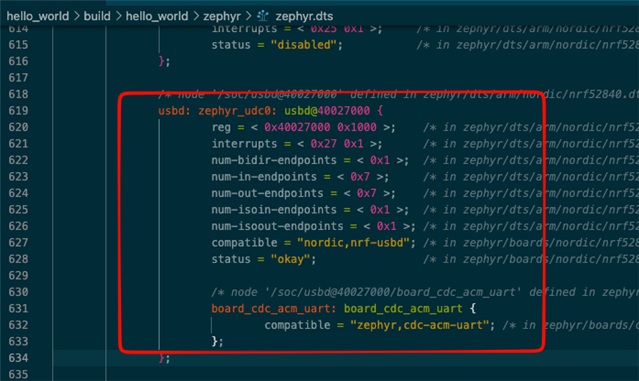
  • The nrf52840Dongle/nrf52840 board target enables the USB by default so you shouldn't have to change anything to make this work. To test you can try the "Hello World" sample and print something in a loop.

    Relevant devicetree entries

  • Hi Vidar,

    Logging from the nRF52840 Dongle works great!  How long has this been available?  Last I had looked at it, the nRF Connect SDK did not connect to a Dongle through the CONNECTED DEVICES view at all.  Could or should RTT be used, or has this changed recently too?  A very quick check of this with a nRF52840DK looks like the RTT connection has gone away.

    Is there a way to program the Dongle through the nRF Connect SDK or should I continue to use the Programmer?

    I learned that my nRF52840 Dongle that has the 3.5V output voltage does indeed have it's REGOUT0 set to 3V3.  I understand the process involved in setting this back to 3V0.  However, I need to call this code in place of board_early_init_hook().  How would you recommend I do that?  I tried including it in my code but the build process with fail with a multiple definition of 'board_early_init_hook'.  I probably don't want to modify the code in the SDK.  There is probably a better way.

    Thank you,

    Ken

  • Hi Ken,

    Glad to hear that it worked. The nrf52840dongle board target has always enabled console output on USB, what is new is that the VS code extension will now recognise it as a development board and list it under CONNECTED DEVICES. Previously you would have to manually find and select the correct COM port.

    To use RTT you would need to have an external debug probe connected to your dongle. 

    Ken58 said:
    A very quick check of this with a nRF52840DK looks like the RTT connection has gone away.

    Maybe something changed in the UI? I know the RTT feature has not been removed, at least.

    Ken58 said:
    However, I need to call this code in place of board_early_init_hook().  How would you recommend I do that? 

    I don't think you need to call it in place of the board_early_init_hook() function. You could try calling the function below at the beginning of your main().

    #include <soc.h>
    
    void reg0_update(void)
    {
        /* Check if REGOUT0 is currently configured to output 3v3 */
        if ((NRF_UICR->REGOUT0 & UICR_REGOUT0_VOUT_Msk) ==
            (UICR_REGOUT0_VOUT_3V3 << UICR_REGOUT0_VOUT_Pos))
        {
            NRF_NVMC->CONFIG = NVMC_CONFIG_WEN_Wen << NVMC_CONFIG_WEN_Pos;
            while (NRF_NVMC->READY == NVMC_READY_READY_Busy);
            NRF_UICR->REGOUT0 =
                (NRF_UICR->REGOUT0 & ~((uint32_t)UICR_REGOUT0_VOUT_Msk)) |
                (UICR_REGOUT0_VOUT_3V0 << UICR_REGOUT0_VOUT_Pos);
    
            NRF_NVMC->CONFIG = NVMC_CONFIG_WEN_Ren << NVMC_CONFIG_WEN_Pos;
            while (NRF_NVMC->READY == NVMC_READY_READY_Busy);
            /* a reset is required for changes to take effect */
            NVIC_SystemReset();
        }
    }

    Best regards,

    Vidar

Reply
  • Hi Ken,

    Glad to hear that it worked. The nrf52840dongle board target has always enabled console output on USB, what is new is that the VS code extension will now recognise it as a development board and list it under CONNECTED DEVICES. Previously you would have to manually find and select the correct COM port.

    To use RTT you would need to have an external debug probe connected to your dongle. 

    Ken58 said:
    A very quick check of this with a nRF52840DK looks like the RTT connection has gone away.

    Maybe something changed in the UI? I know the RTT feature has not been removed, at least.

    Ken58 said:
    However, I need to call this code in place of board_early_init_hook().  How would you recommend I do that? 

    I don't think you need to call it in place of the board_early_init_hook() function. You could try calling the function below at the beginning of your main().

    #include <soc.h>
    
    void reg0_update(void)
    {
        /* Check if REGOUT0 is currently configured to output 3v3 */
        if ((NRF_UICR->REGOUT0 & UICR_REGOUT0_VOUT_Msk) ==
            (UICR_REGOUT0_VOUT_3V3 << UICR_REGOUT0_VOUT_Pos))
        {
            NRF_NVMC->CONFIG = NVMC_CONFIG_WEN_Wen << NVMC_CONFIG_WEN_Pos;
            while (NRF_NVMC->READY == NVMC_READY_READY_Busy);
            NRF_UICR->REGOUT0 =
                (NRF_UICR->REGOUT0 & ~((uint32_t)UICR_REGOUT0_VOUT_Msk)) |
                (UICR_REGOUT0_VOUT_3V0 << UICR_REGOUT0_VOUT_Pos);
    
            NRF_NVMC->CONFIG = NVMC_CONFIG_WEN_Ren << NVMC_CONFIG_WEN_Pos;
            while (NRF_NVMC->READY == NVMC_READY_READY_Busy);
            /* a reset is required for changes to take effect */
            NVIC_SystemReset();
        }
    }

    Best regards,

    Vidar

Children
Related