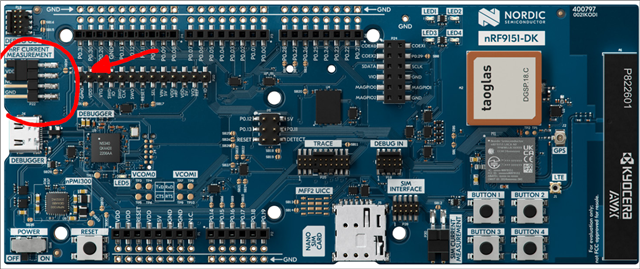
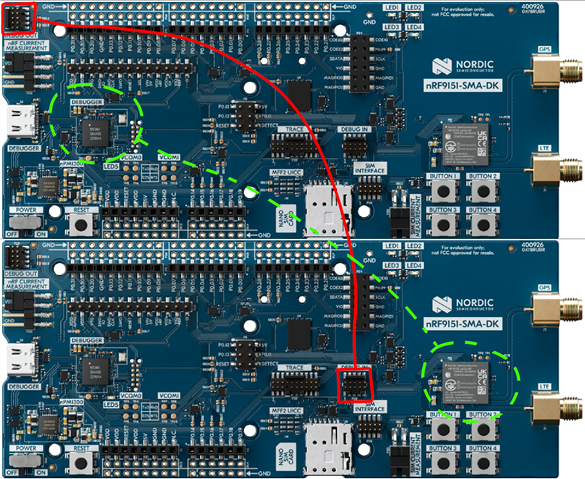
Cannot program our nRF9151-SMA-DK, we have other boards and work normaly. This is the programmer log:
08:30:21.996
Initialising the bundled nrfutil device
08:30:22.282
Using the bundled core version for nrfutil device: 8.1.1
08:30:22.298
Using nrfutil device version: 2.15.7
08:30:22.298
Using nrf-device-lib version: 0.22.5
08:30:22.298
Using nrf-probe version: 0.51.0
08:30:22.298
Using SEGGER J-Link version: JLink_V8.76
08:30:22.442
Getting serial port options from the persistent store for 003600343038511834333935.pc-nrfconnect-programmer
08:30:22.443
Getting serial port options from the persistent store for 001052023783.pc-nrfconnect-programmer
08:30:22.445
Device connected with the serial number 003600343038511834333935
08:30:22.447
Device connected with the serial number 001052023783
08:30:22.449
Device connected with the serial number null
08:30:23.660
Selecting device with the serial number 001052023783
08:30:24.188
Error: Failed with exit code 1. One or more device info tasks failed: * 1052023783: Device error: Setting the debug port SELECT register failed while powering up sys and debug regions (Unknown error in the J-Link DLL (error code =-1)). This might indicate that the debug port is unavailable. Double-check device power supply and SWD lines, and ensure that SWD is not disabled (Generic) Message: Operation device-info failed, Device error: Setting the debug port SELECT register failed while powering up sys and debug regions (Unknown error in the J-Link DLL (error code =-1)). This might indicate that the debug port is unavailable. Double-check device power supply and SWD lines, and ensure that SWD is not disabled.
08:30:24.189
Selected device with the serial number 001052023783
08:30:24.189
Using nrfutil device to communicate with target via JLink
08:30:24.469
Reading readback protection status for Application core
08:30:24.469
Reading readback protection status for Application core 0%
08:30:24.628
Reading readback protection status for Application core 50%
08:30:24.628
Reading readback protection status for Application core 50%
08:30:24.768
Failed "reading readback protection status for application core". Error: code: 1, description: Generic, message: Batch task protection-get failed, Device error: Setting the debug port SELECT register failed while powering up sys and debug regions (Unknown error in the J-Link DLL (error code =-1)). This might indicate that the debug port is unavailable. Double-check device power supply and SWD lines, and ensure that SWD is not disabled
08:30:24.781
Error: Failed with exit code 1. One or more batch tasks failed: * 1052023783: Device error: Setting the debug port SELECT register failed while powering up sys and debug regions (Unknown error in the J-Link DLL (error code =-1)). This might indicate that the debug port is unavailable. Double-check device power supply and SWD lines, and ensure that SWD is not disabled (Generic) Message: Batch task protection-get failed, Device error: Setting the debug port SELECT register failed while powering up sys and debug regions (Unknown error in the J-Link DLL (error code =-1)). This might indicate that the debug port is unavailable. Double-check device power supply and SWD lines, and ensure that SWD is not disabled.
08:30:24.781
Error: Failed with exit code 1. One or more batch tasks failed: * 1052023783: Device error: Setting the debug port SELECT register failed while powering up sys and debug regions (Unknown error in the J-Link DLL (error code =-1)). This might indicate that the debug port is unavailable. Double-check device power supply and SWD lines, and ensure that SWD is not disabled (Generic) Message: Batch task protection-get failed, Device error: Setting the debug port SELECT register failed while powering up sys and debug regions (Unknown error in the J-Link DLL (error code =-1)). This might indicate that the debug port is unavailable. Double-check device power supply and SWD lines, and ensure that SWD is not disabled.
08:30:30.720
Error: Failed with exit code 1. One or more device info tasks failed: * 1052023783: Device error: Setting the debug port SELECT register failed while powering up sys and debug regions (Unknown error in the J-Link DLL (error code =-1)). This might indicate that the debug port is unavailable. Double-check device power supply and SWD lines, and ensure that SWD is not disabled (Generic) Message: Operation device-info failed, Device error: Setting the debug port SELECT register failed while powering up sys and debug regions (Unknown error in the J-Link DLL (error code =-1)). This might indicate that the debug port is unavailable. Double-check device power supply and SWD lines, and ensure that SWD is not disabled.
08:30:31.000
Reading readback protection status for Application core
08:30:31.000
Reading readback protection status for Application core 0%
08:30:31.159
Reading readback protection status for Application core 50%
08:30:31.159
Reading readback protection status for Application core 50%
08:30:31.302
Failed "reading readback protection status for application core". Error: code: 1, description: Generic, message: Batch task protection-get failed, Device error: Setting the debug port SELECT register failed while powering up sys and debug regions (Unknown error in the J-Link DLL (error code =-1)). This might indicate that the debug port is unavailable. Double-check device power supply and SWD lines, and ensure that SWD is not disabled
08:30:31.314
Error: Failed with exit code 1. One or more batch tasks failed: * 1052023783: Device error: Setting the debug port SELECT register failed while powering up sys and debug regions (Unknown error in the J-Link DLL (error code =-1)). This might indicate that the debug port is unavailable. Double-check device power supply and SWD lines, and ensure that SWD is not disabled (Generic) Message: Batch task protection-get failed, Device error: Setting the debug port SELECT register failed while powering up sys and debug regions (Unknown error in the J-Link DLL (error code =-1)). This might indicate that the debug port is unavailable. Double-check device power supply and SWD lines, and ensure that SWD is not disabled.
Do you know how to solve it?
Thanks.