writing into UICR OTP of APP core with nrfprog fails on nrf5340

I try to write data into the OTP section of the APP core with the following command line:

nrfjprog.exe -f nrf53 --program 'OTP.ihex'

ouput:

[error] [SeggerBackend] - JLinkARM.dll reported error -256 at line 736.
[error] [SeggerBackend] - JLinkARM.dll reported error -256 at line 629.
[error] [SeggerBackend] - JLinkARM.dll reported error -256 at line 3139.
[error] [SeggerBackend] - JLinkARM.dll reported error -256 at line 911.
[error] [SeggerBackend] - JLinkARM.dll reported error -256 at line 3139.
[error] [SeggerBackend] - JLinkARM.dll reported error -256 at line 3139.
[error] [SeggerBackend] - JLinkARM.dll reported error -256 at line 3139.
[error] [SeggerBackend] - JLinkARM.dll reported error -256 at line 3087.
[error] [SeggerBackend] - JLinkARM.dll reported error -256 at line 3112.
[error] [SeggerBackend] - JLinkARM.dll reported error -256 at line 3349.
[error] [SeggerBackend] - JLinkARM.dll reported error -256 at line 3160.
[error] [SeggerBackend] - JLinkARM.dll reported error -256 at line 3176.
[ #################### ] 0.116s | Program file - Done programming
WARNING: A programming operation has been performed without --verify.
WARNING: Programming can fail without error.

If I use Ozone to display the written content in a memory window I can see the data written to the OTP memory. But if I perform a power cycle the OTP section is empty again.

I also tried to use the following command for tests: nrfjprog -f nrf53 --memwr 0x00FF8100 --val 0x7E75

the same problem here: cells are empty after power cycle.

Initially I tried to use JFlash without success. This resulted in an error message even if I enable the OTP bank and disable all others
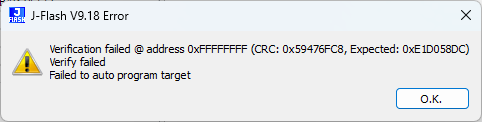
Any Hints how I can write the OTP section permanently?

Parents
  • I was searching the Nordic Q&A and nrfprog was used in most of the comments and so did I.

    Now I tried nrfutil with the following results:

    This seems to work:

    PS D:\app\build\app>  nrfutil.exe device write --address 0x00FF8100 --value 0xDA7A7E75
    v Data written to 504401838
    
    PS D:\app\build\app> nrfutil.exe device read --address 0x00FF8100
    504401838
    0x00FF8100: DA7A7E75                              |u~z.|

    ----- power cycle of the device -------

    PS D:\app\build\app> nrfutil.exe device read --address 0x00FF8100 
    504401838
    0x00FF8100: DA7A7E75                              |u~z.|

    Trying programming using a hex file as input seems not to work:

    PS D:\app\build\app> nrfutil device recover
    v Recovered 504401838
    
    PS D:\app\build\app> nrfutil.exe device program --traits jlink --firmware 'OTP.ihex'
    [00:00:00] ###### 100% [2/2 504401838] Programmed
    
    PS D:\app\build\app> nrfutil.exe device read --address 0x00FF8100
    504401838
    0x00FF8100: DA7A7E75                              |u~z.|

    ----- power cycle of the device -------

    PS D:\app\build\app> nrfutil device recover
    v Recovered 504401838
    
    PS D:\app\build\app> nrfutil.exe device read --address 0x00FF8100
    504401838
    0x00FF8100: FFFFFFFF                              |....|

    Is this by intention or am I doing anything wrong? It would be great if programming using a hex file would work out of the box instead of creating a script with a sequence of single write operations.

  • Hi,


    If you perform a recover operation, ie "nrfutil device recover" or "nrfjprog --recover"; UICR will be deleted:

    https://docs.nordicsemi.com/bundle/ps_nrf5340/page/ctrl-ap.html#ariaid-title3


    If you perform these steps (ie. omit "recover"):

    nrfutil.exe device program --traits jlink --firmware 'OTP.ihex'
    --- power cycle of the device ---
    nrfutil.exe device read --address 0x00ff8100

    You should read back the written data to that address.

    Let me know if this is not working as intended.


    Kind regards,

    Håkon

  • Finaly this seems to work:

    build\app> nrfjprog.exe -f nrf53 --program 'OTP.hex'
    [error] [SeggerBackend] - JLinkARM.dll reported error -256 at line 736.
    [error] [SeggerBackend] - JLinkARM.dll reported error -256 at line 629.
    [error] [SeggerBackend] - JLinkARM.dll reported error -256 at line 3139.
    [error] [SeggerBackend] - JLinkARM.dll reported error -256 at line 911.
    [error] [SeggerBackend] - JLinkARM.dll reported error -256 at line 3139.
    [error] [SeggerBackend] - JLinkARM.dll reported error -256 at line 3139.
    [error] [SeggerBackend] - JLinkARM.dll reported error -256 at line 3139.
    [error] [SeggerBackend] - JLinkARM.dll reported error -256 at line 3087.
    [error] [SeggerBackend] - JLinkARM.dll reported error -256 at line 3112.
    [error] [SeggerBackend] - JLinkARM.dll reported error -256 at line 3349.
    [error] [SeggerBackend] - JLinkARM.dll reported error -256 at line 3160.
    [error] [SeggerBackend] - JLinkARM.dll reported error -256 at line 3176.
    [error] [ Worker] - Can't read memory descriptors, ap-protection is enabled.
    [error] [ Client] - Encountered error -90: Command read_memory_descriptors executed for 15 milliseconds with result -90
    [error] [ Client] - Encountered error -90: Command program_file executed for 1941 milliseconds with result -90
    [error] [  nRF53] - Failed while performing 'Write' operation on target address 0x00FF8100. 
    -90: Access protection is enabled, can't access memory.
    [error] [  nRF53] - Failed while reading device information.
    [error] [ Worker] - Access protection is enabled, can't access memory.
    ERROR: The operation attempted is unavailable due to readback protection in
    ERROR: your device. Please use --recover to unlock the device.
    NOTE: For additional output, try running again with logging enabled (--log).
    NOTE: Any generated log error messages will be displayed.
    
    build\app> nrfutil.exe device recover
    v Recovered 504401838
    
    build\app> nrfjprog.exe -f nrf53 --program 'OTP.hex'
    [error] [SeggerBackend] - JLinkARM.dll reported error -256 at line 736.
    [error] [SeggerBackend] - JLinkARM.dll reported error -256 at line 629.
    [error] [SeggerBackend] - JLinkARM.dll reported error -256 at line 3139.
    [error] [SeggerBackend] - JLinkARM.dll reported error -256 at line 911.
    [error] [SeggerBackend] - JLinkARM.dll reported error -256 at line 3139.
    [error] [SeggerBackend] - JLinkARM.dll reported error -256 at line 3139.
    [error] [SeggerBackend] - JLinkARM.dll reported error -256 at line 3139.
    [error] [SeggerBackend] - JLinkARM.dll reported error -256 at line 3087.
    [error] [SeggerBackend] - JLinkARM.dll reported error -256 at line 3112.
    [error] [SeggerBackend] - JLinkARM.dll reported error -256 at line 3349.
    [error] [SeggerBackend] - JLinkARM.dll reported error -256 at line 3160.
    [error] [SeggerBackend] - JLinkARM.dll reported error -256 at line 3176.
    [ #################### ]   0.080s | Program file - Done programming
    WARNING: A programming operation has been performed without --verify.
    WARNING: Programming can fail without error.
    build\app> nrfutil.exe device read --address 0x00FF8100
    504401838
    0x00FF8100: DA7A7E75                              |u~z.|
    
    ----- power cycle ---------
    
    build\app> nrfutil.exe device read --address 0x00FF8100
    504401838
    0x00FF8100: DA7A7E75                              |u~z.|


    I am a little bit confused that it seems possible to delete an OTP (One Time Programmable) memory section ...

    But nevertheless many thanks for your support, that helped me a lot!

  • Hi,


    Robert said:
    I am a little bit confused that it seems possible to delete an OTP (One Time Programmable) memory section ...

    I agree, the naming convention here is confusing from our side, as OTP refers to a physical memory technology.

    On other devices, the field was called "CUSTOMER", as here with the nRF52840:

    https://docs.nordicsemi.com/bundle/ps_nrf52840/page/uicr.html


    With nRF53 and newer, keys can be stored in this area, and from the "internal point-of-view", ie. code running on the MCU cannot erase UICR, so it is a sort of "emulated OTP".


    My apologies for the inconvenience.


    Kind regards,

    Håkon

  • I just recognized that I used the command "nrfprog" by accident to write the hex file ... Face palm

    If I try the same using "nrfutil" the problem still exists: after power cycle the memory section seems to be empty again. I haven't found a way to get a permanently written OTP section with nrfutil.

    Currently the solution with nrfprog is good enough for me, but for completeness I would like to mention my observation using nrfutil.

    here is what I have done:

    build\app> nrfutil.exe device program --traits jlink --firmware 'OTP.hex' --options verify=VERIFY_READ
    [00:00:00] ###### 100% [3/3 504401838] Programmed
    
    build\app> nrfutil.exe device read --address 0x00FF8100                                                                             
    504401838
    0x00FF8100: DA7A7E75                              |u~z.|
    
    ----- power cycle --------
    
    build\app> nrfutil.exe device read --address 0x00FF8100
    Error: One or more read memory tasks failed:
     * 504401838: Failed to attach to target: The Application core access port is protected (All) (NotAvailableBecauseProtection)
    
    
    The operation was unavailable for some of the devices because they had readback protection enabled. These devices might be possible to unlock using the `recover` subcommand. See `nrfutil device recover --help` for more information.

    connecting the device with ozone has shown that the OTP seems empty again after power cycle.

  • Hi,


    Robert said:

    If I try the same using "nrfutil" the problem still exists: after power cycle the memory section seems to be empty again. I haven't found a way to get a permanently written OTP section with nrfutil.

    The devices are not empty, they are readback protected. This happens when the firmware running on your device does not open up the access port.


    If you flash your device with a firmware first, then write to UICR; this should not happen.

    However, if your "OTP.hex" overwrites/overlaps with the firmware already loaded onto the nRF, this will cause similar behaviour, and it will need to be recovered.

    Robert said:
    connecting the device with ozone has shown that the OTP seems empty again after power cycle.

    Ozone and other JLink software, will detect that your device is protected and provide a pop-up asking if you would like to recover the device by issuing an erase operation.

    This will then erase UICR again, similar to nrfjprog --recover and nrfutil device recover.


    Kind regards,

    Håkon

Reply
  • Hi,


    Robert said:

    If I try the same using "nrfutil" the problem still exists: after power cycle the memory section seems to be empty again. I haven't found a way to get a permanently written OTP section with nrfutil.

    The devices are not empty, they are readback protected. This happens when the firmware running on your device does not open up the access port.


    If you flash your device with a firmware first, then write to UICR; this should not happen.

    However, if your "OTP.hex" overwrites/overlaps with the firmware already loaded onto the nRF, this will cause similar behaviour, and it will need to be recovered.

    Robert said:
    connecting the device with ozone has shown that the OTP seems empty again after power cycle.

    Ozone and other JLink software, will detect that your device is protected and provide a pop-up asking if you would like to recover the device by issuing an erase operation.

    This will then erase UICR again, similar to nrfjprog --recover and nrfutil device recover.


    Kind regards,

    Håkon

Children
No Data
Related