Hello,
We're using nrf-sdk-bm v0.9.0 and having an issue with BLE and UART coexistence. The goal is to be able to operate in and transition between three modes: UART alone, UART/BLE together, and BLE alone.
We are able to connect over UART at 921600 baud and send/receive. When we start BLE advertising, the UART continues to send logs but doesn't respond to commands until the device is rebooted.
The working hypothesis is that UART receive requires the Constant Latency sub-power mode, but the SoftDevice overrides this to Low-power (either when starting advertising or earlier when enabled).
I've been experimenting to try and recover the UART by requesting Constant Latency mode again, but this doesn't seem to be very reliable.
void RequestConstantLatency()
{
    // If the SoftDevice is enabled use the SVC call.
    if (nrf_sdh_is_enabled())
    {
        uint32_t ret = sd_power_mode_set(NRF_POWER_MODE_CONSTLAT);
        if (ret == NRF_SUCCESS)
        {
            LOG_INFO("Constant latency mode requested (SD)");
        }
        else
        {
            LOG_ERROR("Failed to request constant latency mode (SD): %u", ret);
        }
    } else {
        nrfx_err_t err = nrfx_power_constlat_mode_request();
        if (err == NRFX_SUCCESS)
        {
            LOG_INFO("Constant latency mode requested (nrfx)");
        }
        else
        {
            LOG_ERROR("Failed to request constant latency mode (nrfx): %u", err);
        }
    }
}
Is there any documentation on when the SoftDevice requests Low-Power mode, or guidance on how to use both interfaces at the same time?
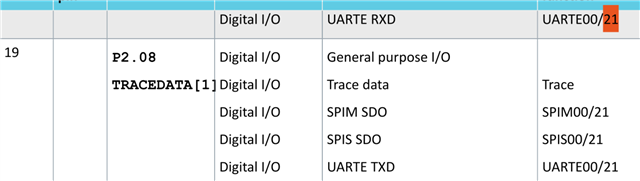
We're using UARTE21, and the board has UART_RX into P2.07/SWO and UART_TX into P2.08