Unable to load certificates through certificate manager on my custom 9151 board

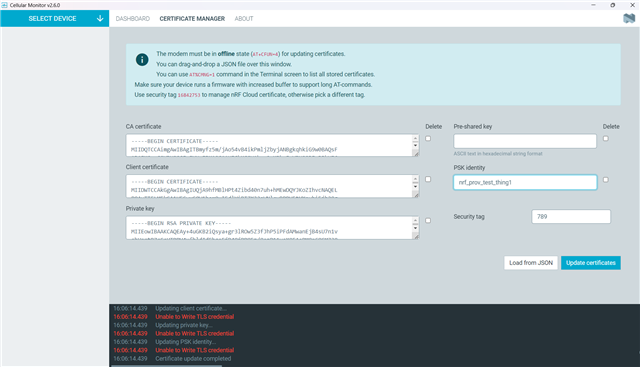
Hi I am able to load the nrf9151dk_at_client example hex on my custom dev board . I try accessing the AT commands and I can very easily get the responses. I want to install custom certificates & priv keys through Certificate Manager But as soon as I try to load it, I get Unable to Write TLS Credential. I did try updating the CERTS through AT%CMNG command and they too keep giving me some errors or are hanging. Not sure why it perfectly works on a dk but not on my custom board.
Parents
  • Hi,

    First please confirm AT+CFUN=4 before any cert operation on the custom board and also check which COM port Cellular Monitor uses on the custom board, and that by sending AT on that same port should returns OK.

    And when writing the certificates with AT%CMNG or directly in code do remember to include newline termination characters. Every line should be ended with '\n' character. Its not needed for Certificate manager as it automatically includes these.

    Regarding 'Unable to Write TLS credential' error when writing through the Certificate Manager, I would request you to capture the error through the AT command method and share the exact AT%CMNG= line (redact if needed) and the full modem response including any error code you are getting so we could investigate further.

    Best Regards,
    Syed Maysum

  • Thanks Syed

     Here are those details as you requested

    > AT
    
    OK
    > AT+CFUN=4
    
    OK
    > AT%CMNG=0,20,0," -----BEGIN CERTIFICATE----- MIIDQTCCAimgAwIBAgITBmyfz5m/jAo54vB4ikPmljZbyjANBgkqhkiG9w0BAQsF ADA5MQswCQYDVQQGEwJVUzEPMA0GA1UEChMGQW1hem9uMRkwFwYDVQQDExBBbWF6 b24gUm9vdCBDQSAxMB4XDTE1MDUyNjAwMDAwMFoXDTM4MDExNzAwMDAwMFowOTEL MAkGA1UEBhMCVVMxDzANBgNVBAoTBkFtYXpvbjEZMBcGA1UEAxMQQW1hem9uIFJv b3QgQ0EgMTCCASIwDQYJKoZIhvcNAQEBBQADggEPADCCAQoCggEBALJ4gHHKeNXj ca9HgFB0fW7Y14h29Jlo91ghYPl0hAEvrAIthtOgQ3pOsqTQNroBvo3bSMgHFzZM 9O6II8c+6zf1tRn4SWiw3te5djgdYZ6k/oI2peVKVuRF4fn9tBb6dNqcmzU5L/qw IFAGbHrQgLKm+a/sRxmPUDgH3KKHOVj4utWp+UhnMJbulHheb4mjUcAwhmahRWa6 VOujw5H5SNz/0egwLX0tdHA114gk957EWW67c4cX8jJGKLhD+rcdqsq08p8kDi1L 93FcXmn/6pUCyziKrlA4b9v7LWIbxcceVOF34GfID5yHI9Y/QCB/IIDEgEw+OyQm jgSubJrIqg0CAwEAAaNCMEAwDwYDVR0TAQH/BAUwAwEB/zAOBgNVHQ8BAf8EBAMC AYYwHQYDVR0OBBYEFIQYzIU07LwMlJQuCFmcx7IQTgoIMA0GCSqGSIb3DQEBCwUA A4IBAQCY8jdaQZChGsV2USggNiMOruYou6r4lK5IpDB/G/wkjUu0yKGX9rbxenDI U5PMCCjjmCXPI6T53iHTfIUJrU6adTrCC2qJeHZERxhlbI1Bjjt/msv0tadQ1wUs N+gDS63pYaACbvXy8MWy7Vu33PqUXHeeE6V/Uq2V8viTO96LXFvKWlJbYK8U90vv o/ufQJVtMVT8QtPHRh8jrdkPSHCa2XV4cdFyQzR1bldZwgJcJmApzyMZFo6IQ6XU 5MsI+yMRQ+hDKXJioaldXgjUkK642M4UwtBV8ob2xJNDd2ZhwLnoQdeXeGADbkpy rqXRfboQnoZsG4q5WTP468SQvvG5 -----END CERTIFICATE-----"
    
    +CME ERROR: 527
    
    > AT%CMNG=0,20,0," -----BEGIN CERTIFICATE-----\n MIIDQTCCAimgAwIBAgITBmyfz5m/jAo54vB4ikPmljZbyjANBgkqhkiG9w0BAQsF\n ADA5MQswCQYDVQQGEwJVUzEPMA0GA1UEChMGQW1hem9uMRkwFwYDVQQDExBBbWF6\n b24gUm9vdCBDQSAxMB4XDTE1MDUyNjAwMDAwMFoXDTM4MDExNzAwMDAwMFowOTEL\n MAkGA1UEBhMCVVMxDzANBgNVBAoTBkFtYXpvbjEZMBcGA1UEAxMQQW1hem9uIFJv\n b3QgQ0EgMTCCASIwDQYJKoZIhvcNAQEBBQADggEPADCCAQoCggEBALJ4gHHKeNXj\n ca9HgFB0fW7Y14h29Jlo91ghYPl0hAEvrAIthtOgQ3pOsqTQNroBvo3bSMgHFzZM\n 9O6II8c+6zf1tRn4SWiw3te5djgdYZ6k/oI2peVKVuRF4fn9tBb6dNqcmzU5L/qw\n IFAGbHrQgLKm+a/sRxmPUDgH3KKHOVj4utWp+UhnMJbulHheb4mjUcAwhmahRWa6\n VOujw5H5SNz/0egwLX0tdHA114gk957EWW67c4cX8jJGKLhD+rcdqsq08p8kDi1L\n 93FcXmn/6pUCyziKrlA4b9v7LWIbxcceVOF34GfID5yHI9Y/QCB/IIDEgEw+OyQm\n jgSubJrIqg0CAwEAAaNCMEAwDwYDVR0TAQH/BAUwAwEB/zAOBgNVHQ8BAf8EBAMC\n AYYwHQYDVR0OBBYEFIQYzIU07LwMlJQuCFmcx7IQTgoIMA0GCSqGSIb3DQEBCwUA\n A4IBAQCY8jdaQZChGsV2USggNiMOruYou6r4lK5IpDB/G/wkjUu0yKGX9rbxenDI\n U5PMCCjjmCXPI6T53iHTfIUJrU6adTrCC2qJeHZERxhlbI1Bjjt/msv0tadQ1wUs\n N+gDS63pYaACbvXy8MWy7Vu33PqUXHeeE6V/Uq2V8viTO96LXFvKWlJbYK8U90vv\n o/ufQJVtMVT8QtPHRh8jrdkPSHCa2XV4cdFyQzR1bldZwgJcJmApzyMZFo6IQ6XU\n 5MsI+yMRQ+hDKXJioaldXgjUkK642M4UwtBV8ob2xJNDd2ZhwLnoQdeXeGADbkpy\n rqXRfboQnoZsG4q5WTP468SQvvG5\n -----END CERTIFICATE-----"
    
    +CME ERROR: 527

    It seems like the modem doesnot like the content. 

    You can have the Root CA content from here : https://www.amazontrust.com/repository/AmazonRootCA1.pem

    Can you provide me the exact AT%CMNG command I can use which the modem would expect?

  • Hi,

    Can you try out the following command:

    AT%CMNG=0,20,0,"
    -----BEGIN CERTIFICATE-----
    MIIDQTCCAimgAwIBAgITBmyfz5m/jAo54vB4ikPmljZbyjANBgkqhkiG9w0BAQsF
    ADA5MQswCQYDVQQGEwJVUzEPMA0GA1UEChMGQW1hem9uMRkwFwYDVQQDExBBbWF6
    b24gUm9vdCBDQSAxMB4XDTE1MDUyNjAwMDAwMFoXDTM4MDExNzAwMDAwMFowOTEL
    MAkGA1UEBhMCVVMxDzANBgNVBAoTBkFtYXpvbjEZMBcGA1UEAxMQQW1hem9uIFJv
    b3QgQ0EgMTCCASIwDQYJKoZIhvcNAQEBBQADggEPADCCAQoCggEBALJ4gHHKeNXj
    ca9HgFB0fW7Y14h29Jlo91ghYPl0hAEvrAIthtOgQ3pOsqTQNroBvo3bSMgHFzZM
    9O6II8c+6zf1tRn4SWiw3te5djgdYZ6k/oI2peVKVuRF4fn9tBb6dNqcmzU5L/qw
    IFAGbHrQgLKm+a/sRxmPUDgH3KKHOVj4utWp+UhnMJbulHheb4mjUcAwhmahRWa6
    VOujw5H5SNz/0egwLX0tdHA114gk957EWW67c4cX8jJGKLhD+rcdqsq08p8kDi1L
    93FcXmn/6pUCyziKrlA4b9v7LWIbxcceVOF34GfID5yHI9Y/QCB/IIDEgEw+OyQm
    jgSubJrIqg0CAwEAAaNCMEAwDwYDVR0TAQH/BAUwAwEB/zAOBgNVHQ8BAf8EBAMC
    AYYwHQYDVR0OBBYEFIQYzIU07LwMlJQuCFmcx7IQTgoIMA0GCSqGSIb3DQEBCwUA
    A4IBAQCY8jdaQZChGsV2USggNiMOruYou6r4lK5IpDB/G/wkjUu0yKGX9rbxenDI
    U5PMCCjjmCXPI6T53iHTfIUJrU6adTrCC2qJeHZERxhlbI1Bjjt/msv0tadQ1wUs
    N+gDS63pYaACbvXy8MWy7Vu33PqUXHeeE6V/Uq2V8viTO96LXFvKWlJbYK8U90vv
    o/ufQJVtMVT8QtPHRh8jrdkPSHCa2XV4cdFyQzR1bldZwgJcJmApzyMZFo6IQ6XU
    5MsI+yMRQ+hDKXJioaldXgjUkK642M4UwtBV8ob2xJNDd2ZhwLnoQdeXeGADbkpy
    rqXRfboQnoZsG4q5WTP468SQvvG5
    -----END CERTIFICATE-----"

    As based on Nordic documented examples there should be no extra text of the BEGIN and END lines and also no leading spaces inside the quotes. If it still gives error you can consider trying out nRF Cloud Utils scripts.

    Best Regards,
    Syed Maysum 

Reply Children
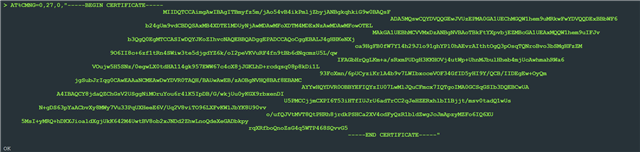
  • this is how certificate manager conditions the certs into the modem

    not sure what those characters are in between

  • Hi,

    Thanks for the update. The characters you see between the certificate lines are standard line endings that Certificate Manager adds automatically which I think should not be the issue.

    However since basic AT commands work fine on your custom board but the large AT%CMNG command fails, we suspect this may be related to how you are physically connecting to the board. On the DK, Cellular Monitor uses the onboard J-Link USB CDC which handles large transfers reliably. On a custom board with a USB-to-UART adapter, if RTS/CTS hardware flow control is not wired, bytes can be silently dropped.

    So could you confirm:
    1. Are you using a USB-to-UART adapter to connect to the custom board? Is RTS/CTS wired and enabled?
    2. Please run AT+CGMR on both the DK and custom board and share the output so we can compare modem firmware versions also.

    Best Regards,
    Syed Maysum

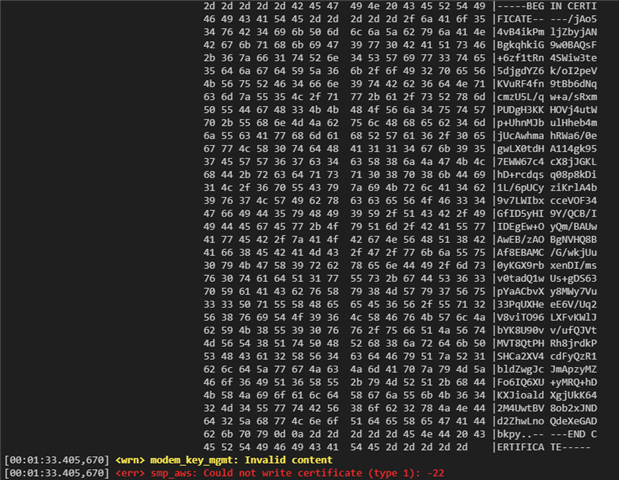
  • I believe the modem expects those line endings CR/LF , and that's the reason its working. 

    I did some hexdump before I try flashing it in the modem and the modem returns -22 [Invalid Content].

    regarding your questions,

    1.No Adapter, we have a seperate data path that is responsible to get the data to the modem, but we are confident that the large data reaches the 9151 modem as shown in the screenshot above. I just suspect the modem wants it to be formatted in a very particular way. 

    LOG_HEXDUMP_INF((const uint8_t *)write_ptr, write_len, "modem_key_mgmt_write write_ptr");
    
        ret = modem_key_mgmt_write(CONFIG_AWS_IOT_SEC_TAG,
                                   cred_type,
                                   write_ptr,
                                   write_len);

    2. modem fw: mfw_nrf91x1_2.0.2 for both

  • Parth Sagar0 said:
    I did some hexdump before I try flashing it in the modem and the modem returns -22 [Invalid Content].

    It looks like the certificate is being cut short somehow in the hex dump. But it's hard to say for sure what is going on without the full code.

    Parth Sagar0 said:
    I just suspect the modem wants it to be formatted in a very particular way. 

    Yes, but as you said it also works on the DK. The modem on the DK should take the same format as the one on the custom board I would imagine. So you should try to check what is different in those two cases.

Related