flashing modem firmware on thingy 91 x

Hello, 
i'm trying to flash  mfw-nr+_nrf91x1_2.0.0.zip on a thingy91 x. it doesnt work via nrfutil

nrfutil device program --firmwaremfw-nr+_nrf91x1_2.0.0.zip 
THINGY91X_13A2EC8A4FC: Failed to read file `manifest.json` from extracted MCUBoot multi-image ZIP archive: specified file not found in archive

it also doesnt work via jlink. presumably the jlink header is actually connected to the nrf53


nrfutil 91 modem-firmware-upgrade --firmware ~/Downloads/mfw-nr+_nrf91x1_2.0.0.zip -
Warning: jlink_usb_000820101868 is a nRF53 device, assuming nRF91
[00:00:00] ------ 0% [000820101868] Failed to upgrade modem firmware on 000820101868, Device oper
Error: Operation failed for one or more devices:
* jlink_usb_000820101868: Device operation failed when updating modem fw: Trustzone Peripheral access error. Probe has Secure access


both headers seem to connect to the same chip

Parents
  • Hi,

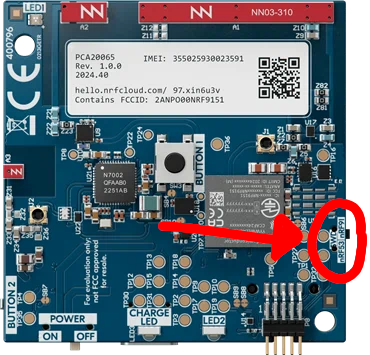
    I believe you are doing the right thing. However, if it shows as a nRF5340 it might be that the SWD switch is on nRF53 and not nRF91.

    The SWD is connected to both Chips (nRF5340 and nRF9151) through a switch. This switch is not directly accessible. You have to remove the front cover to access it.

    To remove the front cover (orange) you can open the Thingy91x by unclipping the two tabs (on the yellow back) that are retaining the front cover. Don't forget to open the port access door as we are removing the whole orange part. Then pull the orange front cover from the top (where the unclipped tabs are). Now you should have access to the switch and put it in the "nRF91" position.

    Now you can close your device and retry to update the modem firmware through the JLink.

    Let me know if that solved your problem.

    Best regards,

    Simon D-M

Reply
  • Hi,

    I believe you are doing the right thing. However, if it shows as a nRF5340 it might be that the SWD switch is on nRF53 and not nRF91.

    The SWD is connected to both Chips (nRF5340 and nRF9151) through a switch. This switch is not directly accessible. You have to remove the front cover to access it.

    To remove the front cover (orange) you can open the Thingy91x by unclipping the two tabs (on the yellow back) that are retaining the front cover. Don't forget to open the port access door as we are removing the whole orange part. Then pull the orange front cover from the top (where the unclipped tabs are). Now you should have access to the switch and put it in the "nRF91" position.

    Now you can close your device and retry to update the modem firmware through the JLink.

    Let me know if that solved your problem.

    Best regards,

    Simon D-M

Children
Related