Current version of AssetTracker

Hi

There is a github repo https://github.com/nrfconnect/Asset-Tracker-Template/tree/main that receives updates as of yesterday.

However on the documentation website https://docs.nordicsemi.com/bundle/ncs-2.9.2/page/nrf/applications/asset_tracker_v2/README.html , I read:

Important

The Asset Tracker v2 application is in maintenance mode. For new projects, it is recommended to use the Cellular: nRF Cloud multi-service sample instead..

Could explain what that means ? Why should I use the multi-service sample ? Is the AssetTracker as implemented in the github repo obsolete or is there a difference in functionality ?

Kind regards

Peter

Parents
  • Hi Peter,

    The link you just sent is referring to an old version of the Asset Tracker application, which was called "Asset Tracker v2". The newest version of this application has been renamed to "Asset Tracker Template" which is the application you saw on GitHub.

    You can find the documentation for the new application here.

    The Asset tracker template is the recommended application to use for new Asset tracking projects.

    Best regards,

    Simon D-M

  • Hi, Thank you Simon

    What exactly is the difference between the Asset Tracker Template and the multi service sample ? Why would one choose one over the other ?

    Kind regards 

    Peter

  • Hi,

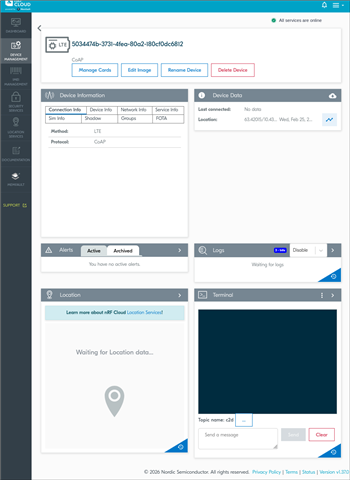
    Hmmmm, it is strange. You should see something like this:

    Can you please retry from scratch and let me know the exact steps you went through ?

    Best regards,

    Simon D-M

  • Hi

    I followed the steps in https://github.com/nrfconnect/Asset-Tracker-Template/blob/main/docs/common/getting_started.md

    # Initialize asset-tracker-template workspace
    west init -m github.com/.../Asset-Tracker-Template.git --mr main asset-tracker-template
    
    cd asset-tracker-template
    
    # Update nRF Connect SDK modules. This may take a while.
    west update

    Navigate to the application folder:
    1. # Assuming you are in the asset-tracker-template folder
      cd project/app
      west build -p -b nrf9151dk/nrf9151/ns # Pristine build
      west flash --erase # The --erase option is optional and will erase the entire flash memory before programming
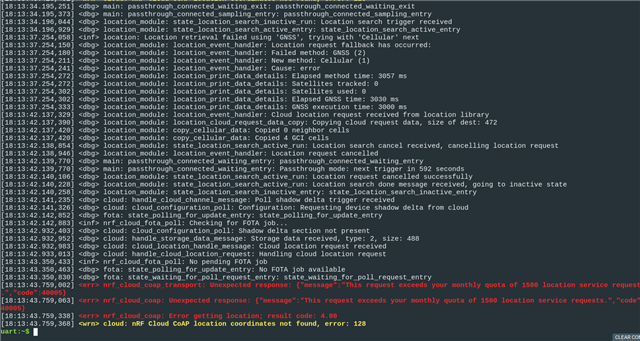
      when I press Button 1, I get:
  • I forgot: I use the nRF9151 SMA DK, I also have a ThingyX91 flashed with AssetTracker using nrf Connect for Desktop which shows the expected UI elements (Terminal, ...) . The same is true for the nRF9161 DK flashed also with the nRF Connect for Desktop App. When I try to compile the Asset Tracker Template from Github for the nRF9161 Dk, I get a compile time error.

  • Hi,

    Eau Du Puid said:
    When I try to compile the Asset Tracker Template from Github for the nRF9161 Dk, I get a compile time error.

    The Asset tracker template does not natively support the nRF9161 DK. As for now, it only natively supports the nRF9151 DK / SMA DK and the Thingy:91 X. When using the Thingy, it also collects some more information from the on-board sensors.

    Eau Du Puid said:
    when I press Button 1, I get:

    It says that your monthly quota of 1500 location service has already been used. It fails because the Asset Tracker Template uses by default nRF Cloud A-GNSS, which uses "location service tokens". (If you don't know what A-GNSS is, you can learn a more here.)

    Now, you have 3 options in front of you:

    1. You can wait until you have new "location service tokens".
    2. You can upgrade your nRF Cloud plan to one that gives more "location service tokens"
    3. You can use normal GNSS instead of A-GNSS.

    I would recommend you to try the latest one, as you don't have to wait and it is free.

    To do that, you can go in the prj.conf and disable the A-GNSS config "CONFIG_NRF_CLOUD_AGNSS=n". Rebuild the application and flash it and now your device should be using normal GNSS.

    Please tell me if that worked, I wasn't able to test it myself as I don't have access to a limited nRF Cloud account right now.

    If you still don't have the right interface in nRF Cloud, you can try to delete the device and unclaim it. Then reclaim it and run the application again.

    Best regards,

    Simon D-M

  • Hi, thank you, unfortunately, it doesn't help. I flashed 3 different nRF9151 SMA DKs in addition to the Thingy91X and the nRF9161 DK.

    The Thingy91x has been flashed with the Asset Tracker from nRf Connect for Desktop, all others with the github version.

    Two of the three nRF9151 SMA DKs show this:

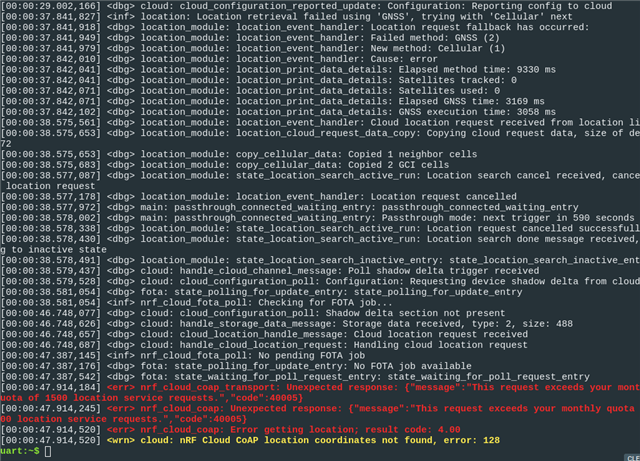
    I have reflashed one with the suggestion you made (disable CONFIG_NRF_CLOUD_AGNSS) but this doesnt help:

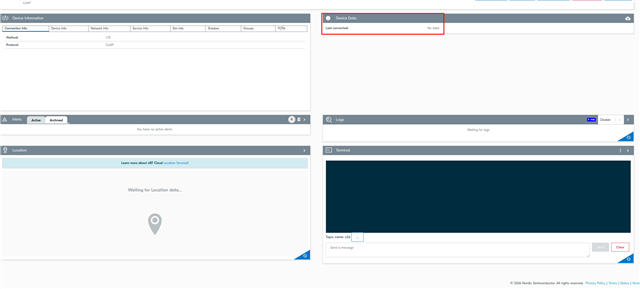
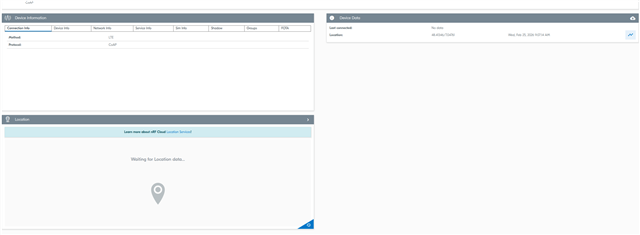
    Finally the third nRF9151 SMA DK show this:

    so no terminal , no data but a location !. This was the first one I claimed in nRFCloud. I have unclaimed it then reflashed it ( with the github version) and then reclaimed it.

    No idea why it is rendered differently in nRFCloud.

    Kind regards

    Peter

Reply
  • Hi, thank you, unfortunately, it doesn't help. I flashed 3 different nRF9151 SMA DKs in addition to the Thingy91X and the nRF9161 DK.

    The Thingy91x has been flashed with the Asset Tracker from nRf Connect for Desktop, all others with the github version.

    Two of the three nRF9151 SMA DKs show this:

    I have reflashed one with the suggestion you made (disable CONFIG_NRF_CLOUD_AGNSS) but this doesnt help:

    Finally the third nRF9151 SMA DK show this:

    so no terminal , no data but a location !. This was the first one I claimed in nRFCloud. I have unclaimed it then reflashed it ( with the github version) and then reclaimed it.

    No idea why it is rendered differently in nRFCloud.

    Kind regards

    Peter

Children
  • Hi Peter,

    I just asked internally, and the Asset Tracker Template has other things that use the nRF Cloud Location service.

    It uses the Location service for Cellular Positioning and Wi-Fi Positioning (Wi-Fi is only relevant for the Thingy:91 X).

    To deactivate these service, you can disable the config "CONFIG_LOCATION_METHOD_CELLULAR=n" in prj.conf.

    And :

    • for the nRF9151 DK, disable in boards/nrf9151dk_nrf9151_ns.conf :
      • "CONFIG_LOCATION_REQUEST_DEFAULT_METHOD_SECOND_CELLULAR=n
    • for the Thingy:91 X, disable in boards/thingy91x_nrf9151_ns.conf :
      • "CONFIG_LOCATION_METHOD_WIFI=n"
      • "CONFIG_LOCATION_REQUEST_DEFAULT_METHOD_FIRST_WIFI=n"
      • "CONFIG_LOCATION_REQUEST_DEFAULT_METHOD_THIRD_CELLULAR=n"

    I hope this will solve your issue. If it still uses the Location Service I'll try to check if there is even more things that use it.

    Best regards,

    Simon D-M

  • Hi Simon

    Thank you , I will try this in a minute. I just upgraded to Pro but I still get the same error:

    [00:00:30.428,436] <inf> nrf_cloud_fota_poll: No pending FOTA job
    [00:00:30.428,436] <dbg> fota: state_polling_for_update_entry: No FOTA job available
    [00:00:30.428,833] <dbg> fota: state_waiting_for_poll_request_entry: state_waiting_for_poll_request_entry
    [00:00:30.869,415] <err> nrf_cloud_coap_transport: Unexpected response: {"message":"This request exceeds your monthly quota of 1500 location service requests.","code":40005}
    [00:00:30.869,476] <err> nrf_cloud_coap: Unexpected response: {"message":"This request exceeds your monthly quota of 1500 location service requests.","code":40005}
    [00:00:30.869,750] <err> nrf_cloud_coap: Error getting location; result code: 4.00
    [00:00:30.869,781] <wrn> cloud: nRF Cloud CoAP location coordinates not found, error: 128

    I don't need location so I am going to change prj.conf as you suggested, but since this is now Pro, maybe there is another issue ?

    Kind regards

    Peter

  • Hi,

    Yes, please try the suggested change first. And if you still have problems with the location service requests after that, I'll forward your issue internally to the nRF Cloud team.

    Best regards,

    Simon D-M

  • Hi Simon

    I disabled all location services:

    # Location
    CONFIG_LOCATION=n
    CONFIG_LOCATION_DATA_DETAILS=n
    CONFIG_LOCATION_METHOD_GNSS=n
    CONFIG_LOCATION_METHOD_CELLULAR=n
    CONFIG_LOCATION_SERVICE_EXTERNAL=n
    CONFIG_LOCATION_REQUEST_DEFAULT_GNSS_TIMEOUT=60000
    CONFIG_LOCATION_REQUEST_DEFAULT_CELLULAR_TIMEOUT=30000
    CONFIG_LOCATION_REQUEST_DEFAULT_TIMEOUT=120000
    CONFIG_LOCATION_REQUEST_DEFAULT_CELLULAR_CELL_COUNT=3
    CONFIG_LOCATION_REQUEST_DEFAULT_GNSS_VISIBILITY_DETECTION=n
    CONFIG_LTE_NETWORK_MODE_LTE_M_NBIOT_GPS=n
    CONFIG_LTE_NETWORK_MODE_LTE_M_NBIOT=y
    CONFIG_NRF_CLOUD_AGNSS=n
    CONFIG_LOCATION_REQUEST_DEFAULT_METHOD_SECOND_CELLULAR=n

    However, this doesn't compile out of the box because of missing guards. Also, this disables the button 1 function.

    It might be interesting to refactor the template so that people who don't need location can easily disable it. Also, basic data upload should work in the free plan even when location quotas are exceeded.

    Anyway, thank you very much for your help.

    Kind regards

    Peter

  • Hi,

    I'm glad you were able to find a solution!

    I found that there is a branch on the GitHub repo that was made with the location module removed. It looks like it has not been updated, but it can be a good way to see what needs to be done to remove it cleanly.

    Best regards,

    Simon D-M

Related