VSCode Extension - Edit build configuration display width hiding elements.

Adding long path/filenames to the drop-down fields in "Edit Build Configuration" dialog in VS Code Extension leads to hidden buttons (Browse). No additional files can be added. Seems like the layout should be more flexible and be able to expand in width. I tried to highlight the problem with the red bracket.
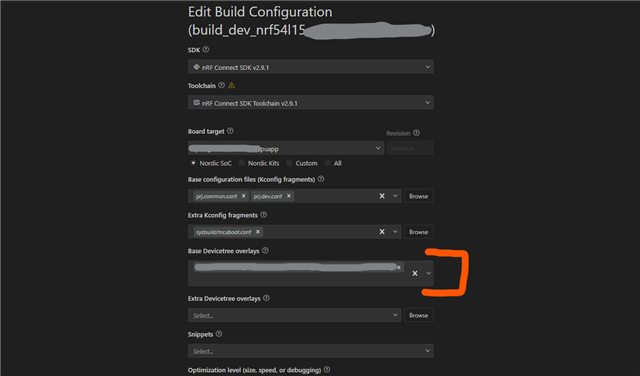
Please update or give a workaround. Am I the first one to experience this?

VSCode:

Version: 1.109.4 (user setup)
Commit: c3a26841a84f20dfe0850d0a5a9bd01da4f003ea
Date: 2026-02-16T15:35:57.932Z
Electron: 39.3.0
ElectronBuildId: 13313481
Chromium: 142.0.7444.265
Node.js: 22.21.1
V8: 14.2.231.22-electron.0
OS: Windows_NT x64 10.0.26100

Extension:

Identifier
nordic-semiconductor.nrf-connect
Version
2026.1.1327
Last Updated
2 weeks ago
Identifier
nordic-semiconductor.nrf-connect-extension-pack
Version
2025.4.4
Last Updated
2 weeks ago
Size
33.99KB
Parents
  • Hi Philipp, 

    Could you shorten the path/filenames? 

    Windows is not able to handle path lengths longer than 256 characters. The nRF Connect SDK will generate build folders with many sub-folders when building. If the path or file name is too long, this could cause your build to fail, even though there is no such GUI issue. 

    I have reported the GUI issue to the team. Hope they can fix it soon. 

    Regards,
    Amanda H.

Reply
  • Hi Philipp, 

    Could you shorten the path/filenames? 

    Windows is not able to handle path lengths longer than 256 characters. The nRF Connect SDK will generate build folders with many sub-folders when building. If the path or file name is too long, this could cause your build to fail, even though there is no such GUI issue. 

    I have reported the GUI issue to the team. Hope they can fix it soon. 

    Regards,
    Amanda H.

Children
Related