XIAO nrf52840 - can flash, but code will not run (flash location)

Hi, I am able to flash my XIAO nrf52840 using my nrf52840dk however the code does not run once flashed. I checked and the code itself is starting at 0x00027000 presumably because of the default bootloader the board came with. However, I no longer have the bootloader. I tried setting this in my prj.conf to override the default for the board, but it still puts code starting at 0x00027000:

# Build UF2 by default, supported by the Adafruit nRF52 Bootloader
CONFIG_BUILD_OUTPUT_UF2=n
CONFIG_USE_DT_CODE_PARTITION=n
And here's where I see the code still coming after the empty reserved location:
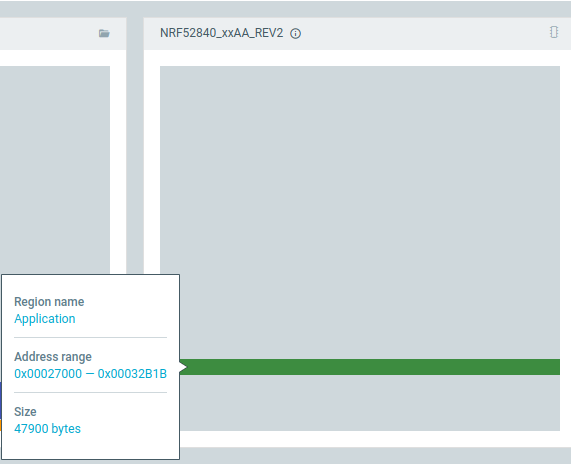
Does anyone know how I can solve this?
Parents
  • Hello,

    Have you removed the default UF2 bootloader that comes preloaded on the XIAO nRF52840? If so, could you explain how you did that?

    From your explanation, I understand that you are trying to flash an application with CONFIG_BUILD_OUTPUT_UF2=n so that it overrides the preloaded bootloader. If that is the case, I doubt that setting CONFIG_BUILD_OUTPUT_UF2=n alone is sufficient to achieve this.

    Could you try adding CONFIG_FLASH_LOAD_OFFSET=0 in your prj.conf and check whether that makes the application start at address 0x0?

    Kind regards,
    Abhijith

  • Thanks for the reply! When flashing and selecting "erase all" via the nrf connect vs code extension it wipes out the bootloader and softdevice (as expected), but I am okay with that if I can get the code to run without it. I tried adding a xiao_ble_nrf52840.overlay file in my project and pasted in the content you provided from `zephyr/dts/vendor/nordic/nrf52840_partition.dtsi`, but I received this error:

    > -- Found devicetree overlay: /home/blinky_3/xiao_ble_nrf52840.overlay
    devicetree error: Label 'boot_partition' appears on /soc/flash-controller@4001e000/flash@0/partitions/partition@0 and on /soc/flash-controller@4001e000/flash@0/partitions/partition@f4000

    Note: if I do reload the bootlader and softdevice with the arduino IDE and then flash with nRF Connect without selecting Erase All, it does work, but, if possible, I'd rather be able to erase as needed and keep things clean since I don't need the bootloader.

Reply
  • Thanks for the reply! When flashing and selecting "erase all" via the nrf connect vs code extension it wipes out the bootloader and softdevice (as expected), but I am okay with that if I can get the code to run without it. I tried adding a xiao_ble_nrf52840.overlay file in my project and pasted in the content you provided from `zephyr/dts/vendor/nordic/nrf52840_partition.dtsi`, but I received this error:

    > -- Found devicetree overlay: /home/blinky_3/xiao_ble_nrf52840.overlay
    devicetree error: Label 'boot_partition' appears on /soc/flash-controller@4001e000/flash@0/partitions/partition@0 and on /soc/flash-controller@4001e000/flash@0/partitions/partition@f4000

    Note: if I do reload the bootlader and softdevice with the arduino IDE and then flash with nRF Connect without selecting Erase All, it does work, but, if possible, I'd rather be able to erase as needed and keep things clean since I don't need the bootloader.

Children
No Data
Related