Unexpected High Current Draw on nRF54L15 DK During Sleep Mode

Hello team,

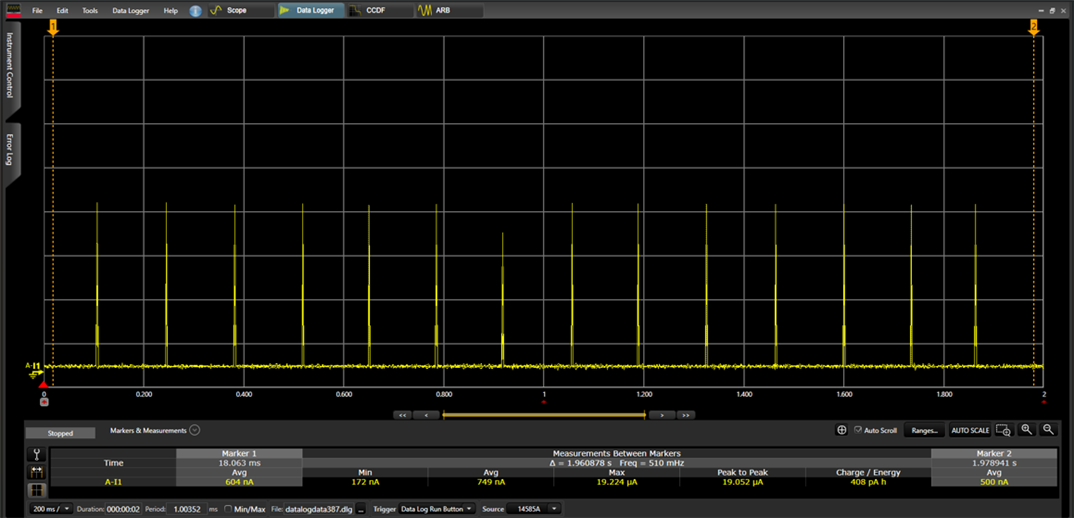
I attempted to measure the sleep current on the nRF54L15 DK board, but I’m seeing a very high current draw of about 74 mA.

I built and compiled the peripheral_power_profiling sample using SDK 3.1.0 and flashed it onto the DK. I also applied the code changes previously recommended by the Nordic team.

https://docs.nordicsemi.com/bundle/ncs-latest/page/nrf/samples/bluetooth/peripheral_power_profiling/README.html

Added the following code line at the beginning of the main function.

NRF_MEMCONF->POWER[0].RET = 0;

NRF_MEMCONF->POWER[1].RET = 0;

NRF_MEMCONF->POWER[0].RET2 = 0;

NRF_MEMCONF->POWER[1].RET2 = 0;

For the measurement, I used the test point labeled "Current Measurement" on the DK board, and I still see a high current.

Could you please let me know if I’m using the wrong sample, or if there are additional settings or configurations I might be missing?

Thanks,

PG

Parents
  • Hello,

    If you measure something as high as 74mA then it's something fundamentally wrong with the hardware, either the DK or the measurement equipment. Maybe there is a short-circuit somewhere.

    Here are some suggestions you can try:

    Check out the DK description if you haven't already:
    https://docs.nordicsemi.com/bundle/ug_nrf54l15_dk/page/UG/nRF54L15_DK/measurements/current_measurements.html 

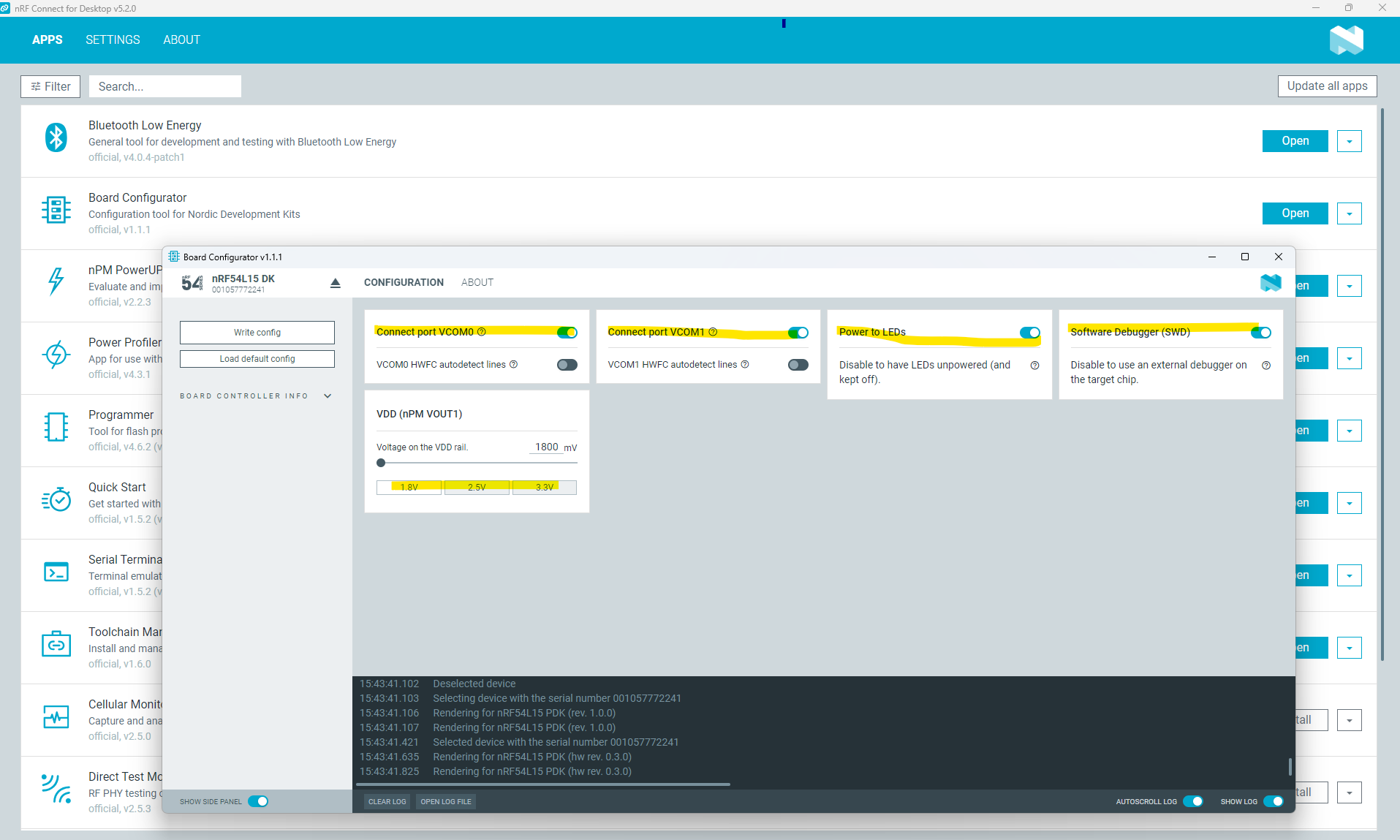
    Also use the board configurator to disable leds, uarts and set the board to the supply voltage you want to measure, e.g. here is a screenshot of the board configurator and the things you can disable:

    If you are using the PPK2 for measurement, then I suggest to set the PPK 2 in source mode.

    If you need an example you can use zephyr\samples\boards\nordic\system_off (make sure to set CONFIG_SERIAL=n to disable debugging to measure power).

    Alternatively, if you want to experiment with ram retention I am attaching a project that show how it can be done. You should measure in the very low uA with this example.

    ram_ret.zip

    Note! Make sure to build for target nRF54l15dk/nrf54l15/cpuapp

    Hope this helps,
    Kenneth

Reply
  • Hello,

    If you measure something as high as 74mA then it's something fundamentally wrong with the hardware, either the DK or the measurement equipment. Maybe there is a short-circuit somewhere.

    Here are some suggestions you can try:

    Check out the DK description if you haven't already:
    https://docs.nordicsemi.com/bundle/ug_nrf54l15_dk/page/UG/nRF54L15_DK/measurements/current_measurements.html 

    Also use the board configurator to disable leds, uarts and set the board to the supply voltage you want to measure, e.g. here is a screenshot of the board configurator and the things you can disable:

    If you are using the PPK2 for measurement, then I suggest to set the PPK 2 in source mode.

    If you need an example you can use zephyr\samples\boards\nordic\system_off (make sure to set CONFIG_SERIAL=n to disable debugging to measure power).

    Alternatively, if you want to experiment with ram retention I am attaching a project that show how it can be done. You should measure in the very low uA with this example.

    ram_ret.zip

    Note! Make sure to build for target nRF54l15dk/nrf54l15/cpuapp

    Hope this helps,
    Kenneth

Children
Related