Power Profiler Data Logger will not start—no disk space?

I must have the PPK2 data logger running for too long .because now it won't start. I see the currently available space is 0.0 MB, so maybe that's the problem.. I tried to find the data file to delete, but nothing seems to have a related name. How can I clear the disk log?

  • Hi, 

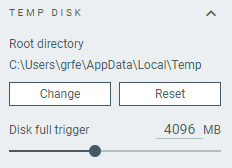
    The Power Profiler app’s Data logger mode writes sampling data to a “temp disk” location, and logging will automatically stop when the free space drops below the configured “Disk full trigger” limit. 

    To clear the disk log and free space: 

    1. Start the Power Profiler app (nRF Connect for Desktop).
    2. Before selecting your PPK2 device, look in the Device panel for the Temp disk section.
    3. In the Temp disk, note the root directory path where sampling files are stored. 
    4. In your OS file explorer, go to that directory and delete the .ppk2 (and any converted .ppk) sampling files.
    5. Optionally, in the Temp disk, adjust the “keep free” disk space setting so you don’t hit 0 MB again. 

    After deleting those files and ensuring there is free disk space, restart the Power Profiler app and try starting the Data logger again.

    Regards,
    Amanda H.

  • Tanks, Amanda! My disk was really full and I had no idea. Just emptying the recycle bin recovered 11+ GB. I di not find any *.ppk or *.ppk2 files in the Temp folder, or anything that looked related. It was only in desperation I checked the drive properties and found it full.

Related