Problem with fstorage and ble active in Release mode

I'm using nRF52832 SoC with nRF5_SDK17.1.0 and SoftDevice v7.3.0. I'm using following code to write data into flash.

 err_code = nrf_fstorage_write(&g_fs, write_addr, buffer32, 128, NULL);

  wait_while_fs_busy(&g_fs);

/* Wait helper: sleep while fstorage is busy (write/erase are async). */
static void wait_while_fs_busy(nrf_fstorage_t const * p_fs)
{
    uint32_t waited_ms = 0;

    while (nrf_fstorage_is_busy(p_fs))
    {

      if ((p_fs->p_api == &nrf_fstorage_sd) && nrf_sdh_is_enabled())
      {
           __enable_irq();
           __set_BASEPRI(0);
           (void)sd_app_evt_wait();
      }
      else
      {
            __WFE();
      }

      (void)NRF_LOG_PROCESS();
      waited_ms++;
      if (waited_ms > 5000)
      {
         NRF_LOG_ERROR("fstorage wait timeout");
         break;
      }
      NRF_LOG_PROCESS();
   }
}

It works fine when compiled in debug mode.

Whenever it's compiled in release mode and fstorage is used while ble is connected, the code enters 2 to 3 times sd_app_evt_wait(); an then hangs in this function.

Whenever it's compiled in release mode and fstorage is used after ble is disconnected, the code enters sd_app_evt_wait(); and hangs in this function immediately.

--> I guess no event is generated any more or masked.

Why this is happening?

Parents
  • Hi

    I have your project running now, but I'm struggling to see what exactly you want us to debug here. It seems like the project behaves in the same way in release and debug mode to me. I was able to connect to the board both in release and debugging (once I removed the breakpoint). Do I need to do something specific to trigger/reproduce this issue?

    Most likely, if the issue happens after a while, some buffers are being optimized away in release mode and fstorage hangs in the background without ever getting the complete event.

    Best regards,

    Simon

  • Hi Simon - thanks for your time. 

    Yes, you have to do these steps:

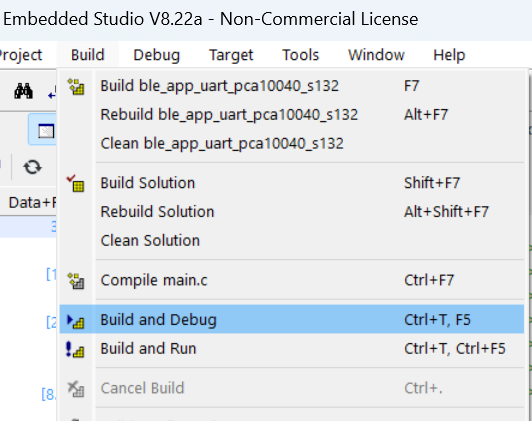
    a) download the program in debug mode (Build and Debug):

    b) starting/running the program

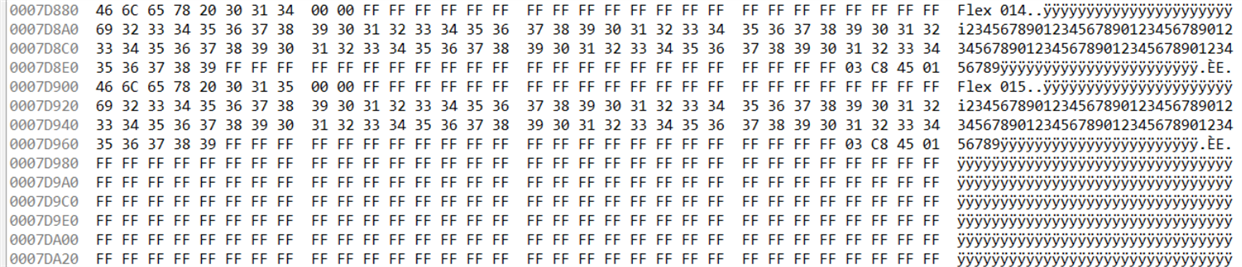
    c) pause the running program and check the flash memory starting at 0x007D000 to 0x007DFFF for last stored entry. 
    The data set (128 bytes) starts with the device name, here it is 'Flex 014' and 'Flex 015' .

    d) reset and restart the program (still in debug mode)

    e) establish a connection with the device (I use a mobile with nRF Connect) and open the service / UUID 'c8d1-e700.....'

    f) send a 'Name change' command --> this is the characteristics 'c8d1-e710....' and write a new name in ASCII (I usually increase just the number of e.g 'Flex 008'. The name has to be 6 characters in minimum)

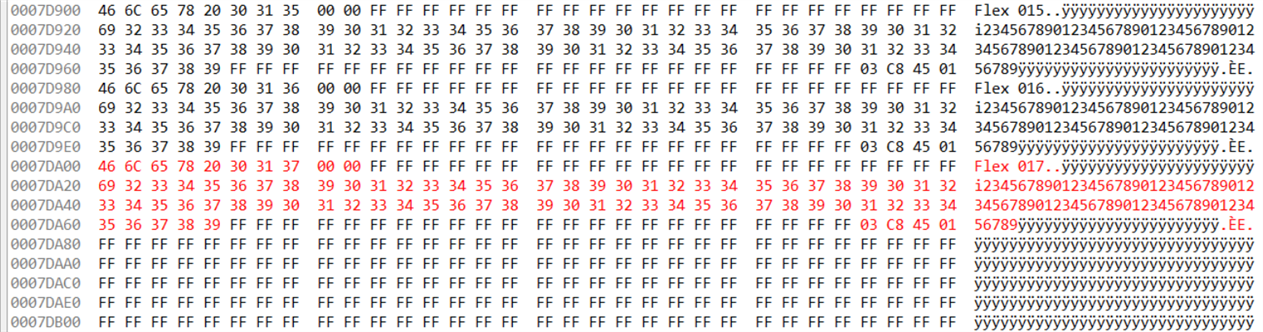
    g) pause the running program and check the flash memory again
    - -> the name should be written to the flash (here in red)

    h) Now download the code in mode 'Build and Run' and do the step e)  -> 'connect' has to be done within few seconds after download completes.

    i) now send again a 'Name change' command (see f) above) with increased number for identification of new write to flash.     On my side, the connection will get lost after this.

    j) download the program in debug mode (Build and Debug) and do b) and c) again to check if the new name has been written.    --> this never happend on our devices.

    I hope this description guides you well and you can reproduce the issue we observe.
    Feel also free to call me to assist you if you have any questions: +41 672 7530

    Best

    Stephan

Reply
  • Hi Simon - thanks for your time. 

    Yes, you have to do these steps:

    a) download the program in debug mode (Build and Debug):

    b) starting/running the program

    c) pause the running program and check the flash memory starting at 0x007D000 to 0x007DFFF for last stored entry. 
    The data set (128 bytes) starts with the device name, here it is 'Flex 014' and 'Flex 015' .

    d) reset and restart the program (still in debug mode)

    e) establish a connection with the device (I use a mobile with nRF Connect) and open the service / UUID 'c8d1-e700.....'

    f) send a 'Name change' command --> this is the characteristics 'c8d1-e710....' and write a new name in ASCII (I usually increase just the number of e.g 'Flex 008'. The name has to be 6 characters in minimum)

    g) pause the running program and check the flash memory again
    - -> the name should be written to the flash (here in red)

    h) Now download the code in mode 'Build and Run' and do the step e)  -> 'connect' has to be done within few seconds after download completes.

    i) now send again a 'Name change' command (see f) above) with increased number for identification of new write to flash.     On my side, the connection will get lost after this.

    j) download the program in debug mode (Build and Debug) and do b) and c) again to check if the new name has been written.    --> this never happend on our devices.

    I hope this description guides you well and you can reproduce the issue we observe.
    Feel also free to call me to assist you if you have any questions: +41 672 7530

    Best

    Stephan

Children
No Data
Related