VScode, nRF SDK and ghost files

I'm using nRF SDK 2.3.0 in VScode, which I recently upgraded. It compiles my firmware correctly, giving me some warnings.
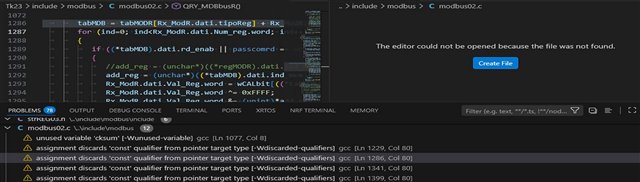
The problem is that clicking on the warnings points me to ghost files in c:\ and not to the correct file in its correct path, which it also found, having used it correctly in the compilation.
Can anyone suggest a fix for this? Note: chatgpt made me try a lot with no solution!

Parents Reply Children
  • Hi. 
    Yes. My application compiles and runs correctly. There are a few warnings, but nothing serious.


    As you can see from the figure, if I try to navigate to the file and line indicated by the warning, it doesn't find the file 'modbus02.c', which was successfully found and compiled, but instead tries to create a new file in c:\.
    It seems the warning generator doesn't recognize the file path!

  • Hi, 
    I agree. It seems to be a problem with VS code didn't get the path correctly. Since VSCode and the extension is just the IDE and not the compiler it self, we often ignore the Problem panel and focus on the Terminal when you compile. As long as you can compile, flash, and debug correctly you are fine and can ignore those issue in the Problems panel. 

Related