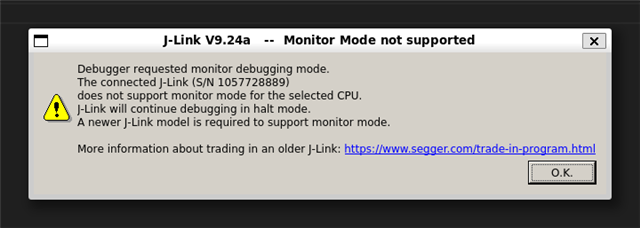
I am evaluating the monitor mode debugging support in nRF Connect SDK with nRF52840-DK and an arbitrary BLE sample (like peripheral_uart). My SDK/toolchain version is 3.1.1 and J-Link version v8.60 on WSL.
I added the Kconfig options as described in https://docs.nordicsemi.com/bundle/ncs-3.1.1/page/nrf/test_and_optimize/debugging.html#enabling_non-halting_debugging_with_cortex-m_debug_monitor to enable monitor mode, but it did not have any effect. After I start debugging with the VS Code extension, I run the example and view the BLE advertisement from the nRF Connect app. When I pause the execution, the advertisements stop and they restart after resuming. Same with the connection: it breaks when I pause the execution. This is the same behavior without monitor mode. Is this supposed to work as I expect? If not, how to verify that the monitor mode is working? There are tutorials to enable the monitor mode but no guides to verify it.