How to see console logs for channel sounding samples

Hi,

I am running(build and flashed successfully) the Channel Sounding example(connected_cs) from the Nordic sample and currently I want to see the distance estimation logs in the console similar to the output shown below (Round-Trip Timing and Phase-Based Ranging results). 
Boards used : nRF54L15
Image is collected from the internet
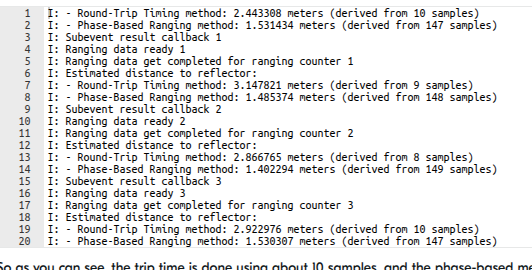

I would like to know if there is any way/tool to visualize these results . Is there any additional tool or application provided by Nordic to visualize Channel Sounding reslults?

Thank you.

Parents
  • For my own Channel Sounding evaluation I created a simple Channel Sounding AT Command Set with nRF Connect SDK for setting up ranging sessions between two devices. It supports one or two antennas (four antenna paths) and I used the dual-antenna channel sounding kit by Ezurio but it also works with the regular single-antenna BL54L15(µ) kits (pre-compiled images for these kits under releases). It outputs raw RTT and IQ data over UART. I also added a Python script which reads the raw IQ data and does the computation for distance estimation and prints all results (RTT, IFFT, slope).

    Might be a good basis for quick testing and further tweaking of the algorithms.

Reply
  • For my own Channel Sounding evaluation I created a simple Channel Sounding AT Command Set with nRF Connect SDK for setting up ranging sessions between two devices. It supports one or two antennas (four antenna paths) and I used the dual-antenna channel sounding kit by Ezurio but it also works with the regular single-antenna BL54L15(µ) kits (pre-compiled images for these kits under releases). It outputs raw RTT and IQ data over UART. I also added a Python script which reads the raw IQ data and does the computation for distance estimation and prints all results (RTT, IFFT, slope).

    Might be a good basis for quick testing and further tweaking of the algorithms.

Children
No Data
Related