OTA(BLE FOTA)

The MCU is NRF54L10, the SDK is NCS2.9.1, and the firmware is updated using MCUboot update mode.

Configuration as follows:

# sysbuild.conf

SB_CONFIG_BOOTLOADER_MCUBOOT=y

# prj.conf

CONFIG_NCS_SAMPLE_MCUMGR_BT_OTA_DFU=y

When updating firmware using the nRF Connect Device Manager mobile app, I encountered the following issues:
1. After the update, sometimes some functions of my device are abnormal, while others are normal. A reset is required for all functions to work correctly (this problem doesn't occur every time after an update, it happens occasionally). I would like to know the reason for this.
2. After my device is flashed with firmware via J-Link, the first time it connects to the phone and I try to update the firmware using nRF Connect Device Manager, the update fails to start. After a few seconds, the phone displays a "connection timed out" message, requiring me to disconnect. After reconnecting to the phone, the firmware update can begin. It seems that after flashing firmware via J-Link, a connection to the phone is required to complete pairing information exchange before subsequent connections can initiate firmware updates. However, I don't have a pairing function set up in my software. What could be the reason for this?(This problem can be reproduced 100%)

Parents
  • Hello,

    1. After the update, sometimes some functions of my device are abnormal, while others are normal. A reset is required for all functions to work correctly (this problem doesn't occur every time after an update, it happens occasionally). I would like to know the reason for this.

    Could you share some more details about this? For example, what exactly is not working after the update?

    Do you have any logs that you can share here? It would be helpful to enable the bootloader logs and check whether they provide any information about the issue you are observing.

    After my device is flashed with firmware via J-Link, the first time it connects to the phone and I try to update the firmware using nRF Connect Device Manager, the update fails to start. After a few seconds, the phone displays a "connection timed out" message, requiring me to disconnect. After reconnecting to the phone, the firmware update can begin. It seems that after flashing firmware via J-Link, a connection to the phone is required to complete pairing information exchange before subsequent connections can initiate firmware updates. However, I don't have a pairing function set up in my software. What could be the reason for this?(This problem can be reproduced 100%)

    Have you also checked the logs from the mobile application? This could potentially be related to the phone-side GATT cache. Based on the description, it does not immediately appear to be an issue related to the DFU/bootloader.

    For both issues, it would be helpful to collect logs from the device as well as from the mobile application and share them here.

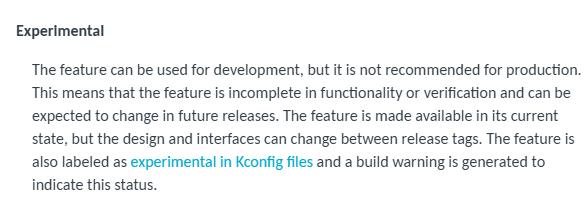
    I would like to point out that MCUboot support for the nRF54L10 in NCS v2.9.1 is in an experimental state. If possible, it is recommended to update to NCS v3.1.0 or later

    See the section software maturity categories.

    Kind Regards,

    Abhijith

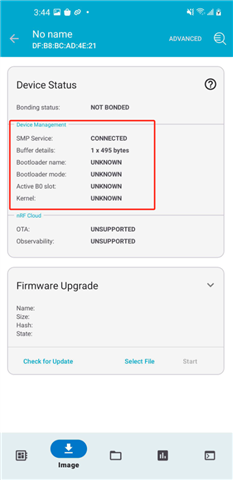
  •    I'm using the NRF Connect Device Manager app to connect to my device. I'm not sure where to find the logs, but as you can see in the screenshot, the device management information was clearly faulty the first time I connected; it couldn't recognize the bootloader name and bootloader mode.
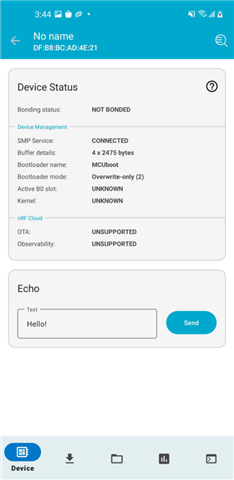
    If I disconnect the BLE connection and then reconnect, the bootloader name and bootloader mode can be recognized, as shown in the image below. What could be the reason that the bootloader name and bootloader mode were not recognized the first time?

Reply
  •    I'm using the NRF Connect Device Manager app to connect to my device. I'm not sure where to find the logs, but as you can see in the screenshot, the device management information was clearly faulty the first time I connected; it couldn't recognize the bootloader name and bootloader mode.

    If I disconnect the BLE connection and then reconnect, the bootloader name and bootloader mode can be recognized, as shown in the image below. What could be the reason that the bootloader name and bootloader mode were not recognized the first time?

Children
No Data
Related