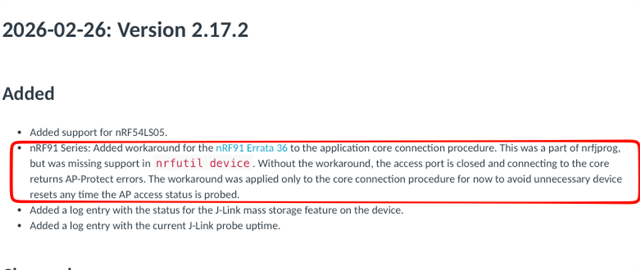
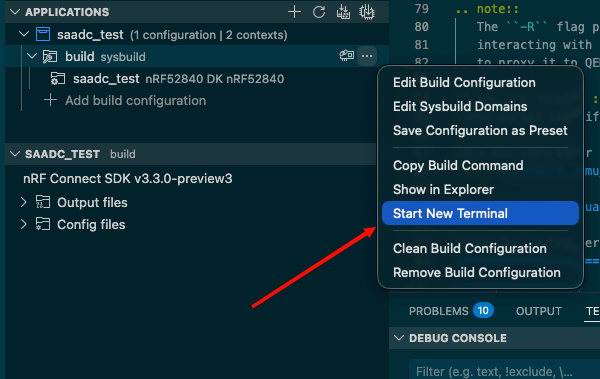
When using an onomondo softsim with all security features etc enabled, and using fota on external flash. nrf9151DK. NRF V3.2.3.
How is it possible to make changes to the firmware and reflash without obliterating the Onomondo Profile. I have 2 production commands I am using 2 commands. The first intentionally erases the entire device. However, once the softsim profile is loaded, I need to reflash only the application. The problem is that the command does not work.
- $ west flash -d ${build_folder_name} --dev-id 1051278334 --recover
- $ west --verbose flash -d . --hex-file "./1-air/zephyr/zephyr.hex" --domain "1-air"
From my reading of the west documentation, my command should work... But it does not. Why?
$ west --verbose flash -d . --hex-file "./1-air/zephyr/zephyr.hex" --domain "1-air"
-- west flash: rebuilding
cmake version 3.21.0 is OK; minimum version is 3.13.1
Running CMake: 'C:\ncs\toolchains\fd21892d0f\opt\bin\cmake.EXE' --build .
[0/31] Performing build step for 'mcuboot'
ninja: no work to do.
[1/31] Performing build step for '1-air'
[0/14] Performing build step for 'tfm'
ninja: no work to do.
[5/25] Performing build step for 's1_image'
ninja: no work to do.
[7/25] Performing build step for 'b0'
ninja: no work to do.
[16/18] cmd.exe /C "cd /D D:\XXXXXXXX\1-air\build_devkit\_sysbuild && C:\ncs\toolchains\fd21892d0f\opt\bin\cmake.exe -E true"
-- west flash: using runner nrfutil
-- runners.nrfutil: reset after flashing requested
runners.nrfutil: nrfutil --json device list
runners.nrfutil: Found boards: ['001051278334']
Using board 001051278334
-- runners.nrfutil: Flashing file: ./1-air/zephyr/zephyr.hex
runners.nrfutil: Erase modes: chip:ERASE_RANGES_TOUCHED_BY_FIRMWARE ext_mem:None
runners.nrfutil: defer: True op: {'operation': {'type': 'program', 'firmware': {'file': './1-air/zephyr/zephyr.hex'}, 'options': {'chip_erase_mode': 'ERASE_RANGES_TOUCHED_BY_FIRMWARE', 'verify': 'VERIFY_READ'}}}
runners.nrfutil: Reset kind: RESET_PIN
runners.nrfutil: defer: False op: {'operation': {'type': 'reset', 'kind': 'RESET_PIN'}}
runners.nrfutil: Executing op: {'operation': {'type': 'reset', 'kind': 'RESET_PIN'}}
runners.nrfutil: nrfutil --json device program --firmware ./1-air/zephyr/zephyr.hex --options chip_erase_mode=ERASE_RANGES_TOUCHED_BY_FIRMWARE,verify=VERIFY_READ --x-family nrf91 --x-append-batch 'D:\XXXXXXXX\1-air\build_devkit\1-air\zephyr\generated_nrfutil_batch.json'
runners.nrfutil: nrfutil --json device reset --reset-kind RESET_PIN --x-family nrf91 --x-append-batch 'D:\XXXXXXXX\1-air\build_devkit\1-air\zephyr\generated_nrfutil_batch.json'
runners.nrfutil: Executing batch in: D:\XXXXXXXX\1-air\build_devkit\1-air\zephyr\generated_nrfutil_batch.json
runners.nrfutil: nrfutil --json device x-execute-batch --batch-path 'D:\XXXXXXXX\1-air\build_devkit\1-air\zephyr\generated_nrfutil_batch.json' --serial-number 1051278334
-- runners.nrfutil: Connecting to probe
Error: One or more batch tasks failed:
* 1051278334: Failed to attach to target: The Application core access port is protected (All) (NotAvailableBecauseProtection)
The operation was unavailable for some of the devices because they had readback protection enabled. These devices might be possible to unlock using the `recover` subcommand. See `nrfutil device recover --help` for more information.
ERROR: runners.nrfutil: Flashing failed because the target must be recovered.
To fix, run "west flash --recover" instead.
Note: this will recover and erase all flash memory prior to reflashing.
FATAL ERROR: command exited with status 24: nrfutil --json device x-execute-batch --batch-path 'D:\XXXXXXXX\1-air\build_devkit\1-air\zephyr\generated_nrfutil_batch.json' --serial-number 1051278334
I also tried setting : CONFIG_NRF_APPROTECT_USE_UICR=n ... However, although this appeared to flash successfully, the logs show that the app is no longer getting to the application code. It sticks here forever...
*** Booting nRF Connect SDK v3.2.3-6f8485d2890d ***
*** Using Zephyr OS v4.2.99-c4c75f71e709 ***
Attempting to boot slot 0.
Attempting to boot from address 0x8200.
I: Trying to get Firmware version
I: Verifying signature against key 0.
I: Hash: 0x80...b2
I: Firmware signature verified.
Firmware version 1