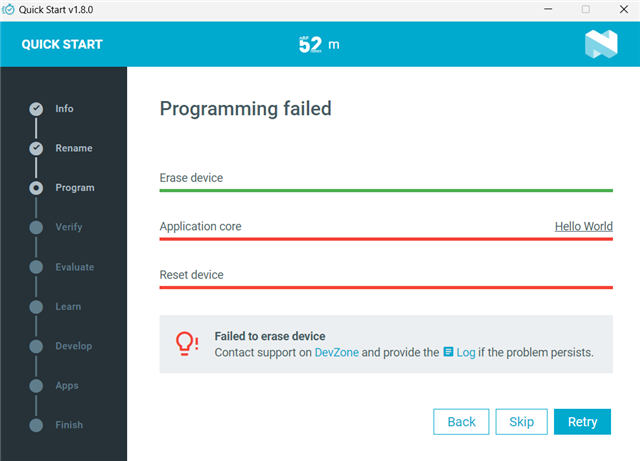
I was trying to flash a program on nRF52833 development kit and got this error, it important to notice that my college was trying to flash (via VS code) it before and I am not sure what he did, how could I fix it?
From the log file I am getting that output:
2026-03-25T09:26:42.570Z DEBUG Changed step: Verify2026-03-25T09:26:45.637Z INFO Opened port with options: {"path":"COM4","baudRate":115200}2026-03-25T09:26:46.512Z ERROR Failed with exit code 1.One or more reset tasks failed: * 1050699653: Failed to attach to target: The Application core access port is protected (All) (NotAvailableBecauseProtection)
The operation was unavailable for some of the devices because they had readback protection enabled. These devices might be possible to unlock using the `recover` subcommand. See `nrfutil device recover --help` for more information.Message: Failed to reset 1050699653, Failed to attach to target: The Application core access port is protected (All).2026-03-25T09:26:46.525Z INFO Closed port: COM42026-03-25T09:27:01.930Z DEBUG Changed step: Program
Also I tried to erase it in "Programmer" app and it gives me following message:
10:50:28.699Reading readback protection status for Application core10:50:28.699Reading readback protection status for Application core 0%10:50:28.769Reading readback protection status for Application core 50%10:50:28.769Reading readback protection status for Application core 50%10:50:28.910Failed "reading readback protection status for application core". Error: code: 1, description: Generic, message: Batch task protection-get failed, Device error: Setting the debug port SELECT register failed while powering up sys and debug regions (Unknown error in the J-Link DLL (error code =-1)). This might indicate that the debug port is unavailable. Double-check device power supply and SWD lines, and ensure that SWD is not disabled