I am not sure if this is an issue with the nRF Connect extension or the my Thingy91 but when I use the "Flash" button in the actions tab of the NRF Connect extension to program the Thingy91 the action fails and I get the following output :
* Executing task: nRF Connect: Flash: hello-world/build
Flashing build to THINGY91_C346A3082A96
west flash -d c:\ncs\v3.1.1\bootloader\mcuboot\samples\zephyr\hello-world\build --dev-id THINGY91_C346A3082A96
-- west flash: rebuilding
[0/10] Performing build step for 'hello-world'
[0/16] Performing build step for 'tfm'
ninja: no work to do.
[2/8] Building C object CMakeFiles/app.dir/src/main.c.obj
[3/8] Linking C static library app\libapp.a
[4/8] Linking C executable zephyr\zephyr_pre0.elf
[5/8] Generating linker.cmd
[6/8] Generating isr_tables.c, isr_tables_vt.ld, isr_tables_swi.ld
[7/8] Building C object zephyr/CMakeFiles/zephyr_final.dir/isr_tables.c.obj
[8/8] Linking C executable zephyr\zephyr.elf
Memory region Used Size Region Size %age Used
FLASH: 38620 B 372 KB 10.14%
RAM: 6744 B 211608 B 3.19%
IDT_LIST: 0 GB 32 KB 0.00%
Generating files from C:/ncs/v3.1.1/bootloader/mcuboot/samples/zephyr/hello-world/build/hello-world/zephyr/zephyr.elf for board: thingy91
image.py: sign the payload
image.py: sign the payload
[1/10] Performing build step for 'mcuboot'
ninja: no work to do.
[4/10] cmd.exe /C "cd /D C:\ncs\v3.1.1\bootloader\mcuboot\samples\zephyr\hello-world\build\_sysbuild && C:\ncs\toolchains\0b393f9e1b\opt\bin\cmake.exe -E true"
[6/10] No install step for 'mcuboot'
[7/10] Generating ../dfu_application.zip
[8/10] Completed 'mcuboot'
[9/10] cmd.exe /C "cd /D C:\ncs\v3.1.1\bootloader\mcuboot\samples\zephyr\hello-world\build\_sysbuild && C:\ncs\toolchains\0b393f9e1b\opt\bin\cmake.exe -E true"
[10/10] Generating ../merged.hex
-- west flash: using runner nrfutil
-- runners.nrfutil: reset after flashing requested
-- runners.nrfutil: Flashing file: C:\ncs\v3.1.1\bootloader\mcuboot\samples\zephyr\hello-world\build\merged.hex
Error: One or more batch tasks failed:
* THINGY91_C346A3082A96: The operation you tried to run is not available for the selected device.
The operation is either not supported for this type of device or the device has issues and it cannot be recognized (NotFound)
FATAL ERROR: command exited with status 3: nrfutil --json device x-execute-batch --batch-path 'C:\ncs\v3.1.1\bootloader\mcuboot\samples\zephyr\hello-world\build\generated_nrfutil_batch.json' --serial-number THINGY91_C346A3082A96
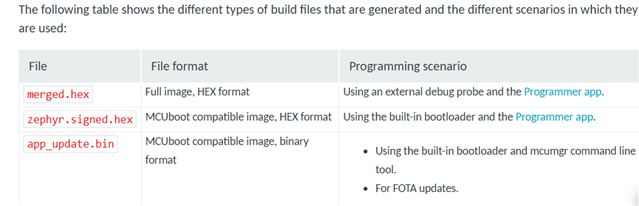
I have also attempted to program the board using the nrfutil tool straight from the terminal which does work however I notice that when i try to program it with a merged.hex file it fails but when i use a zephyr.signed.hex it succeeded. You can view the results below:
Using merged.hex
PS C:\ncs\v3.1.1\bootloader\mcuboot\samples\zephyr\hello-world> nrfutil device program --firmware C:\ncs\v3.1.1\bootloader\mcuboot\samples\zephyr\hello-world\build\merged.hex --serial-number THINGY91_C346A3082A96
[00:00:00] ------ 0% [THINGY91_C346A3082A96] Failed, Wrong magic number at start of image
Error: One or more program tasks failed:
* THINGY91_C346A3082A96: Wrong magic number at start of image (Generic)
Using zephyr.signed.hex
PS C:\ncs\v3.1.1\bootloader\mcuboot\samples\zephyr\hello-world> nrfutil device program --firmware C:\ncs\v3.1.1\bootloader\mcuboot\samples\zephyr\hello-world\build\hello-world\zephyr\zephyr.signed.hex --serial-number THINGY91_C346A3082A96
[00:00:18] ###### 100% [2/2 THINGY91_C346A3082A96] Programmed
So using this information i attempted to modify the file C:\ncs\v3.1.1\bootloader\mcuboot\samples\zephyr\hello-world\build\generated_nrfutil_batch.json however due to the fact that it is a generated file the changes were overwritten.
I have tried bootloader mode as well that does not help with the NRF Connect extension but did help with programing using nrfutil tool.
Any help in getting the button in the NRF connect extension to work correctly is appreciated. Many thanks.