nrf54L15 PCB Design Review for IoT Device

I have been working on a soil moisture sensor for my indoor plants and I wanted to build some skills in PCB design using a Nordic SoC. I have chosen the nrf54L15 for this purpose because it has BLE and is readily available at a good price. I would like the device to run on a coin cell battery and broadcast data using BLE. I have attempted to use a meandered inverted-f antenna (TI AN043: https://www.ti.com/lit/an/swra117d/swra117d.pdf) and have tried to follow the reference circuitry matching network as closely as possible. I calculated the RF trace to be 0.547 mm with a 0.13 mm gap between the ground plane and the trace. I plan to use a 0.8 mm, 2-layer board.

What I am looking for is a review of my PCB design including the RF matching network, power distribution, and general layout of components. I am only looking for ~5 m bluetooth range so I'm hoping to get away without tuning.

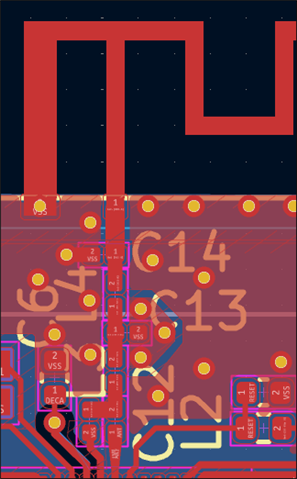
I have designed everything in KiCad, and have the KiCad docs on GitHub (https://github.com/bvizanko/nrf54-soil-moisture-sensor). I have attached a pdf of my schematic and a screen capture of the top layer.

Please let me know if you need clarification. Thanks!

Parents
  • Hi,

    • The nRF54L15-QFAA will not pass regulatory certification on a 2 layer board, it is sensitive to the distance to the GND layer under the ANT pin. If this distance is more than 100um the board will radiate harmonics above the FCC limits.
      If you are planning on getting this board certified, you'll need to switch to a 4 layer board.
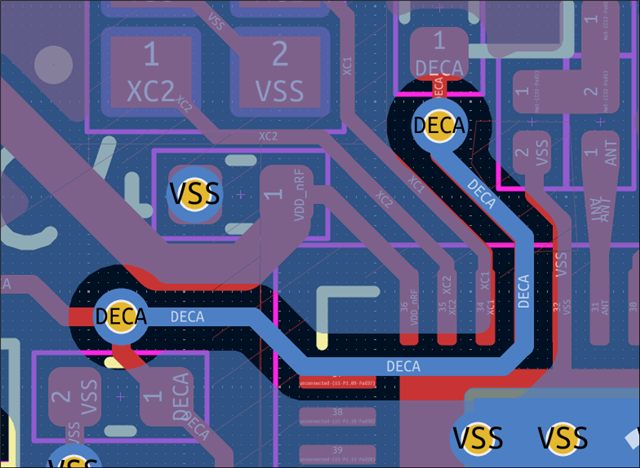
    • Another complication with just 2 layers is the routing of the DECA/DECRF connection, if it's routed directly under the XC1 and XC2 lines it can introduce noise to the clock signal which can impact the radio performance. On a 4 layer a internal GND layer would shield the traces, but on a 2 layer board the DECA/DECRF trace must be routed differently. The best option is probably to route it like this:
    • The antenna tuning capacitor C15 seems to be missing from the layout:
    • The filter components(C11 and R1) on the reset line must be moved as close as possible to the pin. These are required for filtering RF signal coupled from the ANT pin to the reset pin. If the filter is too far from the pin the reset trace will act as a antenna increasing the radiated RF noise.
       

    Other than these points the schematic and layout looks OK.


    Best regards,

    Bendik

  • Hi Bendik,

    Thanks for your help with the PCB design. I ended up ordering some 2-layer test boards and a couple of component sets to test out the board. I am running into a problem with programming the device.

    I have an nrf54l15 DK (PCA10156 1.0.0) for programming that connects to a breakout board that connects to the external board with pogo-pins. I think I have connected the pins correctly (SWDO_VTG to VDD, GND to GND, SWDO_SWDIO to SWDIO, and SWDO_SWDCLK to SWDCLK). When I power the external board then power on the development board, I get the following error within nrf Connect SDK Programmer:

    12:06:15.916
    Failed "reading readback protection status for application core". Error: code: 1, description: Generic, message: Batch task protection-get failed, Device error: Unable to recognize the device: Unknown device family
    12:06:15.928
    Error: Failed with exit code 1. One or more batch tasks failed: * 1057795652: Device error: Unable to recognize the device: Unknown device family (Generic) Message: Batch task protection-get failed, Device error: Unable to recognize the device: Unknown device family.

    When I perform the same powering on operation and do 

    nrfutil device list
    I get the following output:

    1057795652
    Product         J-Link
    Board version   PCA10156
    Ports           COM15, vcom: 0
                    COM14, vcom: 1
    Traits          boardController, devkit, jlink, seggerUsb, serialPorts, usb
    
    Supported devices found: 1

    This is the development board, but it doesn't seem to find the external board. I'm wondering how I can connect to my custom board or if there might be a hardware issue.

    Thanks in advance.

    Brent

  • Hi there,

    How long are the cables anything longer the 3-5 inches won't work you will get that same error,
    in NRF_SDK , under boards where you see the DK, reset the board (right click on it)
    then power on your Prototype. (power your protoboard last always) you will only see the core change on the DK that is there, I have a video doing this on the Seeed Studio Forum and Pictures here on the cables, shorter the better. If it still fails try the same procedure but power the DK board last. try and read the core again.

    HTH

    GL :-) PJ :v:

    https://forum.seeedstudio.com/t/xiao-nrf54l15-an-error-occurred-memory-transfer-fault-0x00ffc31c-0x00ffc31f/293792/53?u=pj_glasso

    vimeo.com/1125305838

  • Thanks for the response. I have tried all of your suggestions with no luck. I got cables that are 4" long, which did not change the outcome. I also tried powering the external board after the nrf54l15 DK and that didn't work either.

    I think it has to be hardware, but I'm not exactly sure where to start to diagnose the issue.

Reply Children
No Data
Related