VS Code cannot recognize the SDK and toolchain

HI
I'm having an issue where VS Code cannot recognize the SDK and toolchain. Everything was working fine before, but now errors occur when I open VS Code and try to build the project directly, as shown in the picture. How can I fix this?
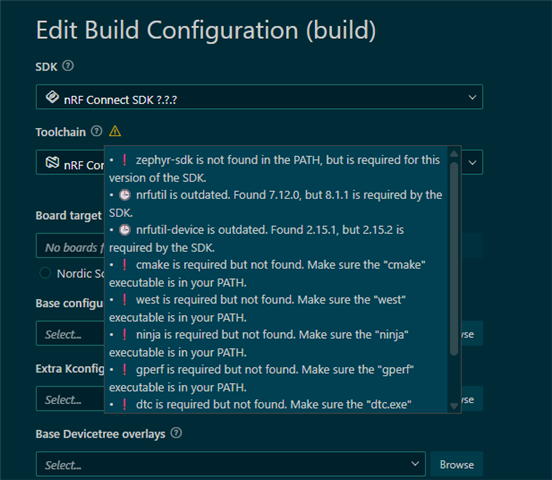
I have already tried the following:
  1. Reinstalled the SDK and toolchain.
  2. Uninstalled the Nordic extensions from the hidden folder in the root directory of the C drive.
  3. nrfutil cannot recognize the SDK version.
  4. Set the ZEPHYR_BASE environment variable.
But the problem still persists.
Thanks!
Parents
  • Try downgrading the nrf connect extension to 2026.1.1327 version.

    Note that ZEPYHR_BASE sounds like a terrible idea when using vs code plugin - it should be handled internally AFAIK and point to the selected NCS SDK for a project when compiling/running tools.

  • I have manually added the following paths to the system environment variables:
    • D:\ncs\toolchain\toolchains\66cdf9b75e\opt\bin
    • D:\ncs\toolchain\toolchains\66cdf9b75e\opt\zephyr-sdk\arm-zephyr-eabi\bin
    • ZEPHYR_BASE = D:\ncs\toolchain\v3.2.1\zephyr
    Now the build can pass successfully.
    But how can I verify that the compiled output is correct and valid?
    And how can I make this configuration automatic instead of manual?
    I have already downgraded the extension to 2026.1.1327 , but it still doesn’t work.
    After manually adding the environment variables, the compilation passed, but I got these warnings. I didn’t pay attention to them before. Are these warnings related to the environment variables I set?
    Warning: UPDATEABLE_IMAGE_NUMBER (defined at D:/ncs/toolchain/v3.2.1/nrf/modules/../samples/common/mcumgr_bt_ota_dfu/Kconfig:87, subsys/dfu/Kconfig:96) was assigned the value '1' but got the value ''. Check these unsatisfied dependencies: (((BOARD_THINGY53_NRF5340_CPUAPP || BOARD_THINGY53_NRF5340_CPUAPP_NS) && SOC_SERIES_NRF53X && NCS_SAMPLE_MCUMGR_BT_OTA_DFU) || (!MCUBOOT && IMG_MANAGER)) (=n). See http://docs.zephyrproject.org/latest/kconfig.html#CONFIG_UPDATEABLE_IMAGE_NUMBER and/or look up UPDATEABLE_IMAGE_NUMBER in the menuconfig/guiconfig interface. The Application Development Primer, Setting Configuration Values, and Kconfig - Tips and Best Practices sections of the manual might be helpful too.
    Warning: MCUBOOT_UPDATE_FOOTER_SIZE (defined at subsys/dfu/Kconfig:55) was assigned the value '0x50' but got the value ''. Check these unsatisfied dependencies: MCUBOOT_IMG_MANAGER (=n), IMG_MANAGER (=n). See http://docs.zephyrproject.org/latest/kconfig.html#CONFIG_MCUBOOT_UPDATE_FOOTER_SIZE and/or look up MCUBOOT_UPDATE_FOOTER_SIZE in the menuconfig/guiconfig interface. The Application Development Primer, Setting Configuration Values, and Kconfig - Tips and Best Practices sections of the manual might be helpful too.
Reply
  • I have manually added the following paths to the system environment variables:
    • D:\ncs\toolchain\toolchains\66cdf9b75e\opt\bin
    • D:\ncs\toolchain\toolchains\66cdf9b75e\opt\zephyr-sdk\arm-zephyr-eabi\bin
    • ZEPHYR_BASE = D:\ncs\toolchain\v3.2.1\zephyr
    Now the build can pass successfully.
    But how can I verify that the compiled output is correct and valid?
    And how can I make this configuration automatic instead of manual?
    I have already downgraded the extension to 2026.1.1327 , but it still doesn’t work.
    After manually adding the environment variables, the compilation passed, but I got these warnings. I didn’t pay attention to them before. Are these warnings related to the environment variables I set?
    Warning: UPDATEABLE_IMAGE_NUMBER (defined at D:/ncs/toolchain/v3.2.1/nrf/modules/../samples/common/mcumgr_bt_ota_dfu/Kconfig:87, subsys/dfu/Kconfig:96) was assigned the value '1' but got the value ''. Check these unsatisfied dependencies: (((BOARD_THINGY53_NRF5340_CPUAPP || BOARD_THINGY53_NRF5340_CPUAPP_NS) && SOC_SERIES_NRF53X && NCS_SAMPLE_MCUMGR_BT_OTA_DFU) || (!MCUBOOT && IMG_MANAGER)) (=n). See http://docs.zephyrproject.org/latest/kconfig.html#CONFIG_UPDATEABLE_IMAGE_NUMBER and/or look up UPDATEABLE_IMAGE_NUMBER in the menuconfig/guiconfig interface. The Application Development Primer, Setting Configuration Values, and Kconfig - Tips and Best Practices sections of the manual might be helpful too.
    Warning: MCUBOOT_UPDATE_FOOTER_SIZE (defined at subsys/dfu/Kconfig:55) was assigned the value '0x50' but got the value ''. Check these unsatisfied dependencies: MCUBOOT_IMG_MANAGER (=n), IMG_MANAGER (=n). See http://docs.zephyrproject.org/latest/kconfig.html#CONFIG_MCUBOOT_UPDATE_FOOTER_SIZE and/or look up MCUBOOT_UPDATE_FOOTER_SIZE in the menuconfig/guiconfig interface. The Application Development Primer, Setting Configuration Values, and Kconfig - Tips and Best Practices sections of the manual might be helpful too.
Children
No Data
Related