VS Code intellisense not finding kconfig options

Something seems to have broken in my VSC and/or Nordic extensions. Intellisense seems to be working for code, but cannot resolve any of my custom kconfig options.

I use some boolean kconfig CONFIG_WHATEVER along with some #if defined(CONFIG_WHATEVER) to enable/disable code blocks. But everything is greyed out now and intellisense for the code within that block is also disabled. I can right-click the CONFIG_WHATEVER and "view definition" (=1 if enabled), and all code compiles exactly as it should.

Other "standard" options like CONFIG_SERIAL behave fine in the same project.

Can you give any hints where to look or how to fix please?

(AI suggested solution of adding "C_Cpp.default.configurationProvider": "nordic-semiconductor.nrf-connect" to settings.json didn't work)

NCS 3.02

VS Code version:

Version: 1.114.0 (user setup)
Commit: e7fb5e96c0730b9deb70b33781f98e2f35975036
Date: 2026-04-01T09:27:11Z
Electron: 39.8.3
ElectronBuildId: 13658728
Chromium: 142.0.7444.265
Node.js: 22.22.1
V8: 14.2.231.22-electron.0
OS: Windows_NT x64 10.0.26200

Parents
  • Same problem here when using sysbuild.

    Fix is relatively simple: Select the application build folder (example: MyProject/build/MyProject) in "Applications" tab. This allows the extension to read correct .config variables.

    The bad thing here is that it breaks Segger Ozone debug support, which wants the "build" folder to be active in order to work correctly. Could be a problem with my very custom cmake scripts, though.

    Note that I am still on the oldstable nrf connect extension version (2026.1.1327) so YMMV.

  • Okaaay thanks.. Yes I think I get something similar. My builds are sysbuild: if I click MYBUILD in the applications window then it doesn't work but if I click like so:

    MYBUILD sysbuild <- click here not OK
    |
    |- myapp <- click here OK
    |-mcuboot

    then it works. That doesn't really explain why the copy of the project works though...?

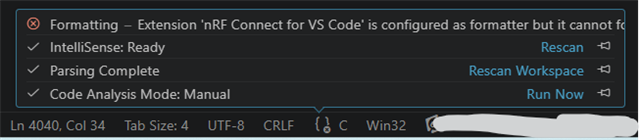
    I noticed also that I get this error in the status bar:

    I may well have messed up my extensions anyway. I was experimenting disabling extensions because starting up was SLOW (>30 sec waiting). So maybe I have something wrong here?

Reply
  • Okaaay thanks.. Yes I think I get something similar. My builds are sysbuild: if I click MYBUILD in the applications window then it doesn't work but if I click like so:

    MYBUILD sysbuild <- click here not OK
    |
    |- myapp <- click here OK
    |-mcuboot

    then it works. That doesn't really explain why the copy of the project works though...?

    I noticed also that I get this error in the status bar:

    I may well have messed up my extensions anyway. I was experimenting disabling extensions because starting up was SLOW (>30 sec waiting). So maybe I have something wrong here?

Children
No Data
Related