nRF9151 firmware lost or corruption in low probability.

Hi Nordic support:

     Our product used nRF9151 modem. During production, we encountered an issue with approximately 0.1% probability on the nRF9151: It's firmware lost or corruption after firmware downloaded and before nRF9151 testing. After re-download nRF9151 firmware, nRF9151 functions normally. 

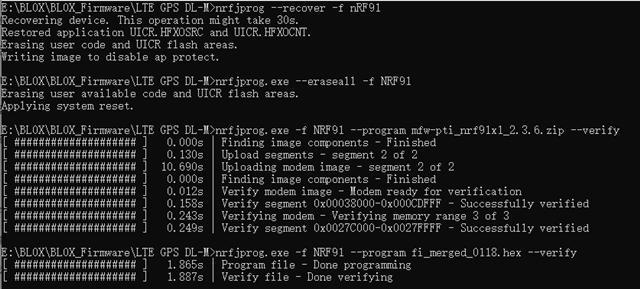
     We used following 4 nrfjprog commands to download firmware, verified each command executed successfully, then powered off nRF9151. Could you help us to check if there is any problem with our firmware download procedure?
     
nrfjprog.exe --recover -f nRF91
nrfjprog.exe --eraseall -f NRF91
nrfjprog.exe -f NRF91 --program mfw_nrf91x1_2.0.3.zip --verify
nrfjprog.exe -f NRF91 --program app.hex --verify
    In addition, could you share us some advice on how to avoid nRF9151 firmware lost or corruption?
    Thanks!
BRs
Qin, Rong-Lin
  • This picture shows our nRF9151 download procedure. 

  • Hi,

    During production, we encountered an issue with approximately 0.1% probability on the nRF9151: It's firmware lost or corruption after firmware downloaded and before nRF9151 testing

    How do you detect that the firmware was not flashed correctly? Is it a notification from the "--verify" when programming the chip, or do you detect it afterward ?

    Could you help us to check if there is any problem with our firmware download procedure?
         
    nrfjprog.exe --recover -f nRF91
    nrfjprog.exe --eraseall -f NRF91
    nrfjprog.exe -f NRF91 --program mfw_nrf91x1_2.0.3.zip --verify
    nrfjprog.exe -f NRF91 --program app.hex --verify

    It looks right to me.

    Also, I want to make sure, you saw that nrfjprog has been archived and has been replaced by nRF Util. It doesn't mean that nrfjprog doesn't work anymore, it just means that it is not maintained anymore. So it would be a good idea to migrate to nRF Util if you can.

    The corresponding commands in nRF Util would be something like this:

    nrfutil device recover --family nrf91
    nrfutil device erase --all --family nrf91
    
    nrfutil device program --family nrf91 --firmware app.hex
    nrfutil device fw-verify --family nrf91 --firmware app.hex
    
    nrfutil device program --family nrf91 --firmware mfw_nrf91x1_2.0.x.zip
    nrfutil device fw-verify --family nrf91 --firmware mfw_nrf91x1_2.0.x.zip
    
    nrfutil device reset --family nrf91
    

    Best regards,

    Simon D-M

Related