Erase protect and App protect in nRF5340

I have implemented the erase protect and app protect in our application. There are commands for locking and unlocking the device.
Actually, during testing I was able to lock the device and unlock the device through JLink commands. And at one point, JLink 'Connect' command was erasing the application even after enabling the erase protect.
So I raised a ticket here at that time and you have suggested some Jlink commands:

# Enable APPPROTECT and ERASEPROTECT of network core
nrfjprog.exe -f NRF53 --coprocessor CP_NETWORK --memwr 0x01FF8004 --val 0x00000000 --verify
nrfjprog.exe -f NRF53 --coprocessor CP_NETWORK --memwr 0x01FF8000 --val 0x00000000 --verify

# Enable APPPROTECT, SECUREAPPROTECT and ERASEPROTECT of application core
nrfjprog.exe -f NRF53 --coprocessor CP_APPLICATION --memwr 0x00FF8020 --val 0x00000000 --verify
nrfjprog.exe -f NRF53 --coprocessor CP_APPLICATION --memwr 0x00FF801C --val 0x00000000 --verify
nrfjprog.exe -f NRF53 --coprocessor CP_APPLICATION --memwr 0x00FF8000 --val 0x00000000 --verify

nrfjprog.exe -p
#Noted: Noted: Before using this command, please ensure that your application has a method to #disable ERASEPROTECT both the network core and application core.

Unfortunately, my device got locked and application is not running as well (looks like erased).
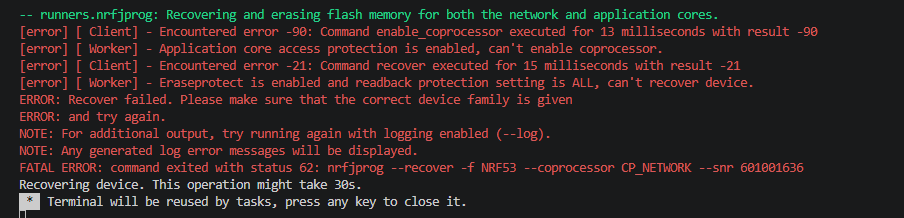


Is there any way to recover ?

Parents
  • Hello,

    Do you have any firmware on one or both of the cores on your nRF5340 which sets the ERASEPROTECT.DISABLE register to a non-zero 32-bit key value? If you don't have that and ERASEPROTECT and APPROTECT is enabled for both cores, we no NOT have a recovery method from this point. 

    If you do have a key written to CTRL-APs ERASEPROTECT.DISABLE register in your firmware, you can disable erase protection by writing the same key to the debugger side ERASEPROTECT.DISABLE register. The base addresses can be found here for the application (ns + s) and network cores. Also available in the linked documentation are instructions on how to disable AP protection and erase protection. 

    Going forward, I advise you to read back the ERASEPROTECT.STATUS before enabling APPROTECT for your device(s). You should not enable APPROTECT and ERASEPROTECT at the same time unless you have firmware which sets the *.DISABLE register(s) to a 32-bit key and you can use that same key by following the instructions for diabling erase and access port protection. 

    Best regards,

    Maria

Reply
  • Hello,

    Do you have any firmware on one or both of the cores on your nRF5340 which sets the ERASEPROTECT.DISABLE register to a non-zero 32-bit key value? If you don't have that and ERASEPROTECT and APPROTECT is enabled for both cores, we no NOT have a recovery method from this point. 

    If you do have a key written to CTRL-APs ERASEPROTECT.DISABLE register in your firmware, you can disable erase protection by writing the same key to the debugger side ERASEPROTECT.DISABLE register. The base addresses can be found here for the application (ns + s) and network cores. Also available in the linked documentation are instructions on how to disable AP protection and erase protection. 

    Going forward, I advise you to read back the ERASEPROTECT.STATUS before enabling APPROTECT for your device(s). You should not enable APPROTECT and ERASEPROTECT at the same time unless you have firmware which sets the *.DISABLE register(s) to a 32-bit key and you can use that same key by following the instructions for diabling erase and access port protection. 

    Best regards,

    Maria

Children
No Data
Related