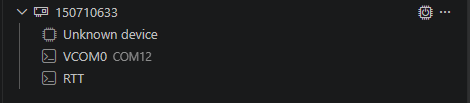
When using jlink to connect to my board in VSCode, it displays "unknown device"

When using jlink to connect to my board in VSCode, it displays "unknown device"
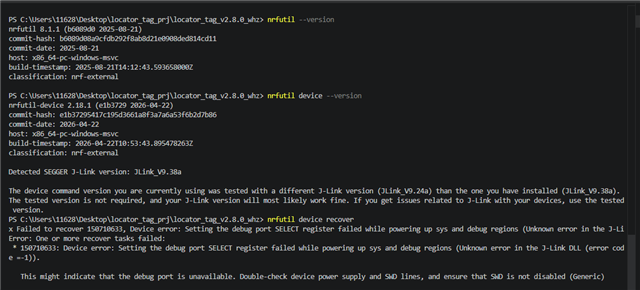
nrfutil device recover
I tried a few of my boards, but the result was always the same: "unknown device",I have verified these boards before and found no issues

I have also used another jlink tool, but the result is still the same

Using the DK development board can achieve successful connection.

I have also tried boards with nrf54l15 and nrf5340 chips, but neither of them could connect

Parents
  • Hi Ethan, 

    I tried a few of my boards, but the result was always the same: "unknown device",I have verified these boards before and found no issues

    What are your boards, the custom boards or DKs? If it's the custom board, do you connect a debugger with them?

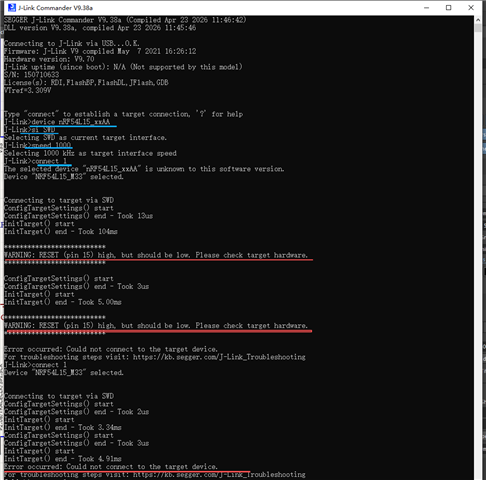
    The log usually means that either something is wrong with the power supply or the connection. You can use J-Link Commander to ensure VTref is present (~3.0–3.3V), and also check the protection status to ensure that the SWD connection isn't disabled.

    Regards,
    Amanda H.

  • What are your boards, the custom boards or DKs? If it's the custom board, do you connect a debugger with them?

    Those are my custom boards ,Connect to VSCode via the jlink debugger。A few months ago, I was able to connect to VSCode using this jlink debugger without any issues, using the same custom board and the same jlink debugger。

    You can use J-Link Commander to ensure VTref is present (~3.0–3.3V),

    VTref is 3,3V.

    The error prompt indicates that the reset pin needs to be connected and pulled low。

    The chip on my custom board does not have the reset pin exposed。

    In my previous experience, I have never connected the reset pin when using the jlink debugger, but it still successfully connected and worked

    and also check the protection status to ensure that the SWD connection isn't disabled.

    How to check if this SWD connection is disabled?

Reply
  • What are your boards, the custom boards or DKs? If it's the custom board, do you connect a debugger with them?

    Those are my custom boards ,Connect to VSCode via the jlink debugger。A few months ago, I was able to connect to VSCode using this jlink debugger without any issues, using the same custom board and the same jlink debugger。

    You can use J-Link Commander to ensure VTref is present (~3.0–3.3V),

    VTref is 3,3V.

    The error prompt indicates that the reset pin needs to be connected and pulled low。

    The chip on my custom board does not have the reset pin exposed。

    In my previous experience, I have never connected the reset pin when using the jlink debugger, but it still successfully connected and worked

    and also check the protection status to ensure that the SWD connection isn't disabled.

    How to check if this SWD connection is disabled?

Children
Related