Not able to flash Thingy91x: nrf5340

Hello Team,

I am not able to flash any firmware to nRF5340 which is available in Thing 91x.

I had tried peripheral_lbs example which was working fine. When I tried to reflash it with standard connectivity bridge application, 

it got stuck and I had tried multiple restarts and even tried multiple flashing. SWD Switch is changed to nRF53 still I am not able to flash any firmware to it.

Even I am not able to re flash peripheral_lbs example. Need your support. I am doubting I may have bricked it.

Thanks and regards,

Vinay

Parents
  • Hi Jonathan,

    I tried the steps mentioned in the recovery of Thingy 91x guide.

    But the problem is, it is not even detecting SWD port.

    Error

    "C:\ncs>nrfutil device device-info
    Error: One or more device info tasks failed:
    * 506000160: Device error: Failed to configure Coresight: LOW_VOLTAGE (Generic)"

    Please let me know what is this issue pointing at.

    Thanks and regards,

    Vinay

  • Hi Vinay,  

    Make sure you have updated the J-Link and nrfconnect tools just to be sure its not a software issue as well. 

    Try to wiggle the power switch a bit and push it all the way to the "on" position. In case there is a issue with the power switch. 

    Have you tested "nrfutil device reset" to see for both the nRF9151 and the nRF5340 to see if it register in the terminal. The nRF Programmer app might not always connect successfully. 

    For the nRF5340 have you run both of the following commands? 
    nrfutil device recover --x-family nrf53 --core Network --traits jlink
    nrfutil device recover --x-family nrf53 --core Application --traits jlink


    It seems that the issue could be HW related, like that the device is not power properly or that the debug connection over SWD is not ok, is the cable you use good, does it work on other devices without issues? 


    Regards,
    Jonathan

  • Hi Jonathan,

    I yes my jlink is of latest version. I have tried wiggling switch also now. 

    Yes I have tried "nrfutil device reset" it also failed for me. 

    And even I tried "nrfutil device recover --x-family nrf53 --core Network --traits jlink
    nrfutil device recover --x-family nrf53 --core Application --traits jlink" commands.

    I am getting this error

    "

    C:\ncs>nrfutil device recover --x-family nrf53 --core Application --traits jlink
    x Failed to recover 506000160, Device error: Setting the debug port SELECT register failed while powering up sys and debError: One or more recover tasks failed:
    * 506000160: Device error: Setting the debug port SELECT register failed while powering up sys and debug regions (Unknown error in the J-Link DLL (error code =-1)).

    This might indicate that the debug port is unavailable. Double-check device power supply and SWD lines, and ensure that SWD is not disabled (Generic)

    "

    I am powering it using type c usb cable. I believe other Thingy 91x device is getting powered on correctly. I dont think its cable issue because we have used same USB cable for both boards to power on.

    Please let me know what am I missing here.

    Thanks and regards,

    Vinay

  • Hi Vinay, 

    Do you have the 10 pin debug pin cable connected? or only the USB?

    If the firmware on the nRF5340 is bugged in some way, it is only recoverable with external debugger. 

    What debugger are you using? 


    You can use something like this, should work. 


    I suspect that there is something that is not registering that the device is power from the dbug side of things. 

    Regards,
    Jonathan

  • Hi Jonathan,

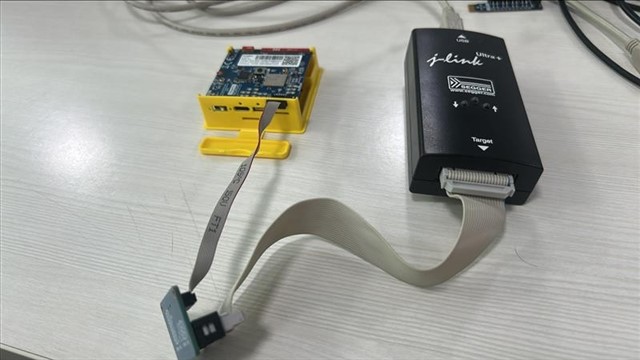
    Yes I am using Jlink Ultra Plus debugger for flashing firmware using SWD.

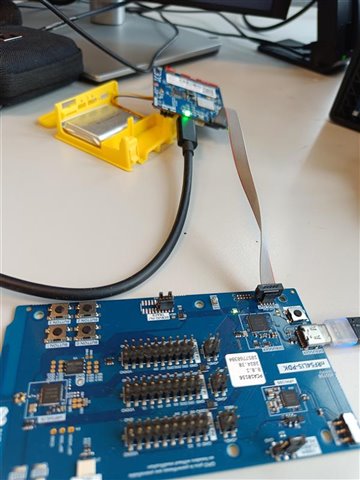
    I have connected the board as shown in above picture.

    I am not able to flash the firmware need your help to understand the issue.

    Thanks and regards,

    Vinay

  • Hi Vinay, 

    Are there any missing pins on the adapter for the 10 pin cable you use there? Does the debugger + adapter and cable work fine with other devices, DK's or Thingy's 

    I dont have a Jlink Ultra Plus at hand so I can not test a 1 to 1 setup here. 

    It is possible that the device got damaged in some way, if the programming fail or was interrupted during the process but its unlikely, but not impossible. 

    I presume that this is the same setup that used when flashing it previously and it did not cause this issue?

    Regards,
    Jonathan

Reply
  • Hi Vinay, 

    Are there any missing pins on the adapter for the 10 pin cable you use there? Does the debugger + adapter and cable work fine with other devices, DK's or Thingy's 

    I dont have a Jlink Ultra Plus at hand so I can not test a 1 to 1 setup here. 

    It is possible that the device got damaged in some way, if the programming fail or was interrupted during the process but its unlikely, but not impossible. 

    I presume that this is the same setup that used when flashing it previously and it did not cause this issue?

    Regards,
    Jonathan

Children
  • Hi Jonathan,

    As I have previously said, I have 2 Thingy 91x boards and I am able to flash one more 
    thingy 91x using Jlink Ultra plus using SWD connections and it doesnt give any issues.

    But this one board is not providing or able to flash any image or firmware using SWD interface or others.

    And when I connect Jlink ultra plus debugger it only shows 1 led and if I power on Thingy 91x, 2 led will be glowing in Jlink ultra plus. So I believe SWD power is available.

    Kindly please let me know any other issue is causing this problem.

    Thanks and regards,

    Vinay

  • Hi Vinay,

    VinayKotadamakki said:
    have 2 Thingy 91x boards and I am able to flash one more 
    thingy 91x using Jlink Ultra plus using SWD

    Thanks for the extra explanation, i did not catch that you had tested on multiple different Thingy devices. 

    What voltage do you measure on TP 2 and 3 ? 

    https://docs.nordicsemi.com/bundle/ug_thingy91x/page/UG/thingy91x/hw_description/test_points.html 

    It could be that the device is damaged in some way, but difficult to say exactly what.

    Regards,
    Jonathan

  • Hi Jonathan,

    I have measured voltage. 

    TP2 - 1.742v

    TP3 - 4.130v

    Is this measurements right?

    Thanks and regards,

    Vinay

  • Values looks ok. So it seems that the nRF91 and nRF53 is powered correctly at least.

    I am curious if the SWD switch is the issue, do you have the option to probe or connect to some other points on the board? 

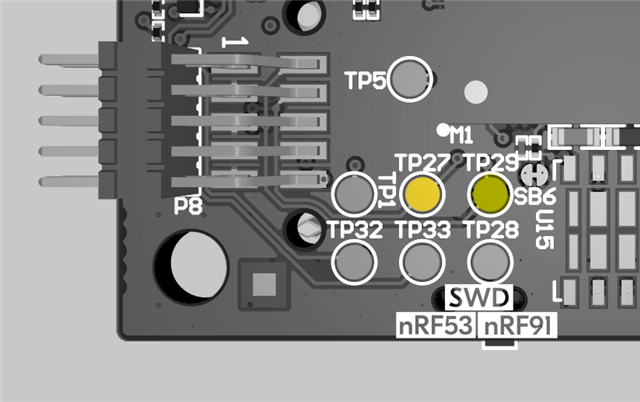
    You can probe the SWD lines on TP29 and TP 27 to see if there is any activity there. 


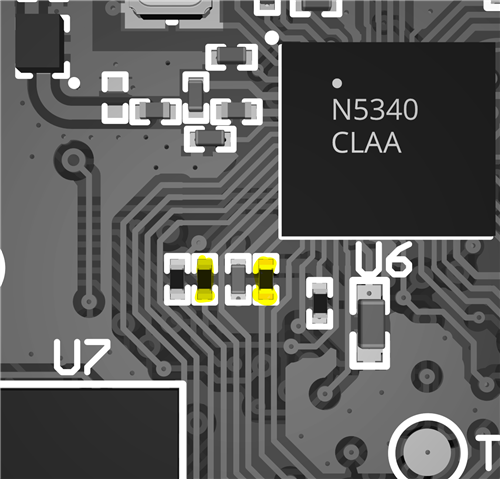
    If there not much going on there then R4 and R6 can be probed, these are closer to the nRF5340 after the switch. 


    Its not a design that is easy to probe as most of the traces and components are small and not named on the silkscreen so I understand if that is not a viable solution. So if you are not able to get it working the normal way and the device is unresponsive over SWD then there could be a issue with one of the switches or power\logic that drives these functions. If you are able to contact your supplier where you got the device from they might be able to issue a replacement for you. 

    Regards,
    Jonathan

Related