nRF Connect for Desktop forces me to install J-Link but I have it already

I'm using nRF Connect for Desktop on Linux and updated today to v5.3.0.

I have J-Link V9.24a installed and it is available in $PATH. Also it works well with Programmer v4.7.4, current nrfutil and all other software from Nordic.

However I am not using Debian-like distro and I get annoying message "Install SEGGER J-Link" at every startup:

nRF Connect for Desktop requires SEGGER J-Link. The recommended version v9.24a is available for installation. Click "Install" to start.
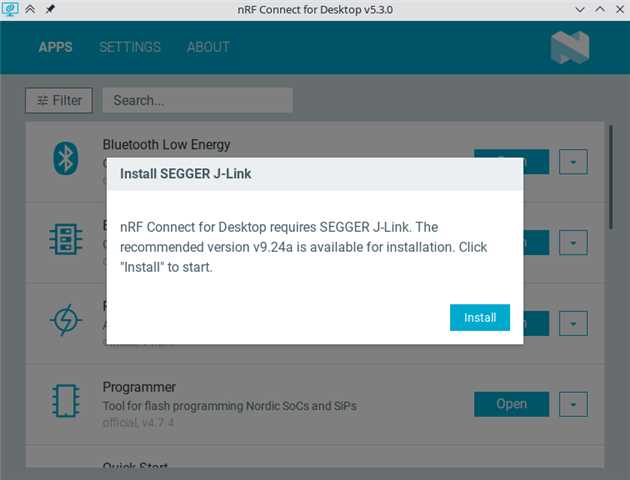
As you can see on the screenshot I can't do anything but click on "Install". This opens super user authentication window which I click "Cancel" on, then the process fails with error message in another window and only then I can use the app normally. This is a bit cumbersome way to open the application.

Ideally this process should look for J-Link in PATH and don't suggest installation if it finds correct J-Link version. Also the initial window could have close button for quick cancellation.

I think the former worked in previous version because I used to see warnings about outdated J-Link after nRF Connect for Desktop updates.

Parents
  • Hi Mateusz,

    Could you try placing the J-Link binaries in /opt/SEGGER/JLink as suggested in the following ticket:  JLinkARM DLL can't be found by the command "nrfutil device list" on Linux 

    Regards,

    Swathy 

  • I should have been more clear, apologies. I already have it there with the magic of symlinks, see my folder structure:

    $ ls -l /opt
    lrwxrwxrwx - root 28 Feb 2024 SEGGER -> /home/xxx/.local/opt/SEGGER/

    $ ls -l /opt/SEGGER/
    lrwxrwxrwx   - xxx 30 Apr 11:23 JLink -> JLink_Linux_V924a_x86_64/
    drwxr-xr-x   - xxx 30 Apr 11:44 JLink_Linux_V924a_x86_64/
    .rw-r--r-- 66M xxx  1 Apr 14:03 JLink_Linux_V924a_x86_64.tgz
    .rw-r--r-- 143 xxx 30 Apr 11:52 README

    $ ls -l /opt/SEGGER/JLink
    .rw-r--r--  21k xxx  5 Mar 11:51 99-jlink.rules
    .rwxr-xr-x 175k xxx  5 Mar 12:04 DDConditionerExe*
    .rwxr-xr-x 233k xxx  5 Mar 12:04 DevProExe*
    drwxr-xr-x    - xxx 30 Apr 11:22 Doc/
    drwxr-xr-x    - xxx 30 Apr 11:22 ETC/
    drwxr-xr-x    - xxx 30 Apr 11:22 Firmwares/
    drwxr-xr-x    - xxx 30 Apr 11:22 GDBServer/
    .rwxr-xr-x 1.7M xxx  5 Mar 12:05 JFlashExe*
    .rwxr-xr-x 568k xxx  5 Mar 12:06 JFlashLiteExe*
    lrwxrwxrwx    - xxx  5 Mar 12:10 JFlashSPI_CL -> JFlashSPICLExe*
    ... etc

    As I wrote, nrfultil just works. All JLink tools are in /opt/SEGGER/JLink. nRF Connect for Desktop must be checking something else.

Reply
  • I should have been more clear, apologies. I already have it there with the magic of symlinks, see my folder structure:

    $ ls -l /opt
    lrwxrwxrwx - root 28 Feb 2024 SEGGER -> /home/xxx/.local/opt/SEGGER/

    $ ls -l /opt/SEGGER/
    lrwxrwxrwx   - xxx 30 Apr 11:23 JLink -> JLink_Linux_V924a_x86_64/
    drwxr-xr-x   - xxx 30 Apr 11:44 JLink_Linux_V924a_x86_64/
    .rw-r--r-- 66M xxx  1 Apr 14:03 JLink_Linux_V924a_x86_64.tgz
    .rw-r--r-- 143 xxx 30 Apr 11:52 README

    $ ls -l /opt/SEGGER/JLink
    .rw-r--r--  21k xxx  5 Mar 11:51 99-jlink.rules
    .rwxr-xr-x 175k xxx  5 Mar 12:04 DDConditionerExe*
    .rwxr-xr-x 233k xxx  5 Mar 12:04 DevProExe*
    drwxr-xr-x    - xxx 30 Apr 11:22 Doc/
    drwxr-xr-x    - xxx 30 Apr 11:22 ETC/
    drwxr-xr-x    - xxx 30 Apr 11:22 Firmwares/
    drwxr-xr-x    - xxx 30 Apr 11:22 GDBServer/
    .rwxr-xr-x 1.7M xxx  5 Mar 12:05 JFlashExe*
    .rwxr-xr-x 568k xxx  5 Mar 12:06 JFlashLiteExe*
    lrwxrwxrwx    - xxx  5 Mar 12:10 JFlashSPI_CL -> JFlashSPICLExe*
    ... etc

    As I wrote, nrfultil just works. All JLink tools are in /opt/SEGGER/JLink. nRF Connect for Desktop must be checking something else.

Children
No Data
Related