Using a Power Profiler Kit II with nrf Connect for Desktop v5.3.1 and there in App Power Profiler v4.3.1, OS: Ubuntu Linux

We obtained a Power Profiler Kit II.

I updated  nrf Connect to latest version, then installed App power profiler.

The following state is reached:

When i launch the App Programmer v4.7.4, I see the Power Profiler Kit II as selectable device.

When I launch App Power Profiler v4.3.1, there is no listed device in menu "Select device" which is analogue to programmer's menu, where it is listed.

So basically the device is "fully there" in the system, but App Power Profiler v4.3.1 does not list it.

Asking AI, the following suggestion was made: Search the  App Power Profiler v4.3.1's install path for a firmware with name like pca63100_ppk2*.hex

I found pca63100_ppk2_1.2.4_db16a94.hex. Telling the AI, the AI suggested: use programmer to flash that firmware to listed PPK2.

As I cannot backup the PPK2's firmware (read-protection), i was VERY reluctant to do so, because applying the wrong firmware surely will brick the device.

So, I want to inquire here, at nordic forum, whether AI's suggestion is a good tip or a bad AI recommendation.

Also, I'd like to know in the latter case, what I need to do to get PPK2 listed in App Power Profiler v4.3.1 and any refined instructions/test steps are also welcome.

Be aware, that I also started nrfConnect (with no observable device-detection-change in any way) as:

~/Downloads/nrfconnect361x8664.AppImage --no-sandbox

Thank you and best regards,

Richard H.

  • Hi Richard,

    Please try the following command:

    nrfutil self-upgrade

    It should upgrade nRF Util to the latest version. 

    You should use the version downloaded from the nRF Util product page, as you first did. You can find the installation guide in our documentation:  Installing nRF Util.

    Best regards,
    Marte

  • Dear Marte,

    I now succeeded in getting things to run. The command seemed to fail:

    nrfutil self-upgrade

    But I succeeded using the following commands:

     1970  HOST="https://files.nordicsemi.com"
     1971  PATH_CORE="/artifactory/swtools/external/nrfutil/packages/nrfutil/nrfutil-x86_64-unknown-linux-gnu-8.1.1.tar.gz"
     1972  PATH_DEV="/artifactory/swtools/external/nrfutil/packages/nrfutil-device/nrfutil-device-x86_64-unknown-linux-gnu-2.14.0.tar.gz"
     1973  # 3. Den echten nrfutil 8.x Core-Tarball herunterladen
     1974  wget "${HOST}${PATH_CORE}" -O nrfutil.tar.gz
     1975  tar -xvf nrfutil.tar.gz
     1976  cd nrfutil-x86_64-unknown-linux-gnu-8.1.1/
     1977  ls
     1978  cd data/
     1979  ls
     1980  cd bin/
     1981  ls
     1982  ./nrfutil --version
     1983  cd ..
     1984  wget "${HOST}${PATH_DEV}" -O device.tar.gz
     1985  ./nrfutil-x86_64-unknown-linux-gnu-8.1.1/data/bin/nrfutil device --from-offline ~/Downloads/device.tar.gz
     1986  ./nrfutil-x86_64-unknown-linux-gnu-8.1.1/data/bin/nrfutil install device --from-offline ~/Downloads/device.tar.gz
     1987  ls ./device.tar.gz 
     1988  ./nrfutil-x86_64-unknown-linux-gnu-8.1.1/data/bin/nrfutil self-upgrade --from-tarball ~/Downloads/device.tar.gz
     1989  cd /usr/local/bin/
     1990  ls
     1991  rm ./nrfutil
     1992  sudo rm ./nrfutil
     1993  ln -s /home/richard/Downloads/nrfutil-x86_64-unknown-linux-gnu-8.1.1/data/bin/nrfutil ./nrfutil
     1994  sudo ln -s /home/richard/Downloads/nrfutil-x86_64-unknown-linux-gnu-8.1.1/data/bin/nrfutil ./nrfutil
     1995  nrfutil --version
     1996  nrfutil device --version

    After that, I had to do a system-upgrade, as nrfutil device --version reported it was linked to a newer version of glibc than was provided on my system. But after that, I now can launch the Application and also select the ppk2.

    But now, that leads to some other questions:
    I connected a nRF52840 DK and the PPK2 according to (4 Quickstart/p.7):
    https://docs-be.nordicsemi.com/bundle/ug_ppk2/attach/PPK2_User_Guide_v1.0.1.pdf?_LANG=enus

    After selecting Ampere meter and start, I saw contimuous current consumption of approx. 570nA.

    Then, I started a Program on the DK - but alas, the measurement continues to be those 570nA.

    This already leads to questions:
    1) The switch on nrf DK is set to VDD (avail USB/VDD/LiPo). Do I need to change that?

    2) There are some hints on: https://docs.nordicsemi.com/r/bundle/ug_nrf52840_dk/page/ug/dk/hw_measure_current.html

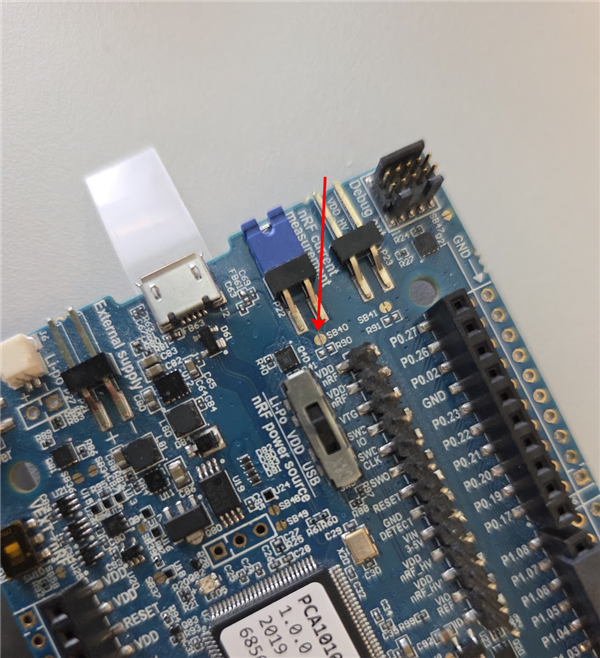
    a) There are PINs listed (e.g. SB40/SB41) but not described - what do I need to do in case of wanting to measure current?

    b) It is written: Note: The current measurements are unreliable if a serial terminal is connected to the virtual serial port.
    Now I need the virtual UART provided via USB - does that note refer to that UART or to a physical UART only?

    3) Basically running tests ON the DK is only a prelude to the final test scenario: We have our own hardware-setup for a BM833 that is battery powered and provides firmware-upload and debug-features (JLINK) by connecting it to a DK (SDW-Sel/SWD-IO/SWD-CLK + GND). When I then start debugging in segger embedded studio, I get Debug-Bridged to "our" device. Now, I want to measure "our" device's power consumption. How would I have to proceed to achieve that with PPK2 (or is it only possible to measure the DK and not our DK-connected device)?

    4) I previously observed, that running any software via debugger on our device gravely changes the power-consumption. What is to be expected concerning that when using PPK2?

    Thank you and best regards,

    Richard

  • Hi Richard,

    RichardHdrd said:
    1) The switch on nrf DK is set to VDD (avail USB/VDD/LiPo). Do I need to change that?

    No, the switch should be set to VDD

    RichardHdrd said:
    a) There are PINs listed (e.g. SB40/SB41) but not described - what do I need to do in case of wanting to measure current?

    You need to cut SB40, as you can see in  nRF52840 Current measurement - Set up the DK. In other words, take a scalpel or something else sharp and cut the small connection between the two semicircles. It's a bit difficult to see, but here you can see my nRF52833 DK, where I have cut SB40:

    RichardHdrd said:
    b) It is written: Note: The current measurements are unreliable if a serial terminal is connected to the virtual serial port.
    Now I need the virtual UART provided via USB - does that note refer to that UART or to a physical UART only?

    It means if you have the UART open in a serial terminal, so if you have it open for logging or similarly.

    RichardHdrd said:
    3) Basically running tests ON the DK is only a prelude to the final test scenario: We have our own hardware-setup for a BM833 that is battery powered and provides firmware-upload and debug-features (JLINK) by connecting it to a DK (SDW-Sel/SWD-IO/SWD-CLK + GND). When I then start debugging in segger embedded studio, I get Debug-Bridged to "our" device. Now, I want to measure "our" device's power consumption. How would I have to proceed to achieve that with PPK2 (or is it only possible to measure the DK and not our DK-connected device)?

    You can measure other devices as well. For source meter mode, connect your custom hardware's power input to the PPK2's VOUT/GND pins, set the desired voltage in the Power Profiler app, and enable power output. Please note that in this case, the PPK2 should be the sole power source of the DUT, so do not connect an additional power supply to it. For ampere mode, connect an external power supply to the PPK2's IN pin, and connect the PPK's OUT pin to your custom hardware's power input.

    RichardHdrd said:
    4) I previously observed, that running any software via debugger on our device gravely changes the power-consumption. What is to be expected concerning that when using PPK2?

    Can you clarify what you mean by running software via debugger?

    Best regards,
    Marte

Related