Clarification on migrating from Partition Manager to Devicetree

Hi,

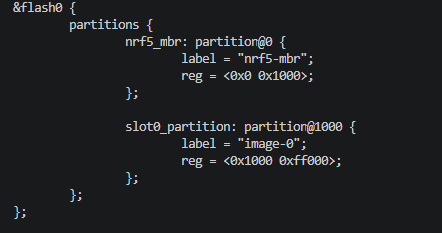
I have a couple of questions on migrating from Partition Manager to Devicetree since a particular example was not provided.  Following the procedure in the SDK v3.3.0 release notes, an nrf52840dongle_nrf52840.overlay was created by pm_to_dts.py as shown here:
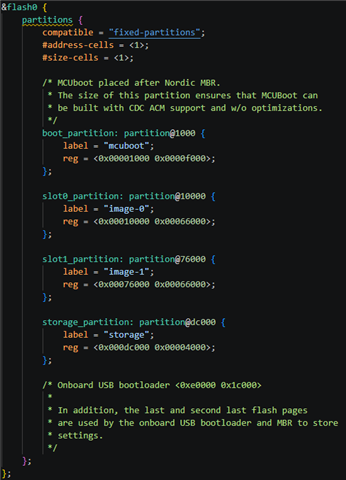
It is considerably different from the ..\v3.3.0\zephyr\boards\nordic\nrf52840dongle\nrf52840dongle_nrf52840.dts shown here:
Questions:

What would you recommend I do for the migration?

Will the default nrf52840dongle_nrf52840.dts in future versions of the SDK be modified for this partitioning?

How and where should I set CONFIG_PARTITION_MANAGER_ENABLED=n ?  I thought .config.sysbuild is generated by the SDK and should not be directly modified.

Thank you,

Ken

  • Hi Ken,

    Will the default nrf52840dongle_nrf52840.dts in future versions of the SDK be modified for this partitioning?

    I'll check this internally and get back to you.

    How and where should I set CONFIG_PARTITION_MANAGER_ENABLED=n ?  I thought .config.sysbuild is generated by the SDK and should not be directly modified.

    You can set it in the sysbuild.conf for you application, or pass it as an extra CMake option like described in step 7 here: https://docs.nordicsemi.com/bundle/ncs-latest/page/nrf/releases_and_maturity/migration/migration_partitions.html#migrate_your_project_to_dts-partitioning

    west build -p \
      -b <board_target> \
      <app_or_test_path> \
      -- \
      -DSB_CONFIG_PARTITION_MANAGER=n


    Best regards,

    Maria

  • Hi Maria,

    Thanks for the response.  However, regarding my first question on the content of the overlay created by the python script and the default nRF52840 Dongle partitioning.  What should I end up with as a merged version of these partitions?

    After more research on the topic, I think that any Zephyr device tree partitioning for a nRF52840 Dongle would have to do the following:

    • Reserve flash address 0x00000000 to 0x00000FFF for the MBR (as shown in the python script output)
    • Reserve flash address 0x000E0000 to 0x000FDFFF for the built in USB bootloader.  (This assumes that one would want to retain the factory programming of the device)  This address range is different in size from what the ..\v3.3.0\zephyr\boards\nordic\nrf52840dongle\nrf52840dongle_nrf52840.dts comments indicate.  That would be address 0x000E0000 to 0x000FBFFF.  Which is correct?  Also, what is the "built in USB bootloader"?  I don't think it is a part of MCUboot.  I can't find any specific documentation at Nordic describing it.  Is there something you can point to?
    • What is going on in the topmost flash addresses:  0x000FE000 or FC000 through 0x000FFFFF?

    I hope you can answer these questions.

    Thanks,

    Ken

  • And also, don't forget the question regarding default partitioning in the nrf52840dongle_nrf52840.dts.  Are these going to change, and if so, to what.  The  nrf52840 Dongle and DK would be good examples.

  • Hi Kenneth

    If your project is running on the nRF52840 Dongle, I'd recommend you use the default board/.dts file from the SDK version you're using after a merge. The python script doesn't seem to have made separate partitions for the MBR, Bootloader, and slot partitions.

    The built in USB bootloader is indeed not part of MCUBoot, please see the Dongle documentation for more information on that.

    We will also be getting back to you on the questions Maria is looking into.

    For your last question, there are no planse to change the Dongle DTS files further AFAIK. Do you see any reason they should be changed?

    Best regards,

    Simon

  • Just to give you an update. There is no reason to think any big changes will come to the current version of the nrf52840dongle board file. The latest updated version of the file can be found here: https://github.com/nrfconnect/sdk-zephyr/blob/main/boards/nordic/nrf52840dongle/nrf52840dongle_nrf52840.dts 

    We can't guarantee there won't be changes in the future, but per now, there are no plans of that at least, and this is the file you should refer to when migrating to a new SDK version.

    Best regards,

    Simon

Related