Message Routing Service disabled and no messages being received after connectivity restored

Hi,

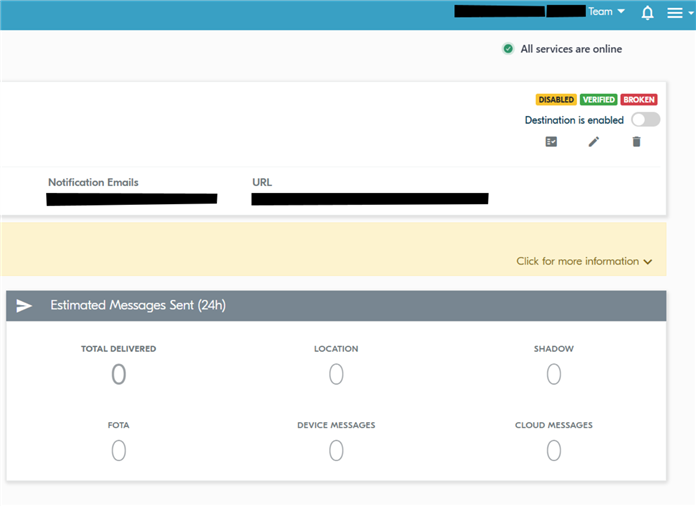
We had connectivity issues on our end for the Message Routing Service webhook since May 13, 2026. It has been restored and tested with the nRF Cloud verification test, but we still are not receiving data. I noticed at the top of Message Routing Service dashboard it says "disabled". How can this be enabled and is this the reason why we are not receiving data?

Parents
  • Hi Michael,

    Message Routing Service will try to connect to your webhook for a week. After a week, webhook will be automatically disabled.

    You can re-enable it by clicking on the Message Routing Service view and click on the disabled webhook.

    Then you should have in right upper corner clickable toggle "Destination is enabled" and greyd out toggle. Click on the toggle to re-enable the destination.

    Best regards,

    Markku Lehto

  • Hi Markku,

    Thanks, I was able to get an administrator and enable. It's now working and pushing real-time telemetry data.

    However, we are missing all telemetry data from the period of the outage, May 13 2:00 pm EDT to June 2 12:46 EDT. Is this expected behavior? We expecting to see all the data from queued up and as soon as the message routing service was enable, the data would be pushed.

    Please let know.

    Thanks!

    Michael

  • Hi Michael,

    Great to hear it is working now.

    Our destination will keep messages queued as long as the destination is active. If the delivery fails for a week straight we will disable the destination and flush the messages. During the week we are trying multiple times to deliver messages and also send multiple emails regarding delivery failures. One last email will be sent when we actually disable the destination.

    Did you manage to get any of these emails?

    These messages are not available any more from the Message Routing Service, but can be found from our Message Store since we keep them for 30 days. In order for you to get them, you have to use our Messaging API: api-docs.nrfcloud.com/

    Let me know if you need further assistance.

    Best regards,

    Markku Lehto

Reply
  • Hi Michael,

    Great to hear it is working now.

    Our destination will keep messages queued as long as the destination is active. If the delivery fails for a week straight we will disable the destination and flush the messages. During the week we are trying multiple times to deliver messages and also send multiple emails regarding delivery failures. One last email will be sent when we actually disable the destination.

    Did you manage to get any of these emails?

    These messages are not available any more from the Message Routing Service, but can be found from our Message Store since we keep them for 30 days. In order for you to get them, you have to use our Messaging API: api-docs.nrfcloud.com/

    Let me know if you need further assistance.

    Best regards,

    Markku Lehto

Children
No Data
Related