Hello
I need some advice on FOTA via BLE on the nRF54LM20B. I use SDK v 3.3.0, building /ns variant.
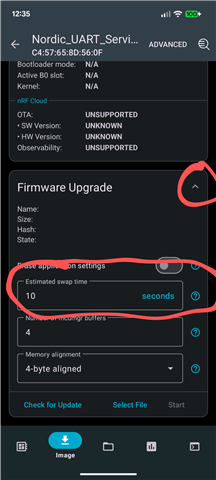
I managed to get FOTA working to upload an updated image via BLE, but after a reboot, the new image doesn't load and remains in a "pending" state.
Could you please advise me on what needs to be configured on the nRF54LM20B to enable the image update?
I previously tried FOTA via BLE on the nRF5340 according Norxic Academy course, where it worked without any issues.
In RTT, I see the following:
- 00> *** Booting MCUboot v2.3.0-dev-fce4dac2e629 ***
00> *** Using nRF Connect SDK v3.3.0-ba167d9f3db4 ***
00> *** Using Zephyr OS v4.3.99-fd9204a02d52 ***
00> [00:00:00.001,667] <inf> mcuboot: Starting bootloader
00> [00:00:00.002,113] <wrn> mcuboot: Cannot upgrade: not a compatible amount of sectors
00> [00:00:00.002,372] <dbg> mcuboot: boot_slots_compatible: slot0 sectors: 238, slot1 sectors: 223, usable slot0 sectors: 237
00> [00:00:00.002,568] <dbg> mcuboot: boot_validate_slot: boot_validate_slot: slot 0, expected_swap_type 0
00> [00:00:00.002,735] <dbg> mcuboot: bootutil_img_validate: bootutil_img_validate: flash area 0xd344
00> [00:00:00.002,888] <dbg> mcuboot: bootutil_img_hash: bootutil_img_hash
00> [00:00:00.098,972] <dbg> mcuboot: bootutil_tlv_iter_begin: bootutil_tlv_iter_begin: type 65535, prot == 0
00> [00:00:00.099,162] <dbg> mcuboot: bootutil_img_validate: bootutil_img_validate: TLV off 489
00> [00:00:00.128,957] <inf> mcuboot: Bootloader chainload address offset: 0x18000
00> [00:00:00.129,108] <inf> mcuboot: Image version: v3.3.4
00> [00:00:00.129,219] <inf> mcuboot: Jumping to the first image slot
00> [00:00:00.002,114] <dbg> os: z_impl_k_mutex_lock: 0x20000970 took mutex 0x2000088c, count: 1, orig prio: 0
00> [00:00:00.002,300] <dbg> os: z_impl_k_mutex_unlock: mutex 0x2000088c lock_count: 1
00> [00:00:00.002,445] <dbg> os: z_impl_k_mutex_unlock: new owner of mutex 0x2000088c: (nil) (prio: -1000)
00> [00:00:00.002,616] <dbg> os: z_impl_k_mutex_lock: 0x20000970 took mutex 0x20000878, count: 1, orig prio: 0
00> [00:00:00.002,788] <dbg> os: z_impl_k_mutex_unloc
Thank you