Lowest power consumption strategy for nRF9151 when VDD_GPIO cannot be driven low

I am developing a custom board using the nRF9151 module controlled by an external host microcontroller. The nRF91x1 is running the Serial LTE Modem (SLM) application.
In my current hardware design, the ENABLE pin of the modem is connected to a GPIO on my MCU. However, both the main VDD and VDD_GPIO are connected directly to the main power supply (always ON). I do not have any hardware switch to cut off their power or pull them to GND.
I read the following warning in the Power and Clock Management section of the Product Specification regarding the System Disabled mode:
"VDD_GPIO input must be driven low when device is disabled, failing to do so could result in increased leakage." "If System Disabled mode is not used, ENABLE must be connected to VDD."
At the same time, I am looking at the SLM documentation for Power Saving, which provides the AT#XSHUTDOWN (System OFF) and AT#XSLEEP (Idle/Sleep) commands.
Given that my hardware does not allow me to ground VDD_GPIO, I would like to know the best strategy to achieve the absolute lowest power consumption:
  1. Hardware vs. SLM Commands: Given the VDD_GPIO constraint, should I pull the ENABLE pin LOW to turn it off (risking reverse leakage), or should I keep ENABLE HIGH permanently and rely exclusively on SLM AT commands (#XSHUTDOWN or #XSLEEP) to put the modem into deep sleep?
  2. Best Command Sequence: If keeping ENABLE HIGH is the correct approach, which command gives the absolute lowest power consumption in my case? Is it #XSHUTDOWN, or #XSLEEP=1 (perhaps sending AT+CFUN=4 beforehand to prevent NVM wear, as noted in the SLM docs)?
  3. Wake-up from #XSHUTDOWN: The SLM documentation states that if #XSHUTDOWN is used, the SiP cannot be woken up using the CONFIG_SLM_POWER_PIN. Since my MCU needs to wake the modem up, what is the recommended way to wake it from #XSHUTDOWN in this architecture?
  4. Expected Current & Troubeshooting: What is the estimated floor current (in µA) I should expect with this setup? Currently, I am measuring around 11 mA even after sending the sleep commands and turning off the radio, which indicates the system is kept awake. Are there common pitfalls in the SLM app (e.g., UART RX pin keeping the CPU awake) that could cause this 11 mA draw?
Any guidance on how to properly handle this hardware constraint alongside the SLM application to reach the microampere range would be greatly appreciated!
Thanks in advance.
Parents
  • Hello,

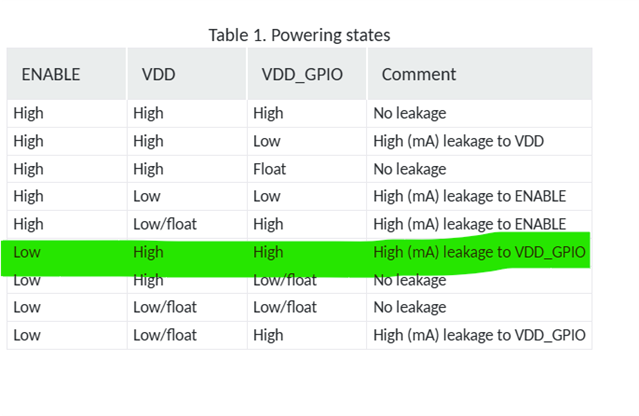
    By checking the powering states table, it is clearly mentioning keeping enable low while VDD and VDD_GIO are high will cause high leakage current. So Based on your limitations, better to not pull down enable pin. 


    Expected Current & Troubeshooting: What is the estimated floor current (in µA) I should expect with this setup? Currently, I am measuring around 11 mA even after sending the sleep commands and turning off the radio, which indicates the system is kept awake. Are there common pitfalls in the SLM app (e.g., UART RX pin keeping the CPU awake) that could cause this 11 mA draw?

    Is this 11 mA just for nRF9151? 

    *For PSM floor current (modem in PSM, UART powered down): around 2–2.7 µA Power Class 3 modem current consumption • nRF9151 Product Specification • Technical Documentation

    *For active UART: around 300–650 µA — a very common cause of high idle current UART configuration — ncs-serial-modem latest documentation

    *11 mA is far above any idle/sleep floor current. This indicates the modem is likely still in an active LTE state . Check if the Modem is really off. Send AT+CFUN=0 or AT+CFUN=4 and wait for OK before issuing sleep commands. The modem may take time to disconnect from the network.


    Best Command Sequence

    *As you mentioned one option is  AT#XSLEEP=1 ( wakes via DTR) which terminates both the Serial Modem service and LTE connection. (To prevent NVM wear, issue AT+CFUN=4 first)

    * Another option is PSM + UART Power-Down via DTR from host MCU side. (Power saving mode setting +CPSMS • nRF91x1 Cellular AT Commands • Technical Documentation)


    Best regards,
    Ressa

Reply
  • Hello,

    By checking the powering states table, it is clearly mentioning keeping enable low while VDD and VDD_GIO are high will cause high leakage current. So Based on your limitations, better to not pull down enable pin. 


    Expected Current & Troubeshooting: What is the estimated floor current (in µA) I should expect with this setup? Currently, I am measuring around 11 mA even after sending the sleep commands and turning off the radio, which indicates the system is kept awake. Are there common pitfalls in the SLM app (e.g., UART RX pin keeping the CPU awake) that could cause this 11 mA draw?

    Is this 11 mA just for nRF9151? 

    *For PSM floor current (modem in PSM, UART powered down): around 2–2.7 µA Power Class 3 modem current consumption • nRF9151 Product Specification • Technical Documentation

    *For active UART: around 300–650 µA — a very common cause of high idle current UART configuration — ncs-serial-modem latest documentation

    *11 mA is far above any idle/sleep floor current. This indicates the modem is likely still in an active LTE state . Check if the Modem is really off. Send AT+CFUN=0 or AT+CFUN=4 and wait for OK before issuing sleep commands. The modem may take time to disconnect from the network.


    Best Command Sequence

    *As you mentioned one option is  AT#XSLEEP=1 ( wakes via DTR) which terminates both the Serial Modem service and LTE connection. (To prevent NVM wear, issue AT+CFUN=4 first)

    * Another option is PSM + UART Power-Down via DTR from host MCU side. (Power saving mode setting +CPSMS • nRF91x1 Cellular AT Commands • Technical Documentation)


    Best regards,
    Ressa

Children
No Data
Related