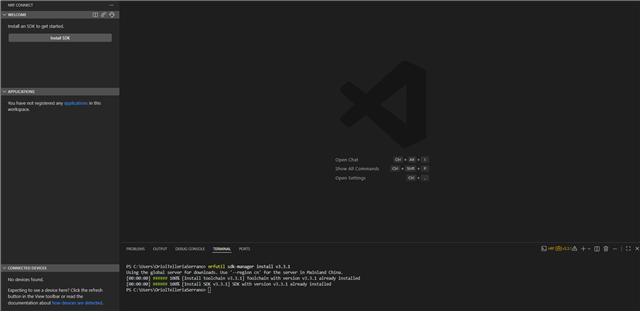
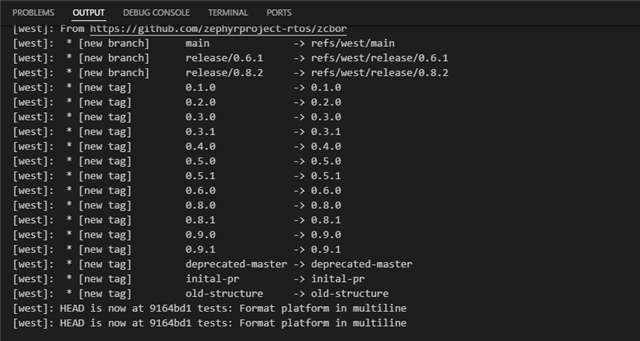
I'm stuck trying to set my nRF Connect extension on VSC. I've followed the guide for the installation but I'm reaching a wall. Every time I try to install a given SDK I have the same result (see pictures) I end up having an error.
It seems a common thing because I've searched for it for some time finding several posts of similar errors as mine I've tried the different pipelines in the blogs but I none work for me.
I've tried to use a previous version of nRF Connect, installing from GitHub repository, unstalling and installing the nRF extension in vsc, tried to extract manually the sdk files, even to rename the python.ext in appdata.
The one thing I haven't tried yet is to deactivate the firewall because I'm not able to do so as the computer is from my enterprise and I don't have permissions to do so.
Images of the last try:

Support file:
// IMPORTANT: The following data can contain sensitive or confidential information about your environment.
// If you do not want others to see this information, make sure to remove it before sharing the data.

// For help and support, visit Nordic Semiconductor's DevZone at https://devzone.nordicsemi.com/.

{
  "platform": {
    "os": "win32",
    "osVersion": "Windows 11 Pro",
    "osKernel": "10.0.26200",
    "vscode": "1.123.0",
    "electron": "42.2.0",
    "node": "v24.15.0",
    "appName": "Visual Studio Code",
    "appHost": "desktop"
  },
  "system": {
    "date": "2026-06-17T07:40:00.887Z",
    "vscodeRoot": "c:\\Program Files\\Microsoft VS Code\\6a44c352bd\\resources\\app",
    "nrfConnectForDesktopInstalled": true,
    "vscodeUptime": "00:47:51",
    "osUptime": "19:39:33",
    "cpu": "Intel(R) Core(TM) Ultra 5 125U"
  },
  "workspace": {
    "name": "Untitled (Workspace)",
    "workspaceFile": "1781596649741",
    "folders": []
  },
  "sdks": [],
  "apps": [],
  "toolchains": [
    {
      "version": "3.3.1",
      "path": "c:\\ncs\\toolchains\\936afb6332",
      "displayName": "nRF Connect SDK Toolchain v3.3.1",
      "compilerTools": [
        "Zephyr SDK (arm) 0.17.0",
        "Zephyr SDK (riscv) 0.17.0"
      ]
    },
    {
      "version": "3.3.0",
      "path": "c:\\ncs\\toolchains\\936afb6332",
      "displayName": "nRF Connect SDK Toolchain v3.3.0",
      "compilerTools": [
        "Zephyr SDK (arm) 0.17.0",
        "Zephyr SDK (riscv) 0.17.0"
      ]
    },
    {
      "version": "3.2.2",
      "path": "c:\\ncs\\toolchains\\c717907b94",
      "displayName": "nRF Connect SDK Toolchain v3.2.2",
      "compilerTools": [
        "Zephyr SDK (arm) 0.17.0",
        "Zephyr SDK (riscv) 0.17.0"
      ]
    },
    {
      "version": "3.2.1",
      "path": "c:\\ncs\\toolchains\\66cdf9b75e",
      "displayName": "nRF Connect SDK Toolchain v3.2.1",
      "compilerTools": [
        "Zephyr SDK (arm) 0.17.0",
        "Zephyr SDK (riscv) 0.17.0"
      ],
      "active": true
    }
  ],
  "connectedDevices": [],
  "tools": {
    "_": "Toolchain: nRF Connect SDK Toolchain v3.2.1",
    "C:\\ncs\\toolchains\\66cdf9b75e\\opt\\zephyr-sdk\\arm-zephyr-eabi\\bin\\arm-zephyr-eabi-gcc.exe": "0.17.0",
    "nrfjprog": "not needed",
    "C:\\ncs\\toolchains\\66cdf9b75e\\nrfutil": "8.1.1",
    "C:\\ncs\\toolchains\\66cdf9b75e\\nrfutil\\home\\bin\\nrfutil-device.exe": "2.15.2",
    "C:\\ncs\\toolchains\\66cdf9b75e\\cmake": "3.21.0",
    "C:\\ncs\\toolchains\\66cdf9b75e\\opt\\bin\\Scripts\\west.exe": "1.4.0",
    "C:\\ncs\\toolchains\\66cdf9b75e\\opt\\bin\\python.exe": "3.12.4",
    "C:\\ncs\\toolchains\\66cdf9b75e\\opt\\bin\\ninja.exe": "1.10.2",
    "C:\\ncs\\toolchains\\66cdf9b75e\\opt\\bin\\gperf.exe": "3.1",
    "C:\\ncs\\toolchains\\66cdf9b75e\\opt\\bin\\dtc.exe": "1.4.7",
    "C:\\ncs\\toolchains\\66cdf9b75e\\opt\\bin\\gn.exe": "2223",
    "C:\\ncs\\toolchains\\66cdf9b75e\\mingw64\\bin\\git.exe": "git version 2.52.0.",
    "debugger (arm)": "c:\\ncs\\toolchains\\66cdf9b75e\\opt\\zephyr-sdk\\arm-zephyr-eabi\\bin\\arm-zephyr-eabi-gdb.exe",
    "debugger (riscv)": "c:\\ncs\\toolchains\\66cdf9b75e\\opt\\zephyr-sdk\\riscv64-zephyr-elf\\bin\\riscv64-zephyr-elf-gdb.exe"
  },
  "nrfutil": {
    "nrfutil-device": {
      "version": "2.18.1",
      "binPath": "c:\\Users\\OriolTelleriaSerrano\\.vscode\\extensions\\nordic-semiconductor.nrf-connect-2026.6.2030-win32-x64\\platform\\nrfutil\\bin\\nrfutil-device",
      "jlinkInfo": {
        "description": "No SEGGER J-Link installation found",
        "expectedVersion": {
          "version": "JLink_V9.24a",
          "versionFormat": "string"
        },
        "name": "JlinkARM"
      }
    },
    "nrfutil-sdk-manager": {
      "version": "1.12.0",
      "binPath": "c:\\Users\\OriolTelleriaSerrano\\.vscode\\extensions\\nordic-semiconductor.nrf-connect-2026.6.2030-win32-x64\\platform\\nrfutil\\bin\\nrfutil-sdk-manager"
    }
  },
  "environment": {
    "_": "SDK: none, Toolchain: nRF Connect SDK Toolchain v3.2.1",
    "westEnv": {
      "HOME": "C:\\Users\\OriolTelleriaSerrano",
      "HOMEDRIVE": "C:",
      "HOMEPATH": "\\Users\\OriolTelleriaSerrano",
      "PATH": "C:\\ncs\\toolchains\\66cdf9b75e;C:\\ncs\\toolchains\\66cdf9b75e\\mingw64\\bin;C:\\ncs\\toolchains\\66cdf9b75e\\bin;C:\\ncs\\toolchains\\66cdf9b75e\\opt\\bin;C:\\ncs\\toolchains\\66cdf9b75e\\opt\\bin\\Scripts;c:/ncs/toolchains/66cdf9b75e\\opt/nanopb/generator-bin;C:\\ncs\\toolchains\\66cdf9b75e\\nrfutil\\bin;C:\\ncs\\toolchains\\66cdf9b75e\\opt\\zephyr-sdk\\arm-zephyr-eabi\\bin;C:\\ncs\\toolchains\\66cdf9b75e\\opt\\zephyr-sdk\\riscv64-zephyr-elf\\bin;c:\\Users\\OriolTelleriaSerrano\\.vscode\\extensions\\nordic-semiconductor.nrf-connect-2026.6.2030-win32-x64\\platform\\nrfutil\\lib\\nrfutil-sdk-manager;C:\\WINDOWS\\system32;C:\\WINDOWS;C:\\WINDOWS\\System32\\Wbem;C:\\WINDOWS\\System32\\WindowsPowerShell\\v1.0\\;C:\\WINDOWS\\System32\\OpenSSH\\;C:\\Program Files\\Docker\\Docker\\resources\\bin;C:\\Program Files\\Git\\cmd;C:\\Program Files\\WireGuard\\;C:\\Program Files\\Microsoft VS Code\\bin;C:\\Users\\OriolTelleriaSerrano\\AppData\\Local\\Programs\\Python\\Launcher\\;C:\\Users\\OriolTelleriaSerrano\\.local\\bin;C:\\Users\\OriolTelleriaSerrano\\AppData\\Local\\Microsoft\\WindowsApps;C:\\Users\\OriolTelleriaSerrano\\AppData\\Local\\GitHubDesktop\\bin",
      "ZEPHYR_TOOLCHAIN_VARIANT": "zephyr",
      "ZEPHYR_SDK_INSTALL_DIR": "c:\\ncs\\toolchains\\66cdf9b75e\\opt\\zephyr-sdk",
      "PYTHONPATH": "C:\\ncs\\toolchains\\66cdf9b75e\\opt\\bin;C:\\ncs\\toolchains\\66cdf9b75e\\opt\\bin\\Lib;C:\\ncs\\toolchains\\66cdf9b75e\\opt\\bin\\Lib\\site-packages"
    },
    "inherited": {
      "HOME": "C:\\Users\\OriolTelleriaSerrano",
      "HOMEDRIVE": "C:",
      "HOMEPATH": "\\Users\\OriolTelleriaSerrano",
      "Path": "C:\\WINDOWS\\system32;C:\\WINDOWS;C:\\WINDOWS\\System32\\Wbem;C:\\WINDOWS\\System32\\WindowsPowerShell\\v1.0\\;C:\\WINDOWS\\System32\\OpenSSH\\;C:\\Program Files\\Docker\\Docker\\resources\\bin;C:\\Program Files\\Git\\cmd;C:\\Program Files\\WireGuard\\;C:\\Program Files\\Microsoft VS Code\\bin;C:\\Users\\OriolTelleriaSerrano\\AppData\\Local\\Programs\\Python\\Launcher\\;C:\\Users\\OriolTelleriaSerrano\\.local\\bin;C:\\Users\\OriolTelleriaSerrano\\AppData\\Local\\Microsoft\\WindowsApps;C:\\Users\\OriolTelleriaSerrano\\AppData\\Local\\GitHubDesktop\\bin",
      "PATH": "C:\\WINDOWS\\system32;C:\\WINDOWS;C:\\WINDOWS\\System32\\Wbem;C:\\WINDOWS\\System32\\WindowsPowerShell\\v1.0\\;C:\\WINDOWS\\System32\\OpenSSH\\;C:\\Program Files\\Docker\\Docker\\resources\\bin;C:\\Program Files\\Git\\cmd;C:\\Program Files\\WireGuard\\;C:\\Program Files\\Microsoft VS Code\\bin;C:\\Users\\OriolTelleriaSerrano\\AppData\\Local\\Programs\\Python\\Launcher\\;C:\\Users\\OriolTelleriaSerrano\\.local\\bin;C:\\Users\\OriolTelleriaSerrano\\AppData\\Local\\Microsoft\\WindowsApps;C:\\Users\\OriolTelleriaSerrano\\AppData\\Local\\GitHubDesktop\\bin"
    }
  },
  "terminal": {
    "defaultProfile": null
  },
  "config": {
    "nordic-semiconductor.nrf-connect": {
      "ozonePath": "",
      "applications": [],
      "applicationOptions": {},
      "west": {
        "env": {
          "$base": "terminal"
        },
        "verbose": ""
      },
      "boardRoots": [],
      "taskBindings": {},
      "buildTerminal": {
        "condensedProgress": true
      },
      "debugging": {
        "flash": true,
        "bindings": {},
        "justMyCode": false,
        "focusOnNrfDebug": true
      },
      "activeAppFollowActiveEditor": true,
      "flash": {
        "softreset": false,
        "erase": false,
        "recover": false
      },
      "enableTelemetry": false,
      "thirdpartyIntegration": {},
      "toolchainManager": {
        "indexURL": null,
        "installDirectory": "C:\\ncs"
      },
      "sdkManager": {
        "region": "default"
      },
      "defaultOpenAction": "ask",
      "terminalProfile": {
        "shell": {}
      },
      "remoteDevices": []
    },
    "nordic-semiconductor.nrf-terminal": {
      "terminalMode": "character",
      "localEcho": false
    }
  },
  "extensions": {
    "internal": {
      "nordic-semiconductor.nrf-connect": {
        "version": "2026.6.2030",
        "path": "c:\\Users\\OriolTelleriaSerrano\\.vscode\\extensions\\nordic-semiconductor.nrf-connect-2026.6.2030-win32-x64",
        "isActive": true
      },
      "nordic-semiconductor.nrf-terminal": {
        "version": "2026.6.352",
        "path": "c:\\Users\\OriolTelleriaSerrano\\.vscode\\extensions\\nordic-semiconductor.nrf-terminal-2026.6.352",
        "isActive": true
      },
      "nordic-semiconductor.nrf-devicetree": {
        "version": "2026.6.904",
        "path": "c:\\Users\\OriolTelleriaSerrano\\.vscode\\extensions\\nordic-semiconductor.nrf-devicetree-2026.6.904",
        "isActive": true
      },
      "nordic-semiconductor.nrf-kconfig": {
        "version": "2026.6.334",
        "path": "c:\\Users\\OriolTelleriaSerrano\\.vscode\\extensions\\nordic-semiconductor.nrf-kconfig-2026.6.334",
        "isActive": true
      }
    },
    "external": {
      "marus25.cortex-debug": null,
      "ms-vscode.cpptools": "1.32.2",
      "TypeScriptTeam.jsts-chat-features": "0.0.2",
      "ms-vscode.js-debug": "1.117.0",
      "ms-vscode.js-debug-companion": "1.1.3",
      "ms-vscode.vscode-js-profile-table": "1.0.10",
      "Blackboxapp.blackbox": "2.8.53",
      "Blackboxapp.blackboxagent": "3.7.0",
      "GitHub.remotehub": "0.64.0",
      "KyleMicallefBonnici.dts-lsp": "0.10.2",
      "ms-azuretools.vscode-containers": "2.4.5",
      "ms-python.debugpy": "2026.6.0",
      "ms-python.python": "2026.4.0",
      "ms-python.vscode-pylance": "2026.2.1",
      "ms-python.vscode-python-envs": "1.34.0",
      "ms-toolsai.jupyter": "2025.9.1",
      "ms-toolsai.jupyter-keymap": "1.1.2",
      "ms-toolsai.jupyter-renderers": "1.3.0",
      "ms-toolsai.vscode-jupyter-cell-tags": "0.1.9",
      "ms-toolsai.vscode-jupyter-slideshow": "0.1.6",
      "ms-vscode-remote.remote-containers": "0.459.1",
      "ms-vscode-remote.remote-ssh": "0.124.0",
      "ms-vscode-remote.remote-ssh-edit": "0.87.0",
      "ms-vscode.azure-repos": "0.40.0",
      "ms-vscode.cmake-tools": "1.23.52",
      "ms-vscode.cpp-devtools": "0.5.13",
      "ms-vscode.cpptools-extension-pack": "1.5.1",
      "ms-vscode.cpptools-themes": "2.0.0",
      "ms-vscode.remote-explorer": "0.5.0",
      "ms-vscode.remote-repositories": "0.42.0",
      "ms-vscode.remote-server": "1.5.3",
      "trond-snekvik.gnu-mapfiles": "1.1.0"
    }
  }
}