Nrf54LM20A_DK vscode cannot be programmed

hi:

nRF54LM20A_DK board vscode cannot be programmed.


-- west flash: using runner nrfutil -- runners.nrfutil: mass erase requested

-- runners.nrfutil: reset after flashing requested

-- runners.nrfutil: Flashing file: C:\ncs\v3.1.1-john\nrf_desktop\build\merged.hex

Error: One or more batch tasks failed:

* 1051847907: Device error: Unable to recognize the device: Unknown part number 0x00000033 (Generic)

FATAL ERROR: command exited with status 1: nrfutil --json device x-execute-batch --batch-path 'C:\ncs\v3.1.1-john\nrf_desktop\build\generated_nrfutil_batch.json' --serial-number 1051847907

  • Hi John,

    nRF54LM20A is supported from NCS v3.1.1, so it should work. Could you make sure you have the right nrfutil version. Perhaps try upgrading nrfutil using the following commands:
    nrfutil self-upgrade
    nrfutil upgrade

    Best Regards,

    Swathy

  • Hi:
    Sorry for the late reply! 

    C:\Users\64619>nrfutil --version
    nrfutil 8.2.0 (c910332 2026-04-21)
    commit-hash: c910332307392c1f6801baadd3cc0265965803a5
    commit-date: 2026-04-21
    host: x86_64-pc-windows-msvc
    build-timestamp: 2026-04-21T14:15:35.519234808Z
    classification: nrf-external


    C:\Users\64619>nrfutil self-upgrade
    nrfutil is already the newest version (8.2.0)

    C:\Users\64619>nrfutil upgrade
    Downloading nrfutil-device-x86_64-pc-windows-msvc-2.19.4
    Verifying nrfutil-device-x86_64-pc-windows-msvc-2.19.4
    Updating nrfutil-device to 2.19.4
    nrfutil-mcu-manager is already the newest version (0.10.2)
    Downloading nrfutil-sdk-manager-x86_64-pc-windows-msvc-1.15.0
    Verifying nrfutil-sdk-manager-x86_64-pc-windows-msvc-1.15.0
    Updating nrfutil-sdk-manager to 1.15.0
    [00:17:16] ###### 100% [Upgrade packages] Upgrade packages

    After updating nrfutil, I still have the same problem.

    -- west flash: using runner nrfutil
    -- runners.nrfutil: mass erase requested
    -- runners.nrfutil: reset after flashing requested
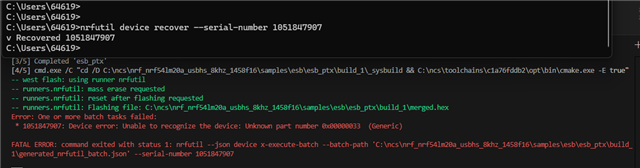
    -- runners.nrfutil: Flashing file: C:\ncs\nrf_nrf54lm20a_usbhs_8khz_1458f16\samples\esb\esb_ptx\build_1\merged.hex
    Error: One or more batch tasks failed:
    * 1051847907: Device error: Unable to recognize the device: Unknown part number 0x00000033 (Generic)

    FATAL ERROR: command exited with status 1: nrfutil --json device x-execute-batch --batch-path 'C:\ncs\nrf_nrf54lm20a_usbhs_8khz_1458f16\samples\esb\esb_ptx\build_1\generated_nrfutil_batch.json' --serial-number 1051847907

  • Hi John,

    The part number 0x00000033 is not a recognized nRF54LM20A identifier. For reference, the nRF54LM20A part code in FICR is 0x054BC20A and nRF54LM20B is 0x054BC20B. Refer: https://docs.nordicsemi.com/r/bundle/ps_nrf54lm20a/page/ficr.html-register.info.part. Reading 0x00000033 suggests the device may not be responding correctly over SWD/J-Link, rather than a software version issue. Could you maybe try recovering the device first as it maybe locked or in an unresponsive state.?

    nrfutil device recover --serial-number 1051847907

    Also, do check your J-Link version.  nrfutil-device v2.19.4 requires SEGGER J-Link v9.24a. An incompatible J-Link version can cause device recognition failures. Please also verify that the DK is connected via the IMCU USB port (not a target USB port).

    Best Regards,

    Swathy

  • This was super annoying, same for me with two LM20B boards.  Did a bunch of things, had all the latest version of SDK, nrfutil, etc then even downgraded JLink to version 9.24a, no go.  But solution: upgrading nrfutil devices.

    Running an `nrfutil upgrade` did this:

    nrfutil-completion is already the newest version (1.5.0)
    Downloading nrfutil-device-x86_64-unknown-linux-gnu-2.19.4
    Verifying nrfutil-device-x86_64-unknown-linux-gnu-2.19.4
    Updating nrfutil-device to 2.19.4
    [00:00:05] ###### 100% [Upgrade packages] Upgrade packages

    And things started working, even if I'd done the same only 2 days prior..?  In any case, re-updated JLink to v9.6.0 and it still works.

  • Hi SwRa:

    Thank you for your help!

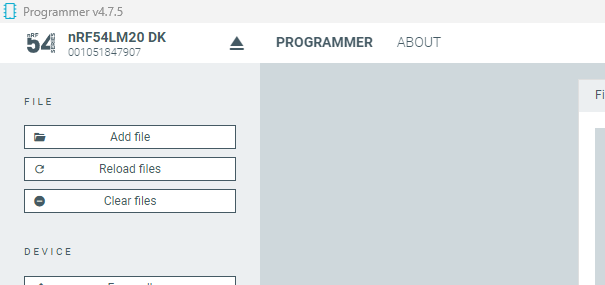
    "nRF Connect for Desktop" can be programmed, but "VScode" cannot.

    After using "nrfutil device recover --serial-number 1051847907", it is also cannot.

Related