VS Code keeps selecting wrong build configuration

Using the nRF Connect extension(s) for VS Code. Our project has multiple build configurations for multiple different hardware designs, including multiple variants of nRF52 microcontrollers. I am able to build each configuration successfully, but no matter what I've tried, VS Code will only recognize the very first configuration (alphabetically) as the one to load things like board definitions, defines, compile guards, etc. from. Makes editing/reading the code just about impossible because sections of code that should be disabled due to compile guards are enabled, and sections that should be enabled are disabled because the wrong defines/guards are being used.

How can I force VS Code to use a specific build configuration when showing the source code in the editor?

  • I have already closed and reopened VS Code many times
  • I have already rebooted my computer
  • I have already closed and reopened all editor tabs
  • I have already selected the build configuration I want in the "APPLICATIONS" tab of the nRF Connect  sidebar
  • I have already tried folding/unfolding the build configuration I want in the "APPLICATIONS" tab of the nRF Connect  sidebar
  • It is not practical for me to delete the other build configurations
    • It takes several minutes to create each of them
    • I switch back and forth between configurations frequently during development
Parents
  • Hi Will, 

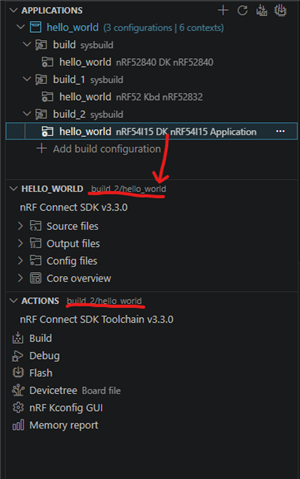
    Try selecting the app entry under the build configuration entry as the following figure: 

    Regards,
    Amanda H.

  • Hi Amanda,

    I have the correct build targets showing up in the locations highlighted in your screen shot, but the editors still show the incorrect code paths as active. To be clear, the code builds and runs correctly, with the execution following the desired path, it's just really hard to trace through the code in the editors because the compile guards are drawing the values from a different build target. A toy example is shown below:

    #if defined( CONFIG_BOARD_FOO_A )
    	#define MY_CONSTANT (123)
    #elif defined( CONFIG_BOARD_FOO_B )
    	#define MY_CONSTANT (456)
    #elif defined( CONFIG_BOARD_FOO_C )
    	#define MY_CONSTANT (789)
    #else
    	#error "No recognized board defined!"
    #endif

    If I build against the target that uses BOARD_FOO_C I would expect the MY_CONSTANT to be shown as (789) and the line defining it as not dimmed out, but instead I see the line where it is defined as (123) as normal and the others are dimmed. As the defines propagate through the editors this results in the "Go To Definition" and "Go To Declaration" features picking the wrong code and hovering over expressions to see how they evaluate showing the wrong values.

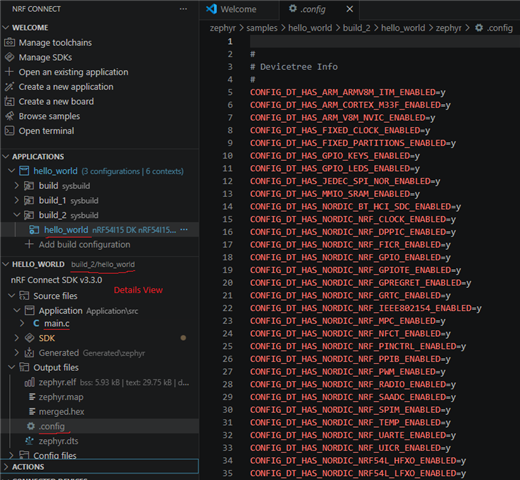
  • If your project can run as expected, only the editor loaded the wrong file. Then, please ensure you select the correct app build folder to load the correct files every time, and open the files from the Details View. You can also open .config from the Output files to verify the config values. 

Reply Children
No Data
Related